Promoción Musical
How to Promote Your Music via Meta Ads (Step-by-Step for Independent Artists)

Nadav Peleg
Actualizado · 16 min de lectura
Learn how to promote your music with Meta Ads. Set up your pixel, build your campaign, pick a budget and track real fans, not just clicks.
On this page
- What you need before you promote your music with Meta Ads
- How to create your Meta Pixel (Do this first)
- How to create your Meta ads campaign (Step by Step)
- How Meta ads and Spotify's algorithm connect
- What creative works best for music ads on Instagram and Facebook
- DIY vs done-for-you Meta ads (when to hire someone)
- How to measure results without vanity metrics
- Frequently asked questions
Most artists running Meta ads can't tell if they're getting listeners or real fans. They get clicks and spend the budget. That’s how they keep themselves in the dark.
The real reason behind all of that is missing pixels, ads sent straight to Spotify, the wrong audience for your genre, panicking and killing the campaign too early, and much more.
In this blog, I'll show you how to promote your music via meta ads like a marketing genius.
What you need before you promote your music with Meta Ads
Three things have to be live before Meta lets you publish. Apart from that, a couple more before your money is worth spending. As per Meta's setup docs, this is what we have got in the checklist:
|
Requirement |
What Meta requires |
|---|---|
|
Facebook Page |
A Page you own, or an admin, editor or advertiser role on someone else's |
|
Ad account |
One by default. You're capped at one ad account ID until a payment clears |
|
Payment method |
On file before Ads Manager will publish anything |
|
Meta Pixel |
Live on your landing page before the campaign starts |
|
Business portfolio (formerly Business Manager) |
Optional, until you run ads for more than one project |
That's the checklist. Now let's see how we create a real campaign for your next release.
How to create your Meta Pixel (Do this first)
Before you build a single Meta ad for your next release, don't repeat the mistake most artists make with their first one. They rush straight into the campaign and skip the very first thing.
Spotify and YouTube won't let anyone install tracking code on their pages. Point your ad straight at either platform, and every click it earns just disappears. You’ll have no record of who clicked. And of course, there will be no way to get that data back.
That's why this comes before anything else in Ads Manager. The pixel has to live on a page you own instead.
There are 3 screens in Events manager:
- Click Connect data, pick Web, then Next.
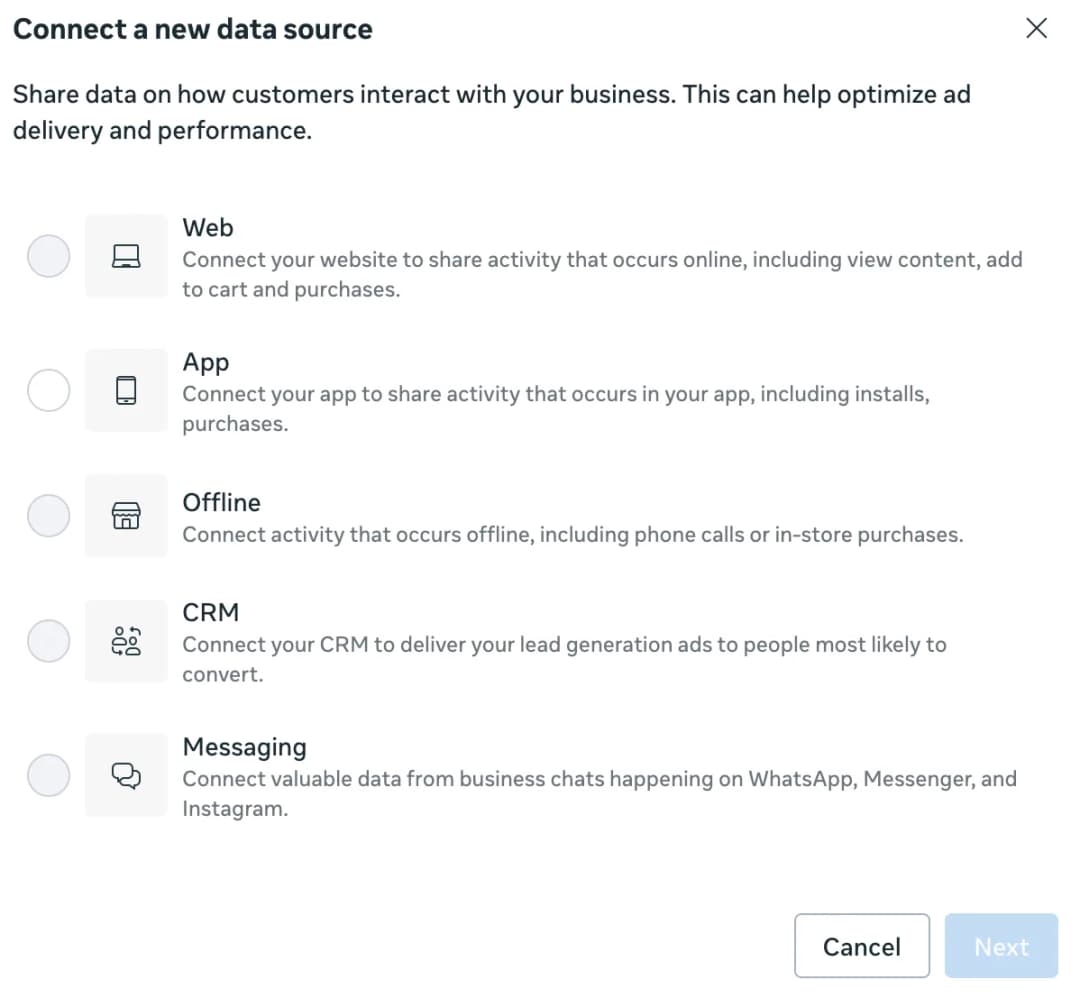
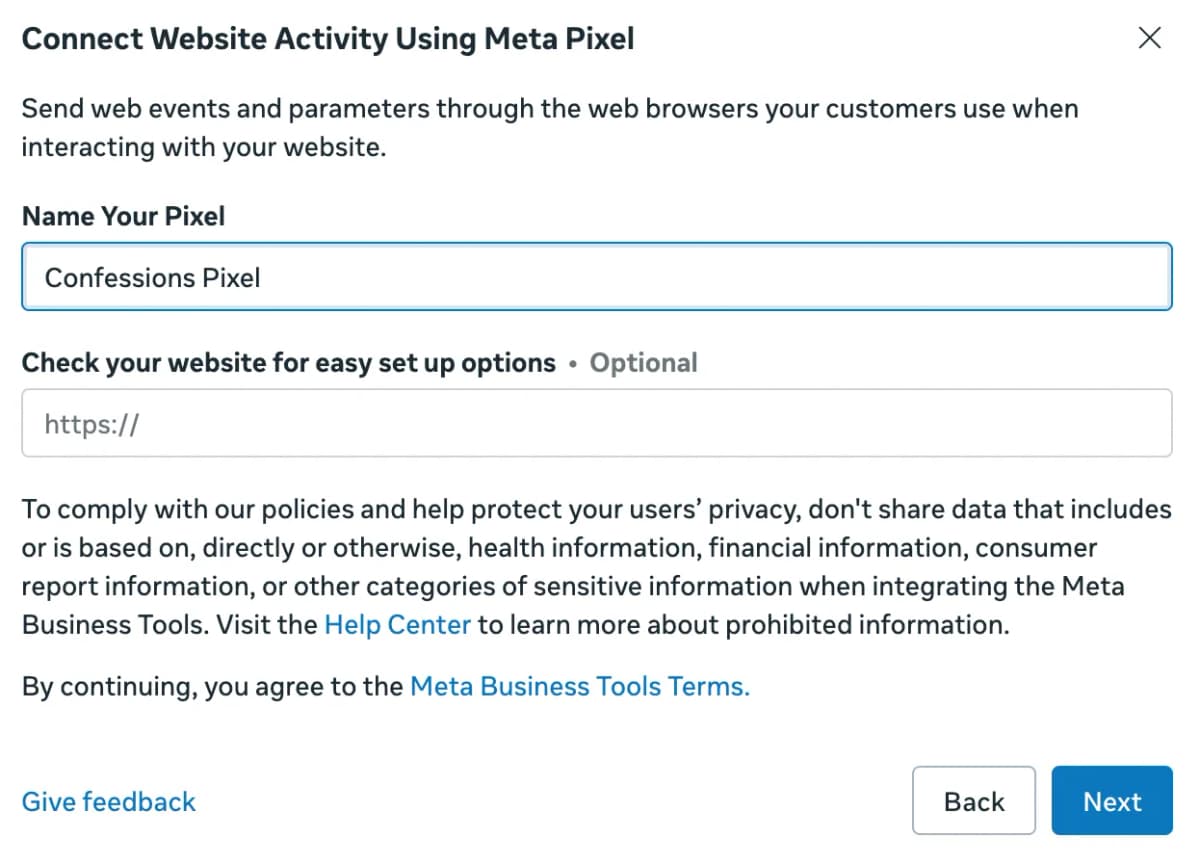
- Name your pixel, then Next. The website URL field below the name is optional. Skip it.
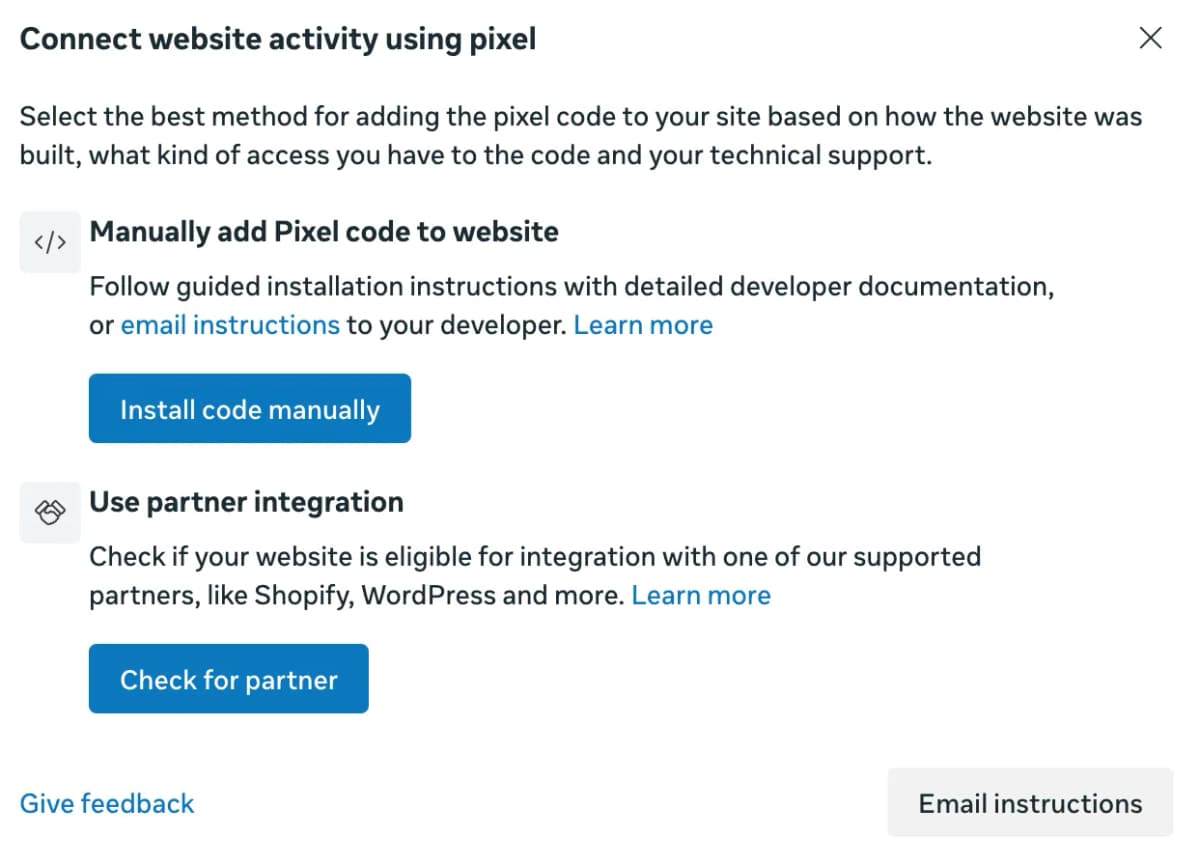
- Pick how the code gets on your site. Manual install is for a site you built yourself. On a smart link tool, skip this screen and paste your pixel ID into the tool's pixel field instead.
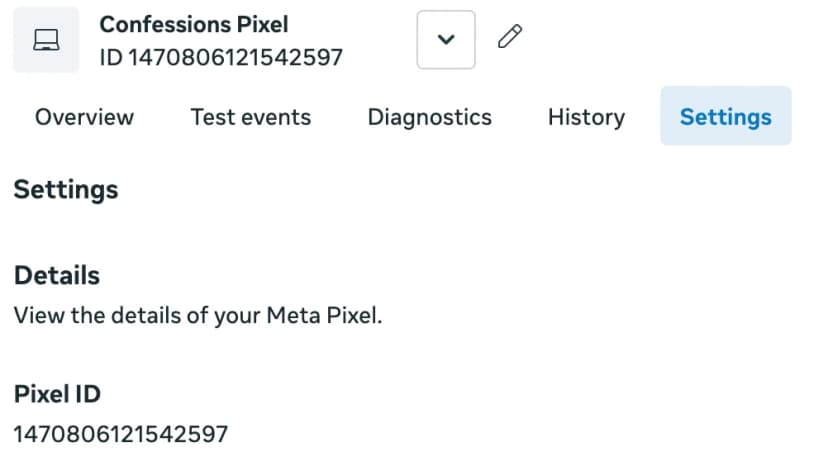
Once it exists, open the pixel and copy its ID. That number is what your landing page tool asks for.
How to create your Meta ads campaign (Step by Step)
- Open Ads Manager. Click Create.
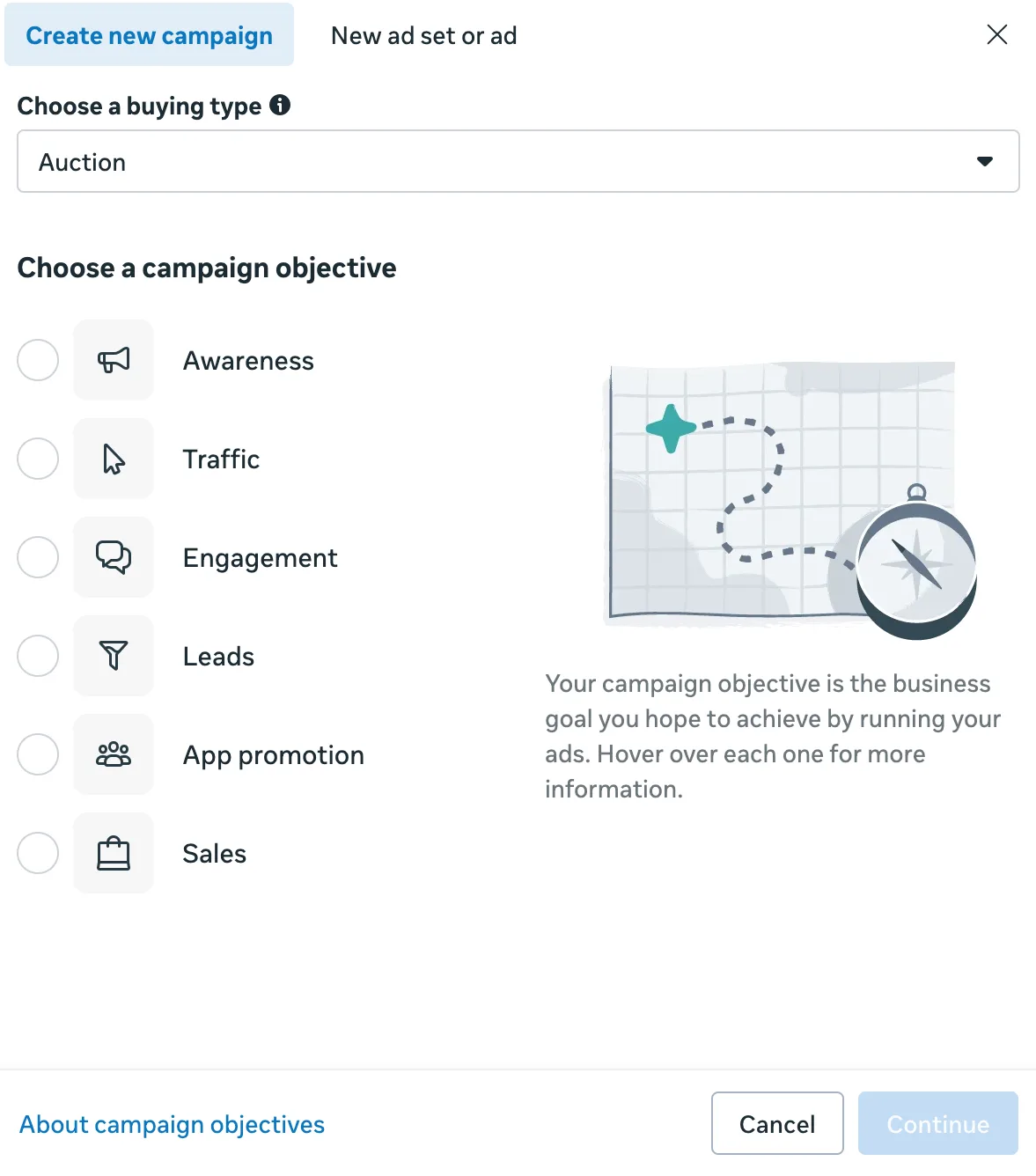
2\. Pick your objective. Click Continue. There are six choices, only three matter:
|
Objective |
What Meta optimizes for |
Where it fits a music campaign |
|---|---|---|
|
Awareness |
People likely to remember your ad |
Absorbed Video views. Cheap reach, low intent |
|
Traffic |
Traffic to a destination of your choice |
The default pick for sending listeners to a link |
|
Engagement |
People likely to engage or act on your ad |
Absorbed Conversions, so a website event sits here |
|
Leads |
Collecting leads via messages, calls or signups |
Designed for form-filling instead of getting streams. Skip it |
|
App promotion |
Getting installs or in-app actions |
Skip it, you're not promoting an app |
|
Sales |
Finding people likely to purchase |
Built for a checkout. Only fits if you're also selling merch |
Traffic is the default. Some artists run Engagement instead, since a landing page view is a signal bots can't fake. Meta doesn't back either one officially. Test both. One Redditor put it well. "Ads buy you a fair hearing, not a good one."
3\. Name the campaign. Song title plus the date works.
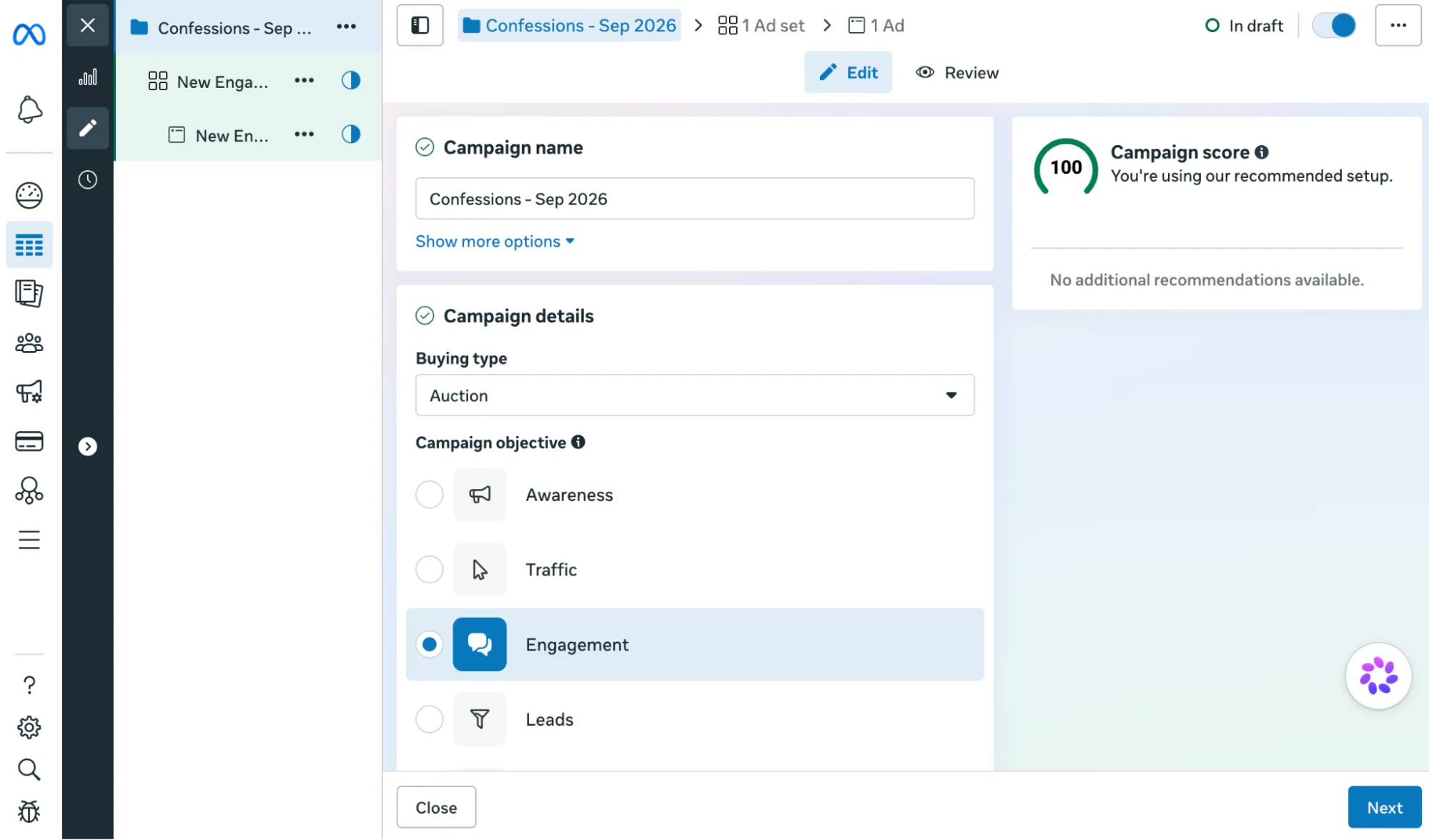
4\. Set your audience. Type artist names who sound like you into detailed targeting. Stack a few whose fans overlap with yours. You can bank up to 500 custom audiences to retarget later.
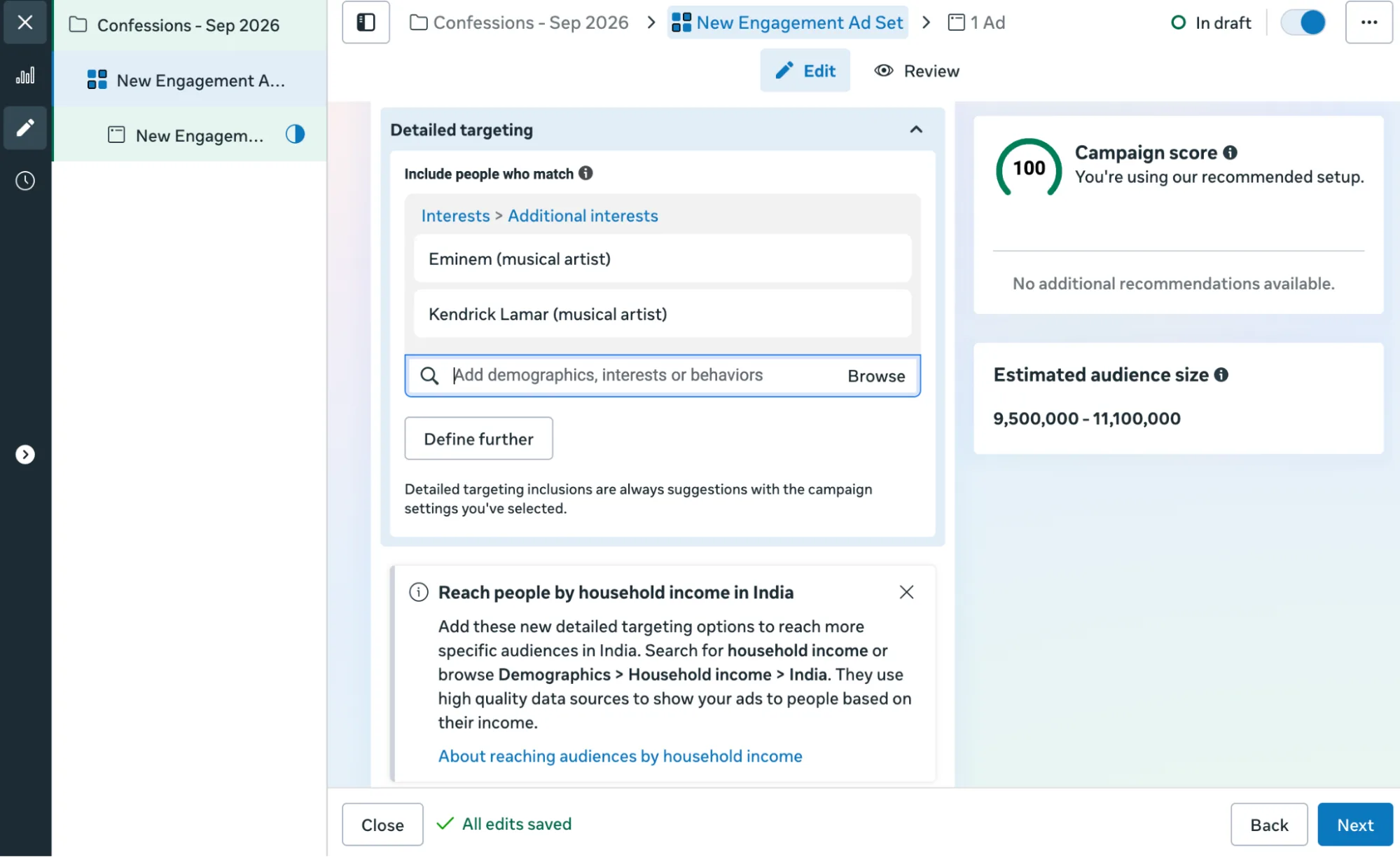
Some bigger-budget artists skip interest targeting entirely and go broad, betting Meta's algorithm reads the ad itself, not the tag. Most artist names aren't even in Meta's interest list anymore. Test both.
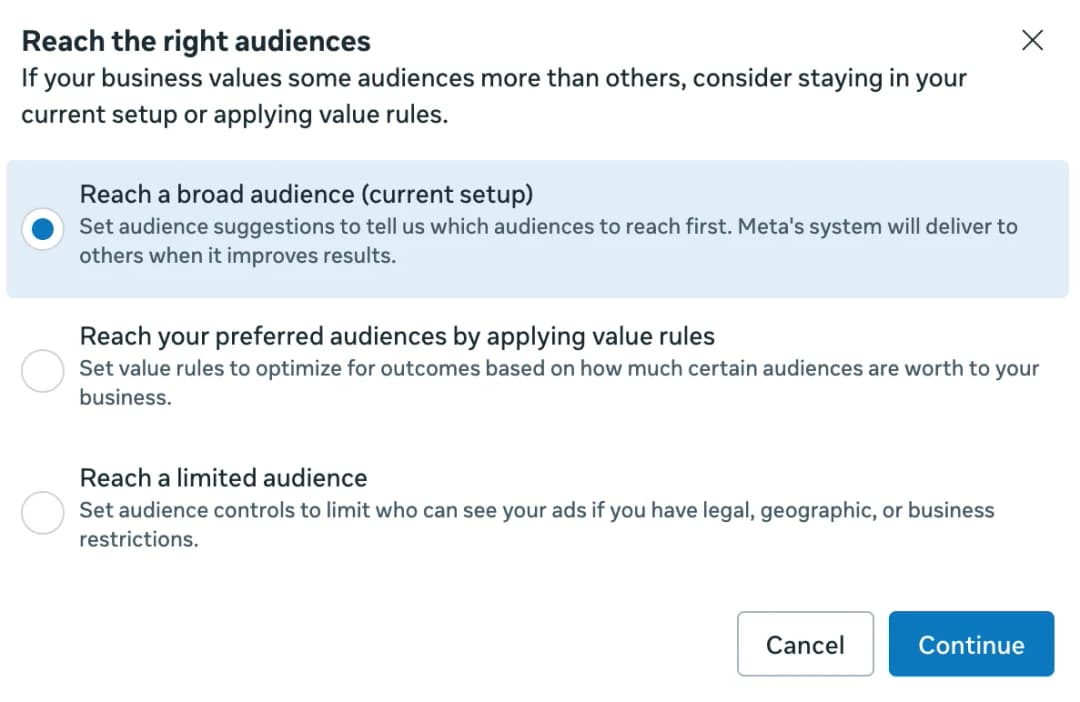
Then check Advantage+ audience. Meta labels it Suggest an audience inside the ad set now. It's on by default, and it can widen your targeting without asking:
|
Setting |
Under Advantage+ audience |
|---|---|
|
Location |
Hard control |
|
Minimum age |
Hard control |
|
Languages |
Hard control |
|
Custom audience exclusions |
Hard control, always |
|
Age and gender |
Suggestion only |
|
Detailed targeting, where artist interests live |
Suggestion only |
|
Custom audience inclusions |
Suggestion only |
To rein it in, open Further limit your audience under Suggest an audience, then pick Reach a limited audience. Meta frames that option around legal and geographic restrictions. There's no clean off switch anymore.
Advantage+ doesn't stop at the audience. Upload a video and its creative tool takes over, generating image variants on its own, sorted by what it predicts will perform best.
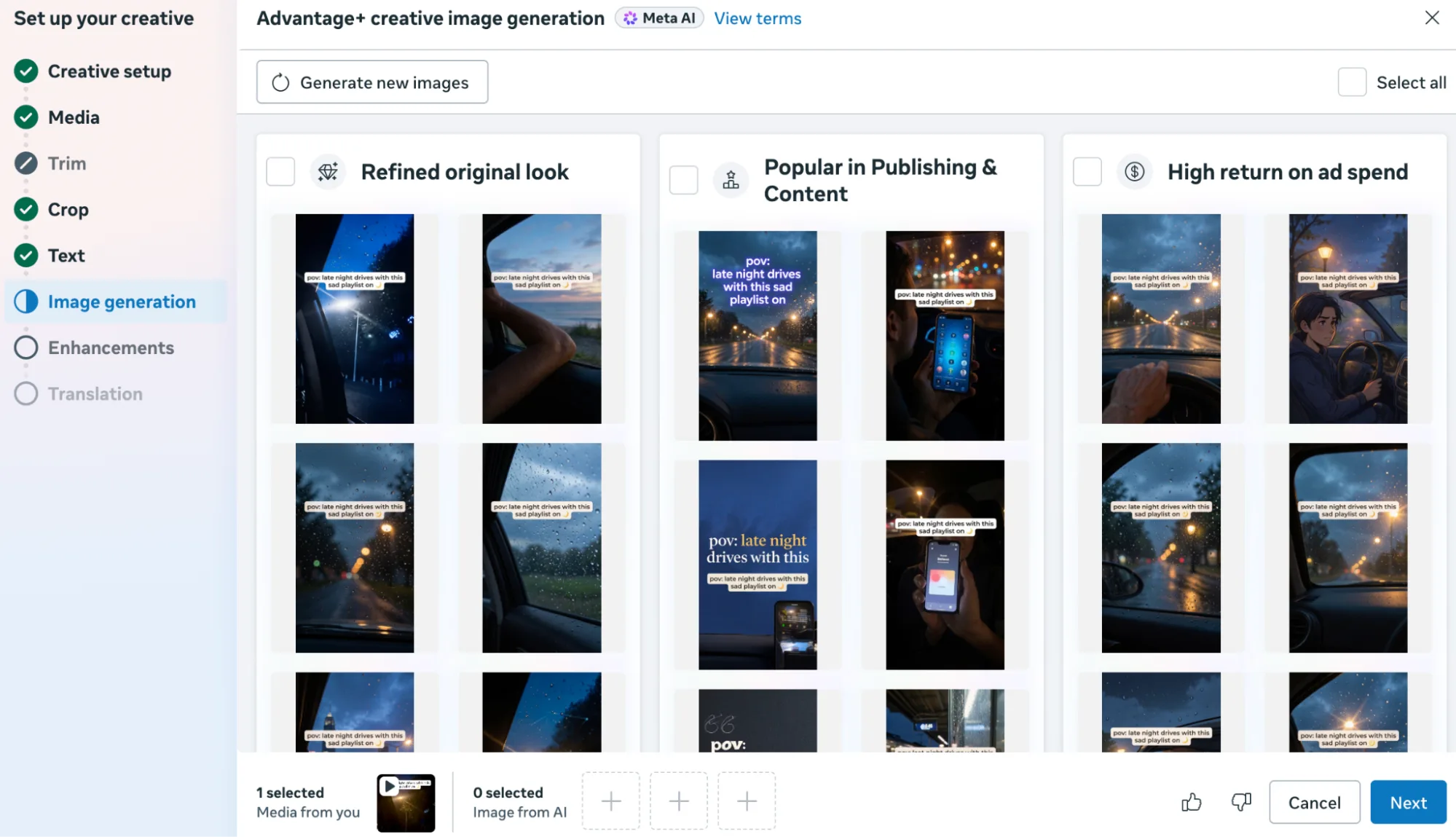
Pick one if you want, or ignore all of them and keep your original. Same rule applies here as everywhere else in this tool. Check what it added before you publish.
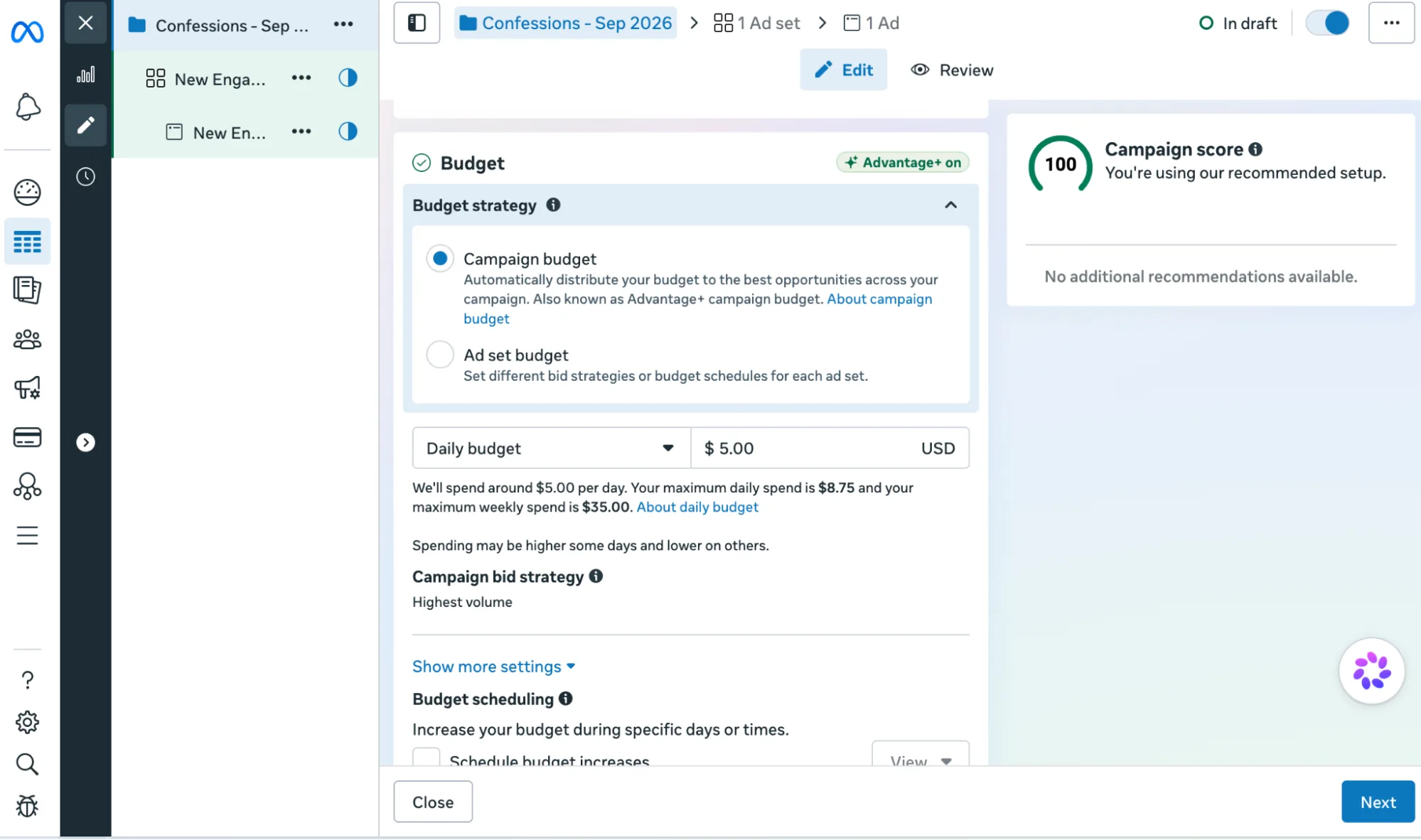
5\. Set your daily budget. Start at $5 to $10, roughly $150 to $300 a month. Weekly spend caps at 175% in a day, 7x in a week.
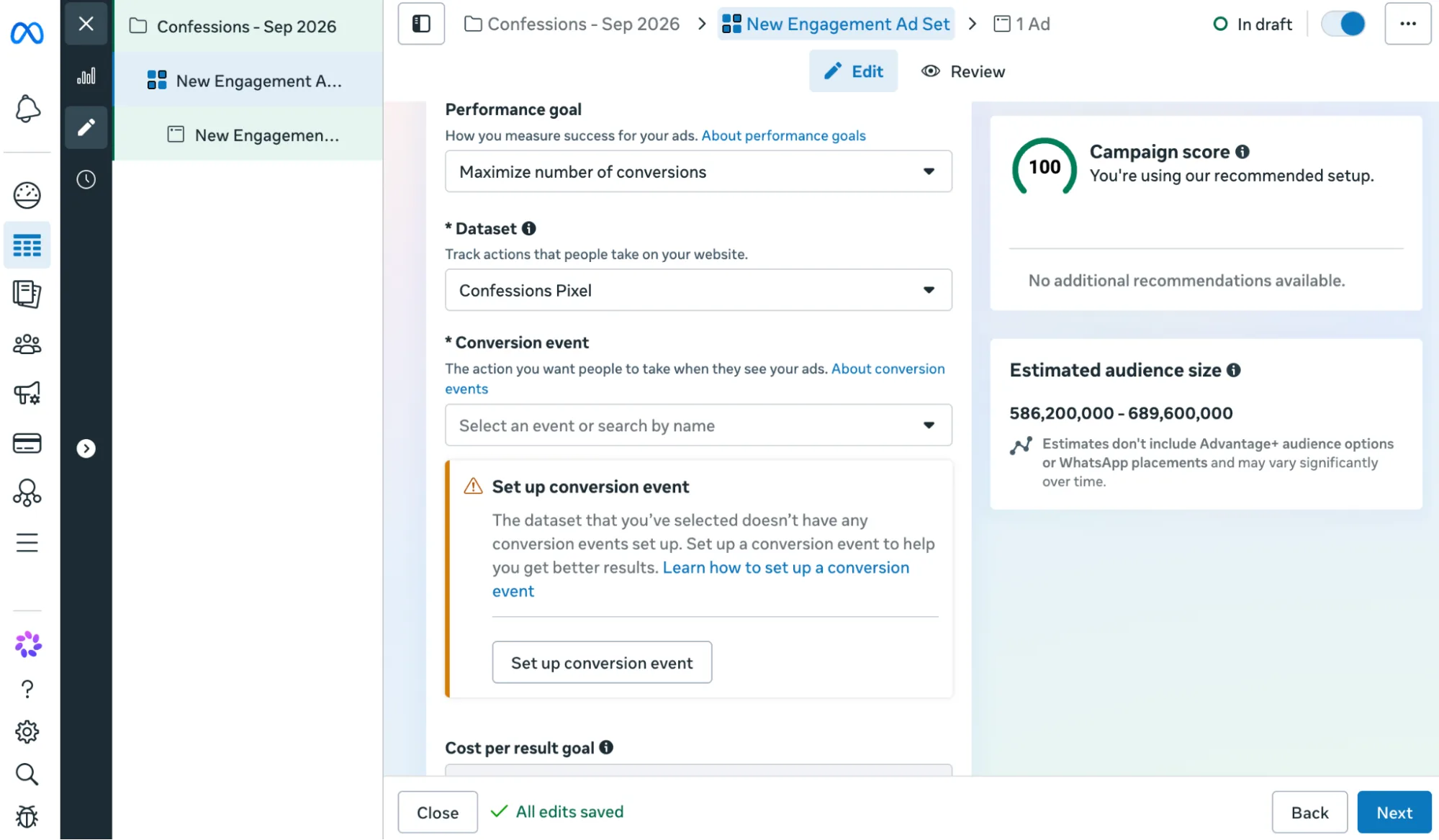
6\. Set your destination: The landing page from your pixel setup, not Spotify or YouTube directly. A direct link leaves nothing to retarget. Use your own site, or a smart link tool: Feature.fm, ToneDen, Linktree, Beacons, Linkfire, Push.fm. "You need a landing page and a pixel. All can be free," says u/MostExpensiveThing. Select your pixel here. If it's new, Meta shows a "set up conversion event" prompt instead of a list. View Content only appears once your pixel has fired at least once from your landing page.
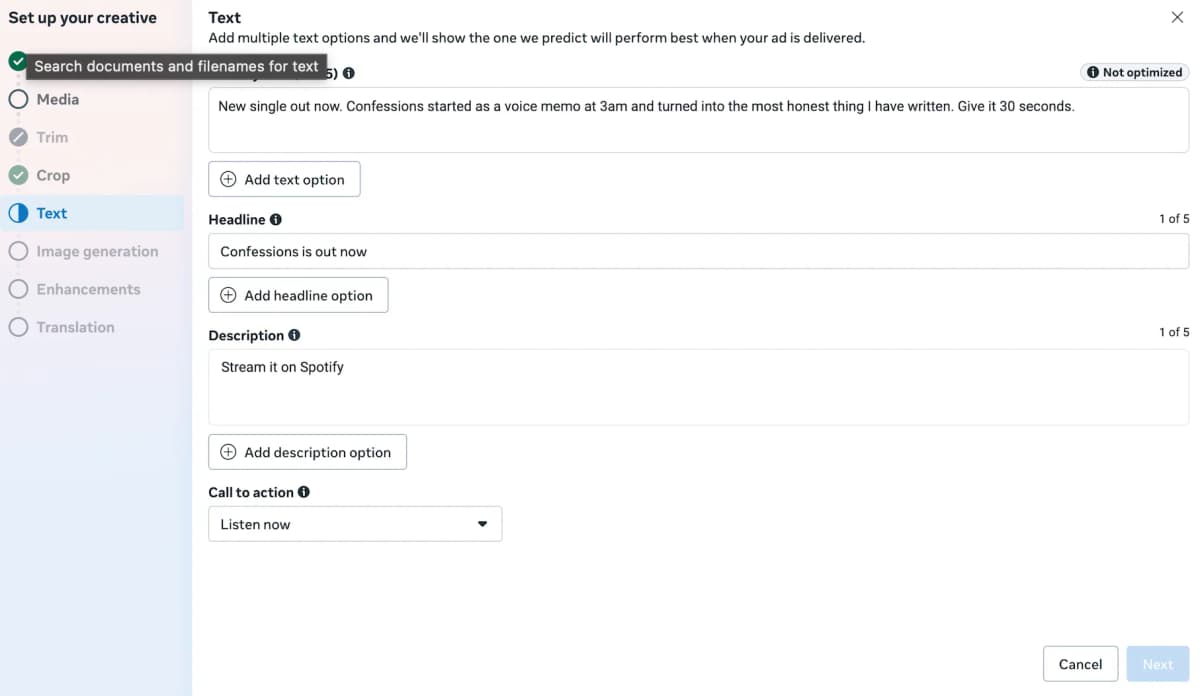
7\. On the ad screen: upload your video, write your primary text and headline, pick a call to action.
8\. That’s it. Click Publish and leave it alone. Meta needs about 50 results to exit the learning phase, when costs run high and unpredictable.
Some edits reset that clock:
|
Edit you make |
Does it reset the clock? |
|---|---|
|
Targeting |
Yes |
|
Creative |
Yes |
|
What you're optimizing for |
Yes |
|
Adding a new ad |
Yes |
|
Pausing it for 7 days or more |
Yes |
|
Changing how you bid |
Yes |
|
Budget amount |
Sometimes, a small change in general doesn't. Meta's own example, $100 to $101 is probably safe, $100 to $1,000 likely resets it. |
Source: Meta on significant edits
That's the build. Everything from here decides whether it actually works.
Your campaign is live. The real question is whether any of this reaches Spotify's algorithm.
How Meta ads and Spotify's algorithm connect
Someone scrolls past your ad and taps it. That's the click. You can point that ad straight at your Spotify or YouTube link, nothing stops you, but you lose something if you do.
You can't put tracking code on Spotify or YouTube's own website since you don't control it. That's why you set up your own website or a third-party platform first, so every listener passes through something you can track before they reach Spotify.
From there they hit a button for whichever platform they use, Spotify, YouTube, wherever you picked. Only then do they land on the real thing and press play, if they press play at all.
Spotify publishes exactly what its algorithm looks at, your taste profile, what it learns about you, trends, and the track itself. Check their page for the full breakdown. An ad click isn't one of them.
YouTube publishes a real list too. It names watch history, search history, subscriptions, likes, dislikes, and satisfaction surveys as what feeds its recommendations. Same as Spotify, an ad click isn't one of them. So if YouTube is the platform you're routing people to, the same rule applies. Getting the click is step one. What that person does on YouTube afterward, watching, subscribing, liking, is step two, and that's the part that counts.
Why a landing page beats sending Meta ads straight to Spotify or YouTube
A click into Spotify buys you a shot at a stream if they press play. A click into a page you own buys that same shot along with a visitor you can retarget.
In a August 2026 thread, u/CCreationsNash described sending ads straight to Spotify. "I had 30,000 link clicks and no spikes at all in streaming."
You can't control what happens after the click. What you can control is the video itself, whether it's good enough to make someone stop scrolling and tap it in the first place.
What creative works best for music ads on Instagram and Facebook
Vertical video with the song audible and a visible instruction to listen. You can follow the specs below for each placement.
|
Placement |
Ratio and resolution |
Duration |
Primary text |
Source, checked |
|---|---|---|---|---|
|
Instagram Reels |
9:16, 1440 x 2560 |
Up to 15 minutes |
44 characters |
Meta ads guide, Aug 2026 |
|
Instagram Stories |
9:16, 1440 x 2560 |
1 second to 60 minutes |
125 characters |
Meta ads guide, Aug 2026 |
On top of the table above, three more rules bring the best results.
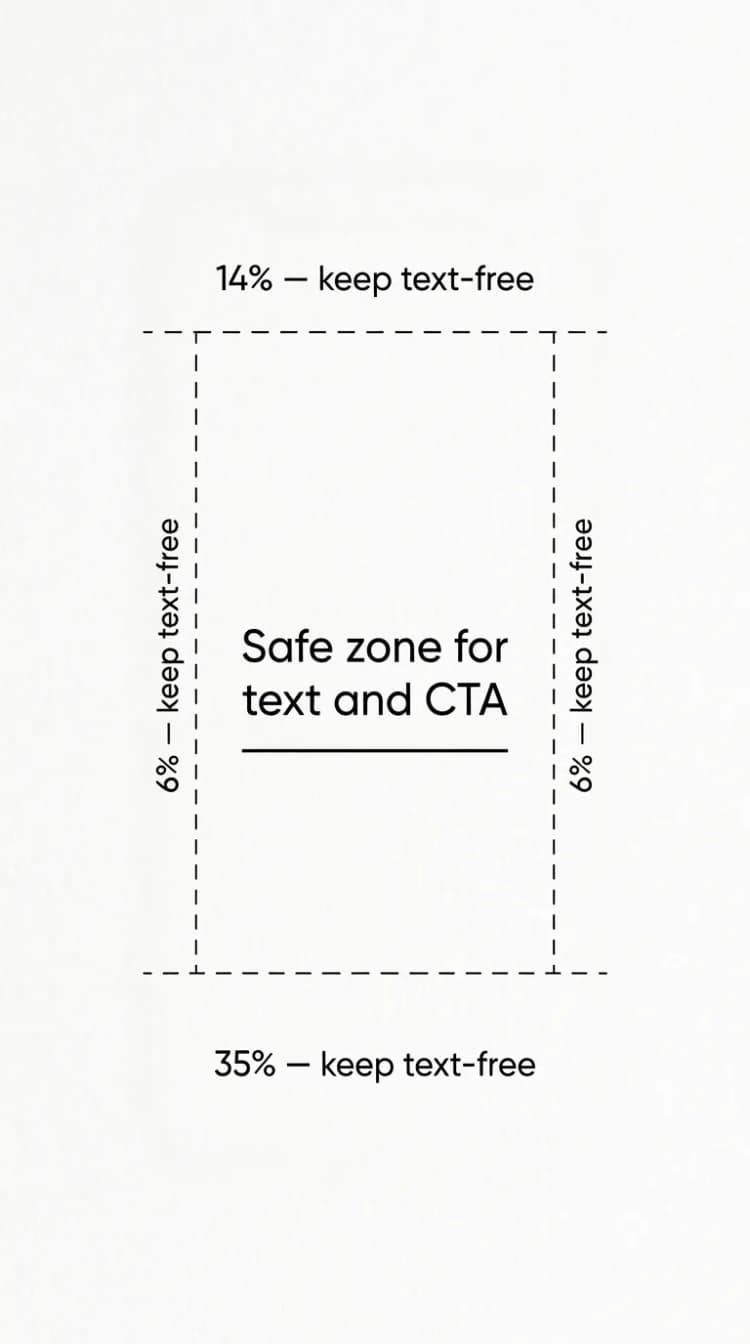
- Safe zone: keep about 14% of the top, 35% of the bottom and 6% of each side text-free.
- Sound: optional but strongly recommended, which for a music ad settles it.
- Length: Stories video under 16 seconds plays in full, longer clips split across cards.
What makes a good hook for your music Meta ad
The first few seconds decide everything, and Meta has real numbers behind that. In a study run with Nielsen, Meta foundup to 47% of a video ad's value lands in the first 3 seconds, and up to 74% by the first 10. That study is from 2016, years before Reels and Stories existed, so treat it as a strong signal rather than a live benchmark.
One artist put the practical version of it bluntly in a July 2026 r/musicmarketing thread. "If the first 8 seconds don't hook a total stranger, no budget saves it."
Put movement in the first second, then get to the actual hook fast, the drop, a lyric moment, your face on camera, sound on. Cut 3 to 5 different versions of the hook and let the results pick the winner instead of guessing.
What's the best call to action for a music Meta ad
Your call to listen is the button telling people what to do next. Meta gives you options like Listen Now and Learn More when you build the ad. Picking the Sales objective narrows those choices, one more reason it doesn't fit a music campaign.
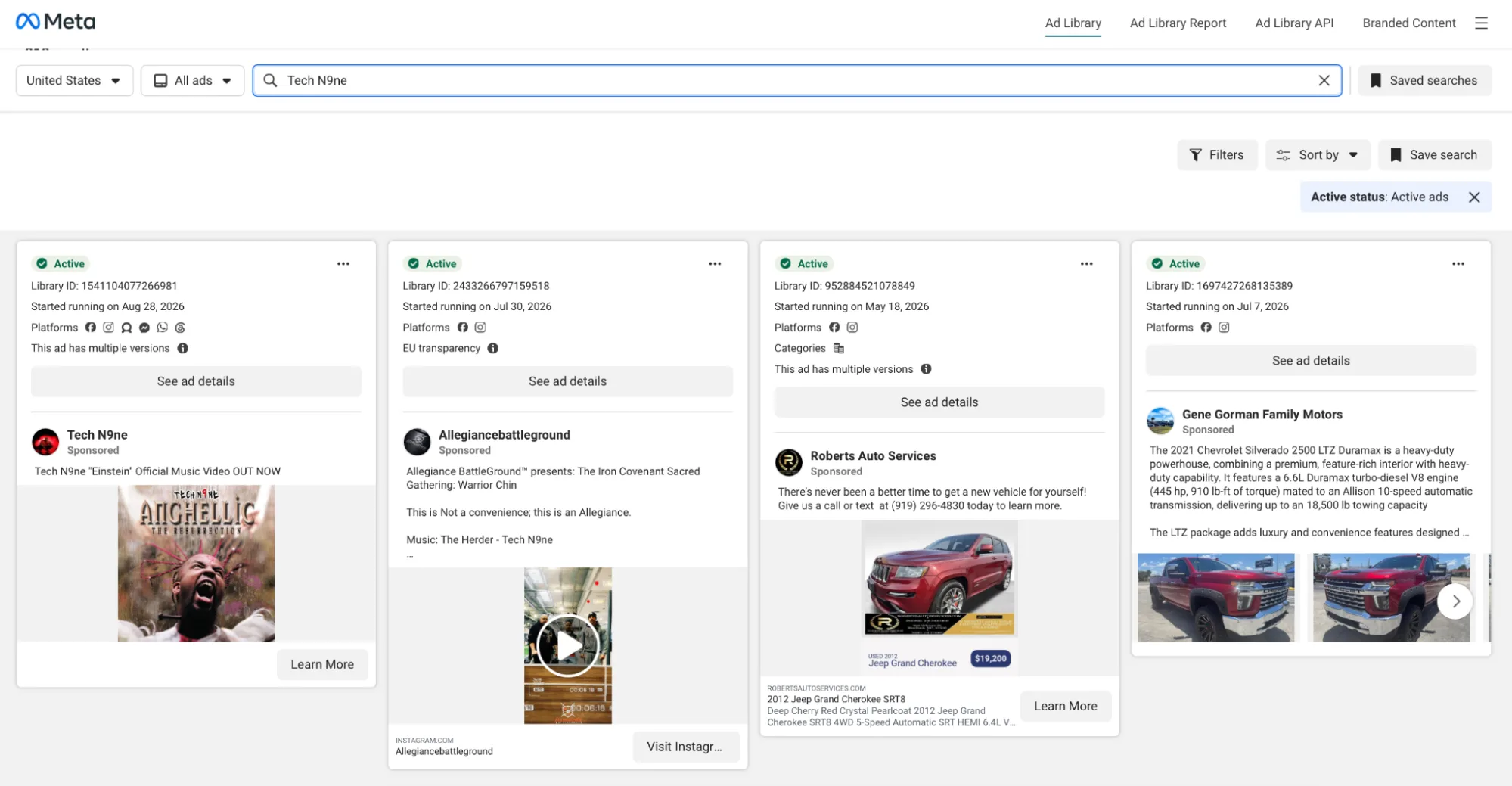
Search an artist in your genre inside Facebook Ads Library before you build your own. Tech N9ne has one running right now, a plain callout, "Einstein" Official Music Video Out Now, next to the cover art. No mystery to it. See what's working for someone else, then make your version.
Can you use your own music in your Meta ads?
Most artists never think to check this. Artists with a co-written song or a cleared sample are usually the ones who get caught the hard way. The risk works like this. Meta doesn't check your music before your ad goes live, nobody there listens to your song and approves it. Instead, your ad can get pulled later if someone who owns a piece of it, a co-writer, someone who cleared a sample with you, an artist you featured, or your label, reports it to Meta. That can happen after your ad has already been running, once you've already spent money on it.
Meta says this plainly in its own music rules, effective March 2024. It puts the responsibility on you. "You remain solely responsible for the content that you post or promote, including any music that is featured in that content." In plain terms, nobody at Meta checks whether you're allowed to use a song before your ad runs. They only act after someone complains.
Your own recording is fine if you control it outright. Co-writes, samples, features and label deals change that, so check before you spend. Ads Manager's music picker only draws from the Meta Sound Collection, so your master rides in on the video.
That's a lot of moving parts for one campaign. That's why some artists pay someone else to handle it.
DIY vs done-for-you Meta ads (when to hire someone)
Let's be honest here for a second. This is where most artists mess up. They either create their own Meta ads campaign or use Done for You campaigns.
Either way, they don't educate themselves enough to start something that yeilds positive results. Before you do that, I'd suggest you to read this Meta Ads Benchmark report I created earlier. You'll learn a lot about the state of Meta ads in the music industry.
|
Option |
What you get |
Cost |
Effort |
|---|---|---|---|
|
Run it yourself |
You build everything. The data stays yours |
Ad spend only. $5 to $10 a day recommended floor |
High |
|
SoundCampaign Meta Ads for Spotify |
Built and optimized in SoundCampaign's verified Meta accounts with reports and free video ads optimized to give you best results |
Same $5 to $10 a day, roughly $150 to $300 a month |
Low |
|
Smart link and ad tools |
Landing pages and retargeting pixels. You still run the ads |
Feature.fm artist plans $0 to $39 a month, plus ad spend |
Medium |
Whichever path you take, you have to understand some basics and spend some time educating yourself about meta ads. In fact, you can get started with this Meta ads for beginners guide.
How to measure results without vanity metrics
Watch saves, follows and playlist adds instead, and you won't find any of them in Ads Manager.
Open Ads Manager and the first numbers you see are reach, impressions (priced as CPM, cost per 1,000 impressions), link clicks (priced as CPC, cost per click), and Page likes, all on the Meta side of things. The real signal lives on Spotify for Artists instead.
Your Meta Ads screen will give you results like this:
|
Campaign |
Results |
Cost per result |
Impressions |
Reach |
Daily budget |
Amount spent |
|---|---|---|---|---|---|---|
|
Golden Hour Jam |
289 |
$0.24 |
48,921 |
41,700 |
$6.50 |
$69.12 |
|
October Skies |
412 |
$0.21 |
63,487 |
54,720 |
$10.00 |
$86.45 |
|
Winter Solstice |
198 |
$0.37 |
37,652 |
29,941 |
$8.00 |
$73.47 |
|
Found My Way |
346 |
$0.28 |
72,308 |
61,203 |
$12.00 |
$96.72 |
These numbers tell you how many people saw the ad or tapped it once. None of them confirm a real listener. Even the Results column can trick you. It counts whatever event you picked as your objective, so a campaign built around landing page views can show a strong Results number while nobody really streamed your song.
Spotify's Source of Streams report shows where those streams came from, with no bucket for ad traffic, so the real proof sits one step past Ads Manager. Find it under Segmentation, then Source of Streams. This is how Spotify sorts every stream into two buckets.
|
Bucket |
What sits in it |
What it means for your ads |
|---|---|---|
|
Active sources |
Your artist profile and catalog, listeners' own playlists, library and queue |
Someone chose you on purpose. Ad-driven listeners land here |
|
Programmed sources |
Editorial playlists, personalized ones like Discover Weekly and Release Radar, other people's playlists |
Spotify or another listener chose you for them |
What should you check each week to know if your music Meta ads campaign is working?
Check 5 things weekly, and know what a normal number looks like for your campaigns.
- Delivery status per ad set: Whether it still reads Learning. Meta's own guidance says an ad set exits Learning after about 50 results in the week following its last edit, and cost per result runs high while it's stuck there. A rough first week isn't a verdict, and touching the ad set now only resets that clock.
- Landing page actions: This is your real conversion, someone tapping the streaming button on your landing page, not just clicking the ad itself. Once your pixel has some history behind it, that click usually settles somewhere between $0.15 and $0.20 in the US, UK, Canada and Australia, cheaper again in lower-cost countries. A brand-new pixel with no data yet often starts closer to $0.40 and comes down as it collects more.
- Saves: This is a single-tap, same-day signal. Brian Hazard, an independent artist who built a free tool that tests whether conversion spikes line up with stream spikes, calls saves the best gauge of a campaign, reasoning that someone chooses to save your song the same day they heard it, not days later for reasons that have nothing to do with your ad.
- Follows: A heavier ask than a save. Someone isn't just keeping one song, they're signing up for whatever you release next. Expect this number to move slower and smaller than saves, and treat any steady climb week over week as the stronger of the two signals.
- Active-source streams in Spotify for Artists: The same number from the table above. Compare it against your pre-campaign baseline. A real ad-driven bump shows up within a few days of spend instead of weeks.
Organic activity, Spotify's own algorithm, Marquee and Showcase campaigns, playlist adds and removals, release-day timing, and weekday versus weekend listening can all move these same numbers too, so don't pin one week's dip on the campaign alone.
For the cost side, our Meta ads benchmark report covers everything you need for the right mindset.
Frequently asked questions
How much does it cost to promote music with Meta ads?
Plan on $5 to $10 a day. That's what our help centre recommends as a minimum, roughly $150 to $300 a month.
Do Meta ads help Spotify streams?
Indirectly at best. Spotify's documentation lists on-platform listener actions as its algorithm inputs, and ad traffic appears nowhere on that list. Ads put a person in front of your track. The rest is on the song.
Should I send Meta ads straight to Spotify or a landing page?
A landing page is what I recommend here. You can't install the Meta Pixel on Spotify or YouTube, so a direct link gives nothing to retarget.
What's the difference between a campaign, ad set, and ad?
- Campaign: Your objective.
- Ad set: The audience, placements, budget and schedule. Learning phase and Advantage+ settings live here.
- Ad: The creative itself, meaning your video, text and button.
Is a done-for-you Meta ads service worth it for independent artists?
A service hands you built-up audience data and campaign experience from day one. Music marketing services like SoundCampaign run these campaigns with people who do this full time, so you skip the months of trial and error a first-timer usually pays for in wasted ad spend. Running it yourself earns that same edge slowly, through your own trial and error. The trade pays off most once you're past a first release and have merch or tickets to sell, and matters less while you're still testing your very first single track with no fanbase yet. Learning the basics still helps even when you hand the campaign to someone else. Just know that nobody can promise a stream count, a service or your own account either way.

Fundador y CEO de SoundCampaign
Soy Nadav. Hacía música antes de construir todo esto, y de ahí viene realmente mi interés por el marketing. La parte de analítica es la que más me gusta: de dónde vienen las reproducciones, qué se movió y qué no. Fundé SoundCampaign para darles a los artistas una exposición realmente genuina. Me llevó mucho más tiempo y esfuerzo del que había previsto, y eso no ha cambiado demasiado.
Promociona tu música
Playlists reales, videos de TikTok y anuncios en Meta

La confianza de más de 100,000 artistas y sellos
Sin bots, nunca.
Caso real
Cómo SoundCampaign puso a Grant Knoche frente a 460,587 oyentes con WOOHOO
Leer la historia completa
¿Listo para que escuchen tu música?
Únete a miles de artistas independientes que usan SoundCampaign para llegar a playlists reales, creadores y fans, con comentarios honestos en cada paso.
- Sin bots, nunca
- Programa de Protección al ArtistaSi un curador o creador no reseña tu tema, te devolvemos el crédito. Tu presupuesto siempre está protegido.
- Conserva el 100% de tus regalíasSomos un servicio de promoción, no un sello. Nunca nos quedamos con un porcentaje de tus streams o regalías.