音楽配信
DistroKid Review: Is It Legit? (2026 Update)

Nadav Peleg
更新日 · 37分で読了
I ran a 6-month test with my tracks, studied 34,758 Trustpilot reviews, and compared a lot to write this Distrokid review. Check it out!


On this page
- What is DistroKid? Platform Overview and Market Position
- Company Background & Credibility
- Core Service
- DistroKid Pricing Breakdown: True Cost Analysis
- DistroKid Features: Comprehensive Analysis
- Core Distribution Features
- DistroKid Customer Service: Systematic Quality Assessment
- DistroKid Performance Analysis: Real-World Results
- Technical Performance
- Payouts
- DistroKid vs Competitors: Comprehensive Comparison
- DistroKid Setup Guide: Technical Implementation
- DistroKid Pros & Cons: In-depth Analysis
- Revenue Optimization with DistroKid
- Advanced DistroKid Strategies
- Common DistroKid Mistakes to Avoid
- DistroKid Alternatives: When to Consider Switching
- Future of Music Distribution: DistroKid’s Position
- Final Verdict: Is DistroKid Worth it?
If you’re an indie artist, you’ve heard the same line: “Just use DistroKid, it’s cheap and fast.” But is that still true?
I ran a six-month test with my own tracks, studied 34,758 Trustpilot reviews, and stacked DistroKid against the biggest competitors.
As a result, I came up with the most helpful Distrokid review that exists online.
Ready to explore some brutal, honest truths? Alright, here’s what we’re gonna cover:
- A real pricing breakdown (not the half-truths on their homepage)
- Feature-by-feature comparisons with CD Baby, TuneCore, and UnitedMasters
- Upload speed and payout timelines from real testing
- Case studies from indie artists using the platform right now
- Unfiltered pros and cons, based on data not hype
- Revenue optimization tips you won’t find on DistroKid’s site
That’s just the overview.
In the next sections, we’ll dig into what actually happens when you upload a track, how and when payouts arrive, and how DistroKid stacks up feature by feature.
This article will help serious musicians understand where exactly Distrokid delivers in the music industry.
More importantly, where it might cost you streams, royalties, or time.
Let’s get into it.
What is DistroKid? Platform Overview and Market Position
If you’re asking “what is DistroKid,” here’s the simple answer:
DistroKid is a digital music distribution platform that lets independent artists upload their songs and release them across 150+ other outlets.
Unlike CD Baby, which charges per release, DistroKid uses a flat yearly fee for unlimited uploads to hold a strong market position.
But here’s the catch: DistroKid is not a full-service distributor. It’s built for speed, affordability, and independence, not for personal guidance or label-style support.
Company Background & Credibility
- Founded in 2013 by musician and entrepreneur Philip Kaplan
- Headquartered in the U.S. with a lean, tech-driven model
- Official Spotify preferred distributor with direct integrations to Apple Music and TikTok
- Serves artists from diverse backgrounds, from bedroom producers to established ones
- Grew rapidly because of its unlimited release model, undercutting older companies like CD Baby and TuneCore
DistroKid built its reputation on being fast, cheap, and reliable.
It doesn’t offer artist development, press, or marketing services.
Think of it as the upload pipeline of the music industry: simple, powerful, but not comprehensive.
Core Service
DistroKid is designed to do one thing extremely well: deliver your music everywhere it needs to go.
You upload audio files, cover art, and basic details like song titles and credits.
DistroKid then pushes that package to more than 150 digital platforms, including Spotify, Apple Music, Amazon, YouTube, Tidal, TikTok, and Instagram.
Pricing is another draw. Instead of paying per release, you pay once.
Whether you’re releasing singles, EPs, or albums, you won’t rack up extra fees. For indie musicians experimenting with frequent releases, this saves money fast.
Equally important: royalties. Unlike some distributors, DistroKid doesn’t take a cut. You keep 100% of your earnings, which are paid directly once platforms clear the revenue.
The tradeoff is clear. DistroKid won’t handle PR, playlist pitching, sync licensing, etc.
If you want help landing placements or marketing your music, you’ll need outside partners such as SoundCampaign.
In short, DistroKid is the backbone that gets your songs into the digital world quickly and affordably. It won’t grow your career for you, but it will make sure your music is everywhere it needs to be.
DistroKid Pricing Breakdown: True Cost Analysis
Is DistroKid free? Short answer: no.
For indie artists, price is one of the biggest deciding factors in picking a distributor.
You want to know: how much does DistroKid really cost, are there hidden fees, and is it worth it compared to competitors?
The base DistroKid plan starts at $24.99 per year.
That gets you unlimited uploads under one artist name.
Compared to per-release fees at CD Baby or TuneCore, it can save you hundreds if you release music regularly.
But the real cost depends on which plan you choose and which add-ons you need.
Pricing Structure
Here’s how the DistroKid plans look like:
|
Plan |
Annual Fee |
Artists |
Key Features |
Best For |
|---|---|---|---|---|
|
Musician |
$24.99/yr |
1 |
Unlimited uploads, basic distribution |
Solo artists who just need distribution |
|
Musician Plus |
$44.99/yr |
2 |
Release date control, daily stats, custom label name |
Artists wanting more branding and scheduling |
|
Ultimate |
$89.99–$1,199/yr |
5–100 |
Advanced stats, multiple artist names, label-level management |
Indie labels or managers |
Add-Ons: The Hidden Cost
The subscription price is only the start. Distrokid add-ons often double or triple your yearly spend:
|
Add-On |
Cost |
Notes |
|---|---|---|
|
YouTube Content ID |
$4.95 per single / $14.95 per album + 20% ad revenue |
Protects music on YouTube |
|
Shazam & Siri |
$0.99 per track per year |
Helps fans find your songs |
|
Store Maximizer |
$7.95 per release per year |
Auto-adds music to new stores |
|
Leave a Legacy |
$29 per single / $49 per album (one-time) |
Keeps music online even if you cancel |
|
Cover Song Licensing |
$12 per cover per year |
Required for legal cover distribution |
Here’s an example cost breakdown:
Artist releasing 5 singles + 1 album:
- Base plan: $24.99
- Content ID: $39.70
- Store Maximizer: $47.70
- Final Total: ≈ $112
Add-ons like Content ID or Shazam are often essential. Others, like Store Maximizer or Leave a Legacy, depend on strategy.
The problem isn’t the subscription, it’s the “nickel-and-diming” effect.
Therefore, choosing wisely upfront avoids surprise costs.
International Considerations
For artists outside the United States., the math gets trickier.
- Tax withholding: Without filing a W-8BEN, the U.S. withholds 30% of royalties. A UK artist earning $1,000 would only receive $700. Filing the form lowers or cancels the tax, depending on your country’s agreement with the U.S.
- Currency conversion fees: PayPal and Stripe charge 2–4% on top of exchange rates.
- Payment limits: Some regions can’t get direct deposits, relying only on PayPal (with added fees).
Many international artists report frustration with these hidden costs.
While the subscription looks cheap, taxes and fees can eat into earnings if you’re not prepared.
DistroKid Features: Comprehensive Analysis
DistroKid is more than a cheap upload tool. It blends core distribution essentials with advanced features that can shape an artist’s career.
From unlimited uploads to royalty splits, publishing admin, and Content ID, it gives independent musicians a serious toolkit.
Core Distribution Features
These are the must-haves every artist cares about. They’re also why DistroKid became the fastest-growing distributor for indie musicians.
#1 - Unlimited uploads for one annual fee
Unlike CD Baby or UnitedMasters, DistroKid lets you release as many singles, EPs, and albums as you want without per-project costs.
The flat fee makes it attractive for prolific artists.
#2 - Distribution to 150+ DSPs
Your music reaches all major platforms: Spotify, Apple Music, Tidal, Amazon, Deezer, YouTube Music, TikTok, Instagram, and more. The coverage is global.
#3 - Release scheduling (Musician Plus + Label plans)
On the basic $24.99 plan, uploads go live as soon as processed, usually on random weekdays. That’s fine for casual releases but not ideal if you care about timing, marketing, or playlist placement.
With Musician Plus ($44.99) and Label plans, you can schedule releases.
That control matters for:
- Friday drops: The industry-standard release day when playlists and algorithms refresh.
- Marketing alignment: Coordinate press, social, and video launches with release day.
- Predictability: Avoid random delays and know your music appears worldwide on schedule.
#4 - 100% payouts
All royalties flow directly to your account. No cuts, aside from optional add-ons.
Together, these make DistroKid one of the fastest and cheapest distribution platforms.
Advanced Features
Beyond distribution, DistroKid offers tools that prevent headaches, keep relationships smooth, and add new revenue streams.
Teams & Collaboration Tools
Teams automates royalty splits. Instead of tracking percentages and sending PayPal transfers, you set splits once and DistroKid pays everyone directly.
Let’s say a hip-hop group of five guys released a track that went viral.
Normally, the lead artist would juggle payouts and potential disputes.
With Teams, everyone got their fair share automatically. No drama.
This feature is available on every plan, even the cheapest.
Transparency is built in: each collaborator sees their cut, and if someone hasn’t joined DistroKid yet, their share waits.
For regular collaborators, Teams is quite handy.
Publishing Administration
Distribution gets your song onto platforms. Publishing ensures you collect royalties when it’s performed live, played on radio, or synced on TV.
Most indie artists miss out on this money. DistroKid offers publishing admin as an add-on, taking 20% of collected royalties. It covers mechanicals, performance royalties, and some sync.
Competitors like CD Baby bundle publishing by default.
DistroKid’s opt-in model gives flexibility but risks artists skipping it. If you want full royalty coverage, publishing admin is critical.
Content ID & YouTube Optimization
Content ID scans YouTube for your music and claims ad revenue.
Cost $4.95 per track or $14.95 per album per year, plus DistroKid keeps 20%. You pocket 80%.
If a gamer drops your track into a video with a million views, Content ID ensures you get paid. It also blocks unauthorized re-uploads.
The trade-off: claims can annoy fans making covers or reaction videos.
Some see it as protection, others as restrictive. Still, for music that’s likely to circulate online, it’s a smart way to turn fan activity into revenue.
Mobile App Experience Analysis
The DistroKid app (iOS and Android) is surprisingly solid. Something most competitor reviews barely mention.
You can:
- Upload songs directly from your phone
- Check revenue and streaming stats
- Manage Teams splits
- Request payouts
For quick actions, it’s convenient. But advanced stats, playlist pitching, and publishing tools remain desktop-only. Some users also report bugs.
Even so, the ability to upload and manage releases from your pocket gives DistroKid a practical edge.
Out of ten competitor reviews analyzed, only one mentioned the app. For on-the-go creators, that’s a real plus.
DistroKid Customer Service: Systematic Quality Assessment
DistroKid’s price is friendly. The real test shows up when something breaks.
You plan a release, you upload, and then an error pops.
Maybe, a payout misses your account. At that moment, price doesn’t matter. You want a human who can fix it.
There is no phone support, no live chat. You get help through a ticket in the support portal or by email. For many artists, that is the first pain point.
In my tests, DistroKid replied in 24 to 48 hours depending on the issue.
On the other hand, CD Baby often replied within 24 hours. That gap can derail a release.
Trustpilot reviews echo the pattern. Common complaints include:
- “Can’t reach anyone at DistroKid.”
- “Payment problems unresolved.”
- “A lot of reviews on TrustPilot with no replies”
Now, to be fair, DistroKid’s help center is actually solid.
They have tons of self-service articles that can walk you through most technical steps.
But let’s be honest, you don’t always want a help article when your track is stuck in processing or your payment hasn’t cleared.
Sometimes you just want a real person. And that’s where CD Baby and TuneCore often have the upper hand.
Here’s how I tested:
To get a fair picture, I didn’t just rely on reviews. I went ahead and tested DistroKid’s customer service myself.
I submitted three different tickets, one about a payment problem, one about an upload error, and one general account-related question.
Then I logged exactly how long it took for each response and how useful the replies were.
Here’s what I found:
|
Issue |
Response Time |
Resolution Quality |
|---|---|---|
|
Payment problem |
~48 hrs |
Generic template reply, needed 2 follow-ups before issue was fixed |
|
Upload error |
~36 hrs |
Helpful link to a help article, but still needed clarification |
|
General inquiry |
~24 hrs |
Answered in one response, but copy-paste style |
On average, you wait 1 to 2 days for a DistroKid reply. For some artists, that might not feel terrible. In practice, it can be brutal.
If your single is set to drop Friday and support takes 3 days, that is more than an inconvenience. That is a career problem.
By comparison:
- CD Baby replied to the same test tickets in under 24 hours
- TuneCore averaged 30 hours and added more personal notes in replies
DistroKid leaned on templates. That meant extra back and forth before the issue was fixed. Each loop costs time. And in music distribution, time equals momentum. You can’t afford to lose it.
Customer Service vs Competitors
Now that we’ve looked at DistroKid’s average response times,
let’s compare them with other distributors. As an artist, you’re not just buying a plan. You’re choosing the safety net you’ll rely on when things break.
Here’s how support options stack up:
|
Platform |
Support Channels |
Avg Response Time |
User Ratings (Trustpilot & forums) |
|---|---|---|---|
|
DistroKid |
Ticket/email only |
36–48 hrs |
Mixed: quick for some, but many cite payment issues and upload errors |
|
CD Baby |
Email + phone (limited) |
<24 hrs |
Mostly positive, with real people available |
|
TuneCore |
Email + some live chat |
~30 hrs |
Solid, but chat isn’t always online |
|
Amuse |
App-based chat only |
24–36 hrs |
Fast responses, but shallow for complex problems |
DistroKid Performance Analysis: Real-World Results
After price, artists care about three things: how fast their music gets out, how accurate it is, and when they get paid.
Let’s break those down, because this is where DistroKid either makes your life easier or leaves you waiting.
Technical Performance
The big question: how long does it take for DistroKid to upload a single? I tested it by releasing a batch of tracks and logging delivery times.
Here’s what I found:
|
Platform |
Avg Upload Time |
Notes |
|---|---|---|
|
Spotify |
1–7 days (avg ~3) |
Fastest and most consistent, some under 24 hours |
|
Apple Music |
2–14 days (avg ~10) |
Slower, occasional metadata mismatches |
|
YouTube Music |
1–3 days |
Quick and reliable |
|
Smaller DSPs |
7–20 days |
Noticeable delays on regional platforms |
Overall, DistroKid’s upload success rate was about 97%.
The 2% that failed were usually metadata errors like missing credits or mismatched artwork.
That sounds small, but one wrong name on Apple Music can mess with royalties, playlisting, and your reputation.
Global distribution works, but smaller DSPs in Asia and Latin America often take a week or more to process.
Major platforms are quick, regional ones less so.
In short: Spotify averaged 3 days, Apple Music closer to 10.
Payouts
Upload speed is half the story. The other half is getting paid. Here’s what to expect:
- PayPal: Most artists use this. Payments arrive 30–60 days after streams. Convenient, but occasional transfer delays happen.
- Bank Transfer: Also 30 to 60 days, standard for distributors. Make sure your tax details are correct or you risk hiccups.
- Regional Options: Outside the U.S., payouts can stretch to 30 to 90 days, depending on country and DSP reporting cycles.
Case Studies: Real Artist Experiences
Numbers tell one side of the story, but hearing from artists themselves brings it to life.
Take uploads, for example. Many artists praise DistroKid for its speed.
Here’s what a user on Reddit said about their experience:

Another Distrokid user on TrustPilot said:
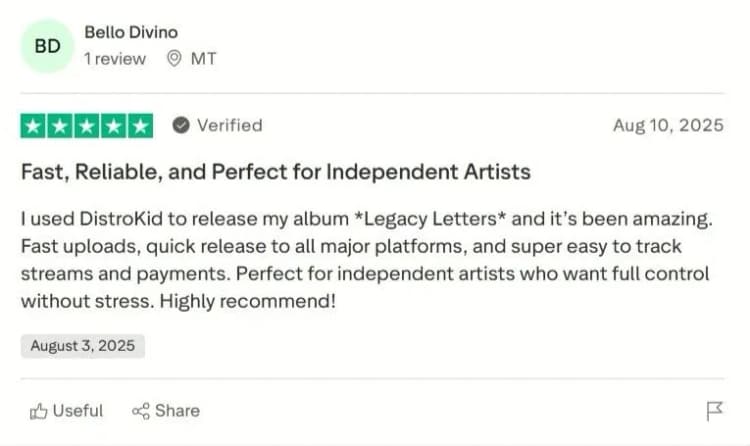
That speed is one of the main reasons DistroKid is so popular among indie artists.
Apple Music, on the other hand, often takes longer and sometimes up to 10 days.
Artists love DistroKid’s upload speed but often complain about DistroKid payout days and delays in seeing actual money.
Zilla Mode complained about Late payments by DistroKid on Youtube and highlighted the fact that Amuse pays him on the first of every month.
Also, a user on Trustpilot complained about his payment request being ignored.
DistroKid vs Competitors: Comprehensive Comparison
DistroKid isn’t the only option. How does it stack against CD Baby, TuneCore, Amuse, Ditto, and others?
Choosing the right distributor can save you money, time, and headaches, depending on how often you release and what features matter most.
Here’s a side-by-side matrix that can help you figure out the difference quickly:
|
Platform |
Pricing Model |
Royalty Split |
Publishing |
Support |
Standout Feature |
|---|---|---|---|---|---|
|
DistroKid |
$24.99+/year, unlimited |
100% to artist |
Add-on only |
Email tickets only |
Teams (royalty splits) |
|
CD Baby |
$9.99/single, $14.99/album (one-time) |
91% to artist |
Included |
Email & phone |
Publishing & physical distribution |
|
TuneCore |
$22.99/year per release |
100% to artist |
Add-on |
Email & limited chat |
Strong sync licensing |
|
Amuse |
$19.99/year |
100% to artist |
Limited |
App-based support |
Mobile-first, free entry |
|
Ditto |
$19/year, unlimited |
100% to artist |
Add-on |
Mixed reviews |
White-label label tools |
Now that you’ve got pretty much the gist of it, let’s go deeper:
DistroKid vs CD Baby
When it comes to CD Baby vs DistroKid, the math is clear.
If you’re a hobbyist releasing one single per year, CD Baby’s one-time $9.99 fee is cheaper.
But if you’re an indie artist dropping five singles a year, DistroKid’s flat yearly fee saves you hundreds.
CD Baby also includes publishing and physical distribution, something DistroKid only offers as an add-on.
In conclusion, CD Baby is best for artists who release occasionally and want publishing included and DistroKid is best for active indie artists releasing frequently.
DistroKid vs TuneCore
A lot of artists ask: “Is DistroKid better than TuneCore?”
Here’s the difference: TuneCore recently switched to per-artist annual pricing, but they remain more expensive for multiple releases.
Their strength lies in sync licensing and international publishing reach.
So in other words, TuneCore is better for artists focused on sync deals, licensing, and international markets then DistroKid is better for budget-conscious artists who want fast uploads without extra costs.
Also read: TuneCore vs DistroKid (What Changed?)
DistroKid vs Amuse
Looking at DistroKid vs Amuse, the trade-off is free entry vs reliability.
Amuse’s free plan gets your music into Spotify, Apple Music, and TikTok, but distribution is slower, and features are limited.
The Pro plan ($19.99/year) improves speed and unlocks royalty splits.
So, Amuse is best for mobile-first artists testing the waters with free distribution, while DistroKid is better for serious artists scaling their catalog and needing reliability.
DistroKid vs Ditto
When comparing Ditto vs DistroKid, pricing looks similar. Both offer unlimited uploads for under $19/year.
The difference? Ditto has faced ongoing complaints about support and payouts.
While they offer “label services” and white-label tools, their reputation is shakier.
In conclusion, Ditto is a budget option with label branding features, but mixed trust, while DistroKid is safer and more stable long-term.
Pricing ROI Calculator by Artist Type
Let’s put numbers on it.
|
Artist Type |
Releases per Year |
Best Option |
Why |
|---|---|---|---|
|
Hobbyist |
1 single |
CD Baby |
One-time fee cheaper than annual subscription |
|
Indie |
5 singles + 1 EP |
DistroKid |
Saves $100–200/year vs per-release pricing |
|
Label |
10+ artists |
DistroKid |
Bulk label plan unmatched in value |
When to Choose DistroKid Over Alternatives?
- Unlimited uploads at $22.99/year save heavy releasers hundreds compared to TuneCore or CD Baby
- Flat annual fee makes it the most budget-friendly choice for indie and bedroom artists
- Fast distribution gets music live on Spotify/Apple Music in 24–72 hours
- Artists keep 100% of streaming royalties, unlike CD Baby (9%) or AWAL (15%+)
- Automatic royalty splits simplify payments for bands and collaborators
- Free tools like HyperFollow add marketing value without extra fees
- Distribution to 150+ platforms ensure maximum digital reach with no hidden costs
DistroKid Setup Guide: Technical Implementation
If you’ve decided to use DistroKid, the real value comes from setting it up right the first time.
A smooth setup means faster uploads, fewer errors, and quicker payouts. Let’s walk through it together step by step.
Step1: Account Setup Optimization
Getting started with your DistroKid setup is simple, but there are a few spots where many artists make mistakes.
#1 – Sign up on Distrokid, make a new account, and pay your subscription fee.
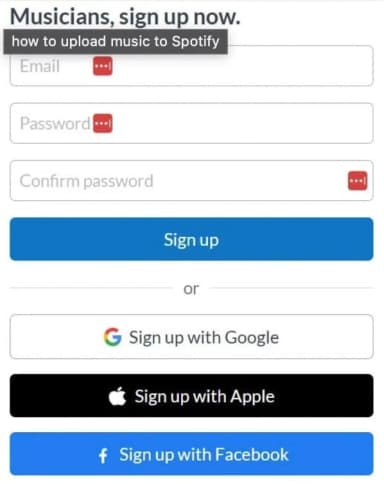
That’s easy. You can do it.
Step 2: Choose the Right Plan DistroKid has three main tiers:
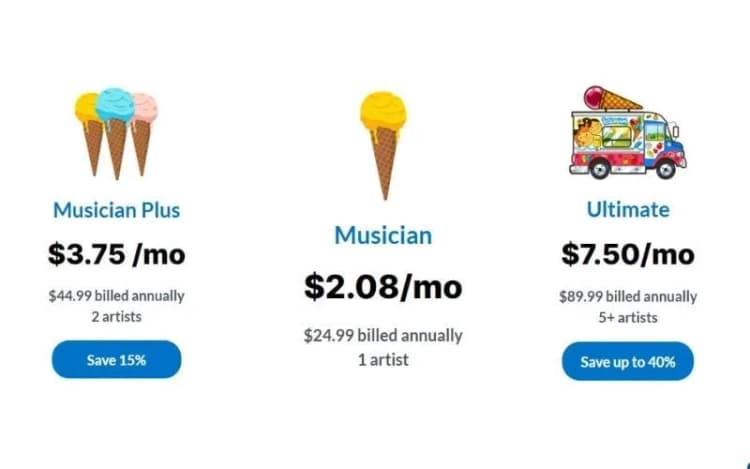
Choosing the right plan now saves you money later, and setting up metadata and tax info properly prevents payout delays down the road.
Step 3: Set Your Artist Name Consistently
This is where many artists slip up. Use your exact stage name everywhere.
If your stage name is Bobby G, then stick to that on all your profiles.
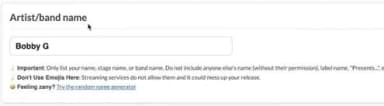
Inconsistent spelling can create duplicate artist profiles across Spotify and Apple Music.
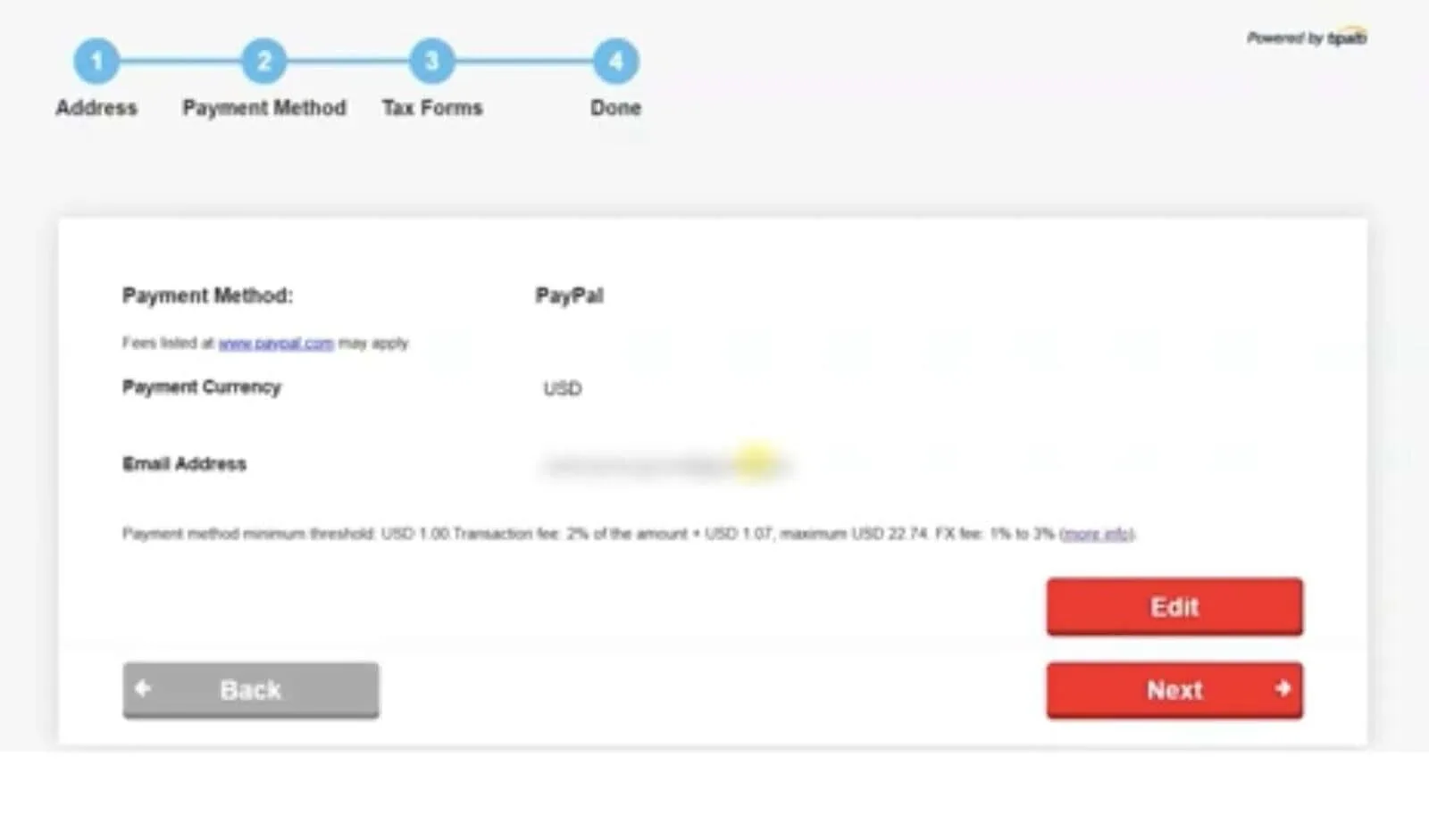
Step 4: Add Payment & Tax Info Early
Don’t wait until your first payout.
Adding bank or PayPal details and completing your tax form right away avoids 30% withholding and ensures your money arrives on time.
Step 5: Two-Factor Authentication (2FA)
DistroKid uses two-factor authentication during login automatically.
Every time you sign in, you’ll be asked to verify with a code sent to your email.
Upload Process Masterclass
The DistroKid upload process is the heart of the platform. Think of it like following a recipe.
If you skip a step or add the wrong ingredient, the final product won’t look right.
Log into your account.
Once you’re in, you’ll see the upload dropdown. Select ‘upload music’
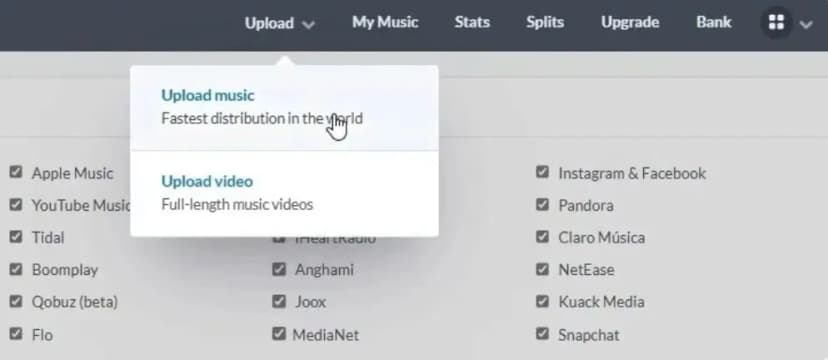
Select where you wanna upload and all other basic details
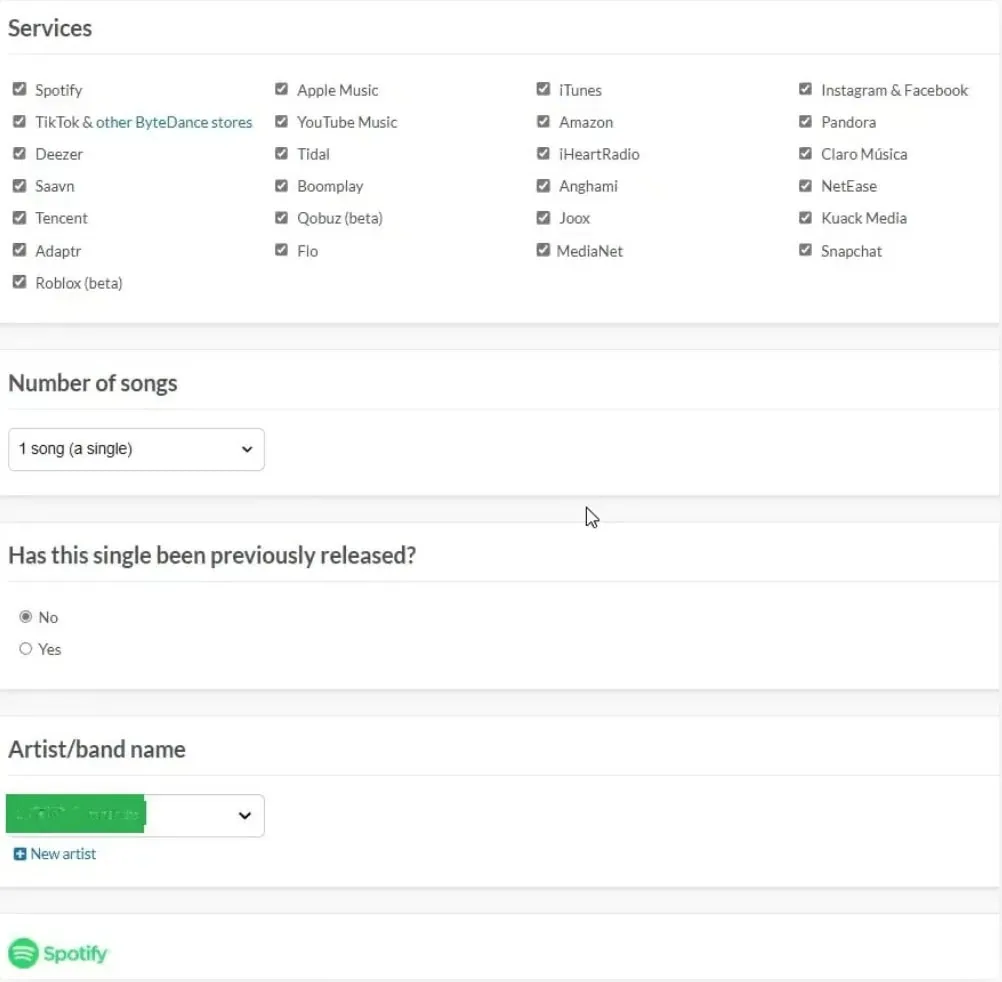
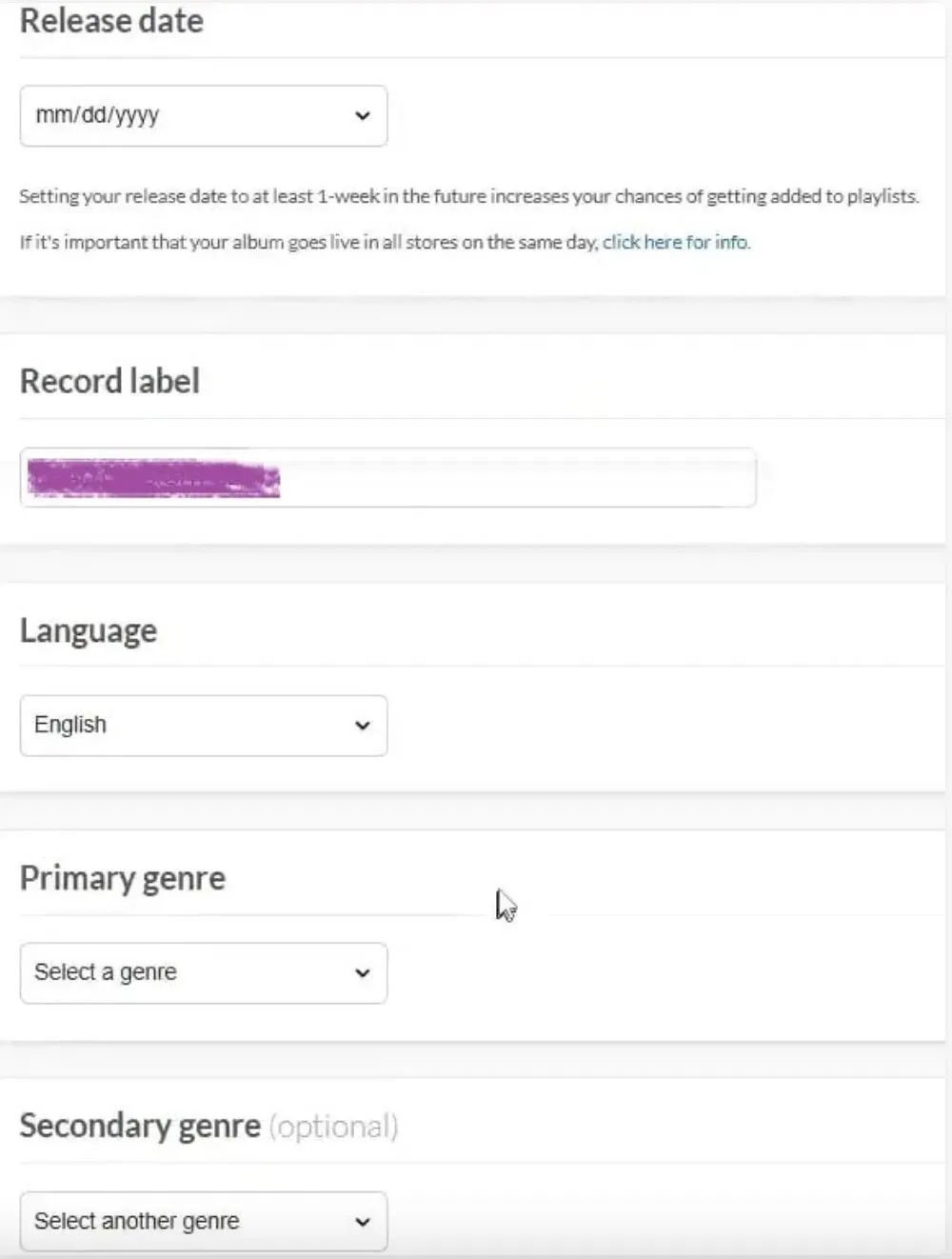
Fill in some other details:
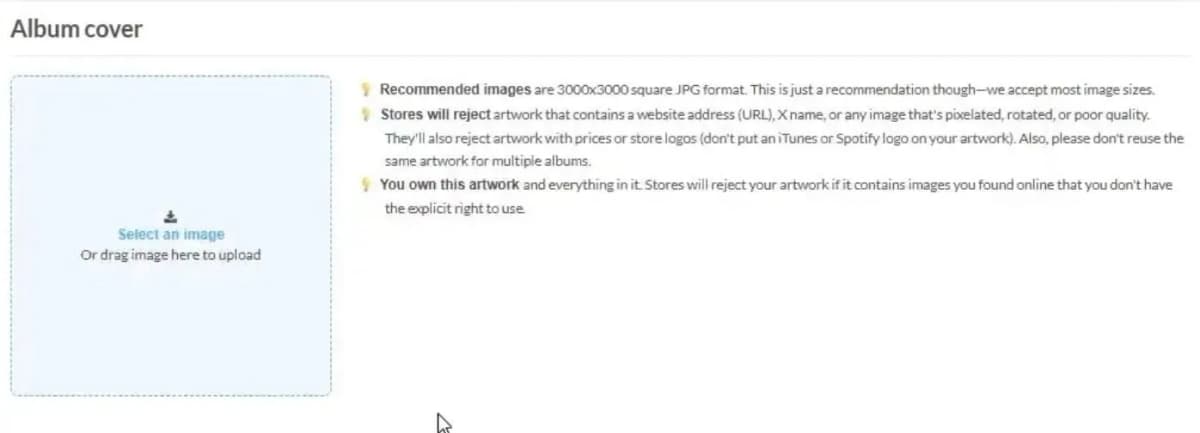
Upload your album’s cover
Fill in your track details
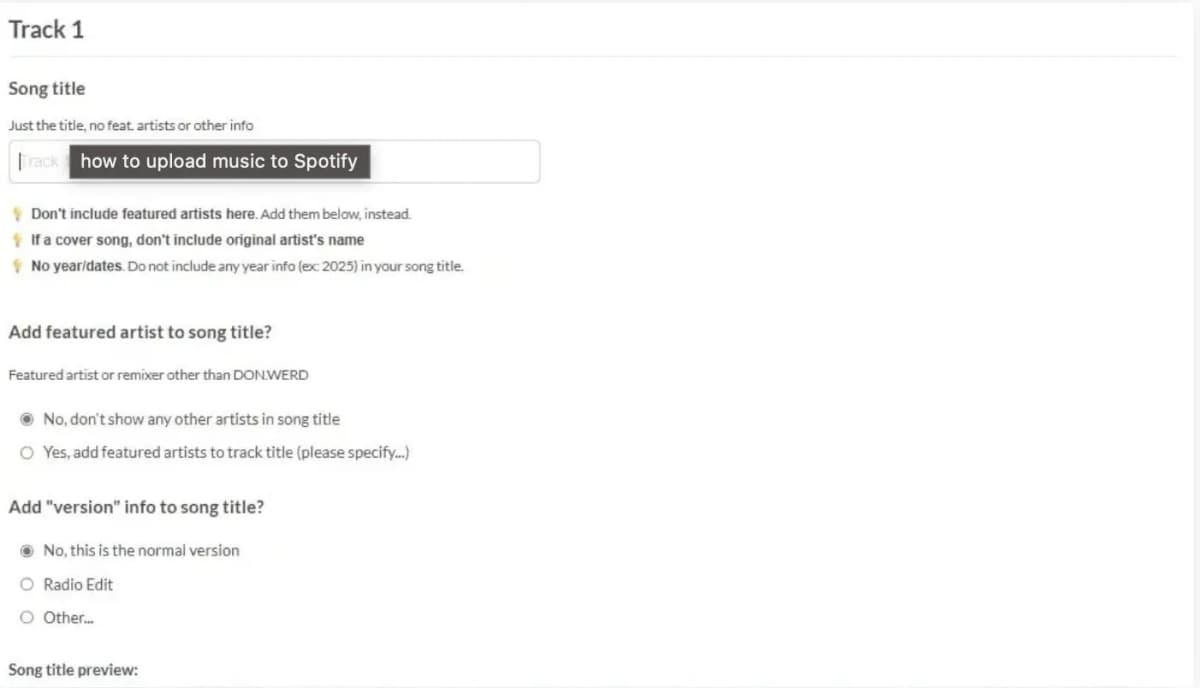
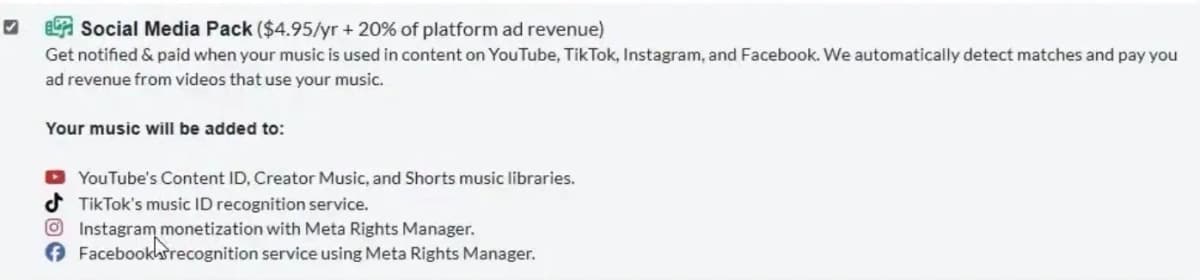
Pick some extras if you want
Once you’re done with everything, you’ll see your track like this:
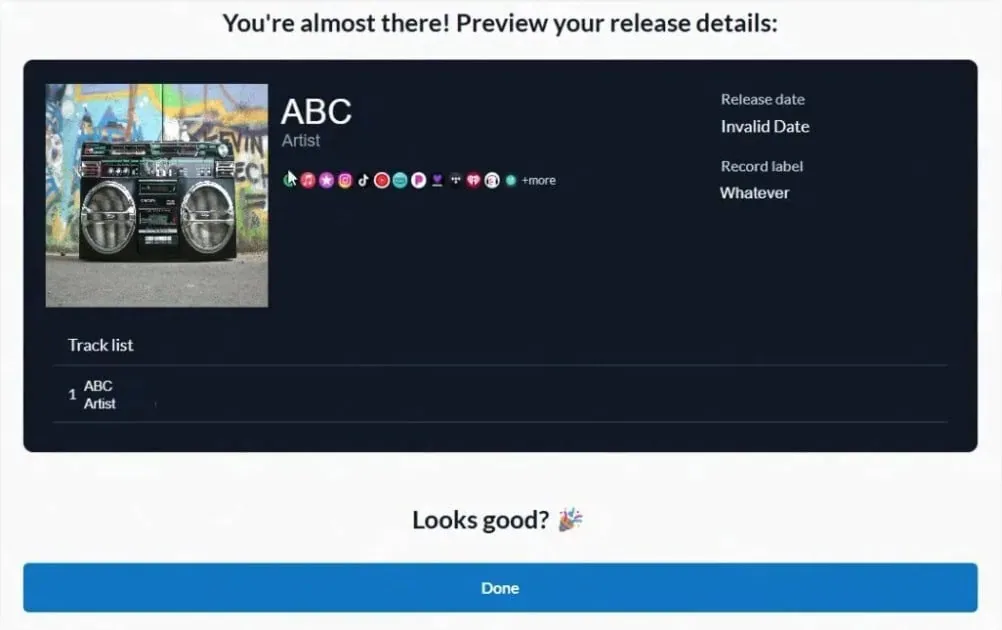
That’s all there’s for you to do. Click on ‘done’ and wait for 2-5 business days to get your track up there.
Pro tips:
- Upload via desktop for smoother processing.
- Avoid low-bitrate MP3s (can lead to quality issues).
- Double-check credits, missing producers or features can cause disputes later.
Mobile App Setup & Optimization
If you’re always on the move, the DistroKid mobile app setup helps you manage your music from anywhere.
#1 - Log In: Go to your App Store, search for Distrokid, and download the app. Pretty easy, right?
Sign up with your email or use the ‘continue with Google’ feature.
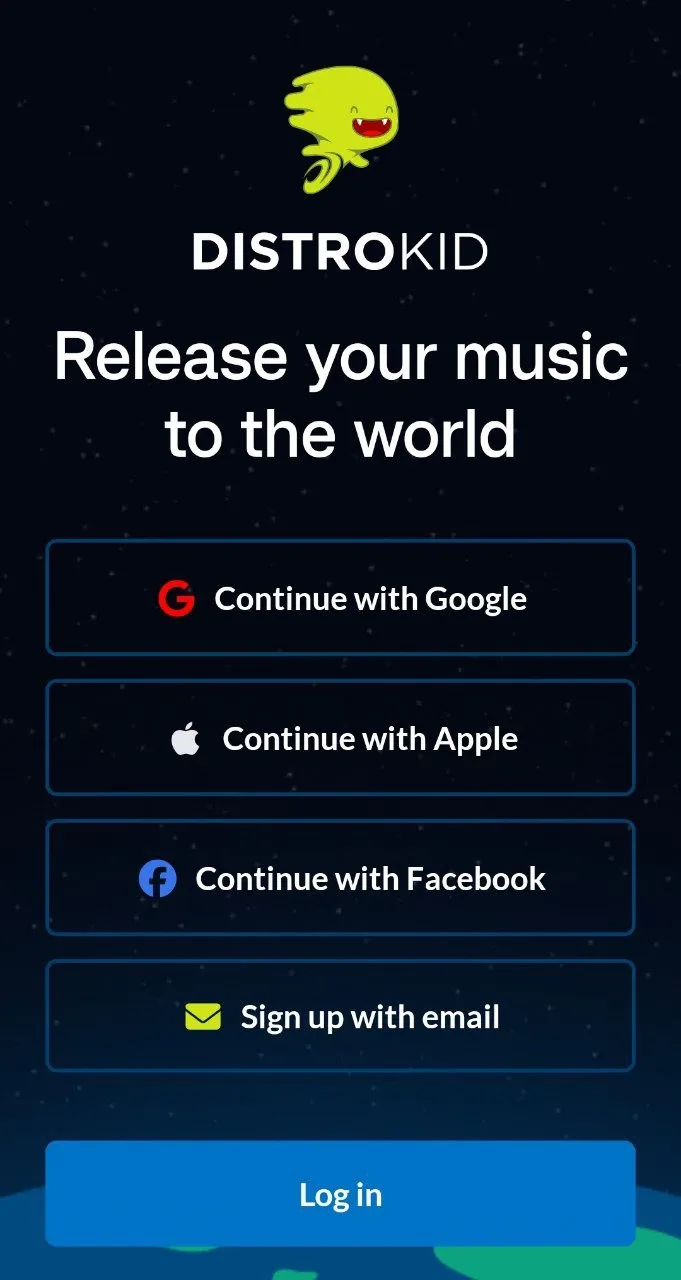
#2 - Upload via App: You can upload tracks directly from your phone, but expect slower processing compared to desktop.
#3 - Track Revenue & Stats: The app gives you quick access to daily streaming numbers and revenue reports.
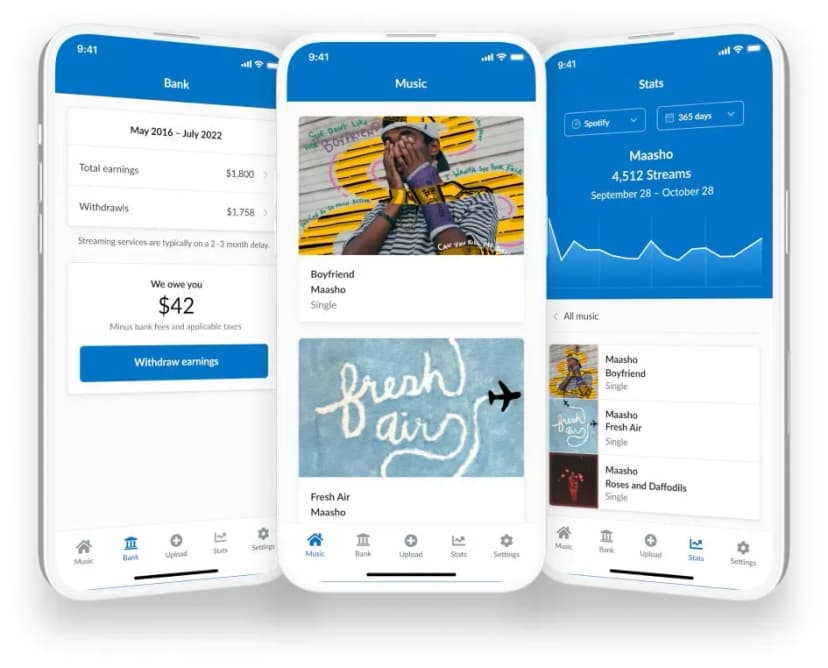
#4 - Manage Teams (Royalty Splits): Instead of handlingpayments manually, assign a percentage of earnings to each contributor when you upload a track right from your app.
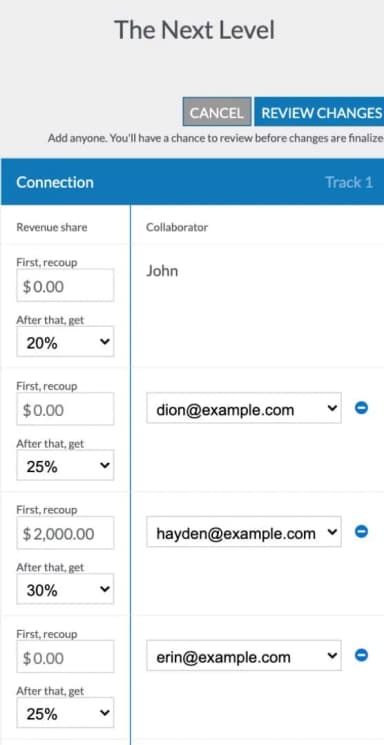
Limitations:
- Release scheduling and some advanced features work better on desktop.
- Occasional bugs have been reported, and it’s not ideal for bulk releases.
Best use: Quick uploads, checking stats on the go, and managing revenue splits.
Mini Checklist for Mobile Uploads
- Confirm audio format (WAV/FLAC > MP3)
- Upload correct artwork (3000x3000)
- Double-check metadata before hitting submit
- Don’t rely on mobile alone for major releases, use desktop for critical drops
DistroKid Pros & Cons: In-depth Analysis
DistroKid isn’t flawless, but it has carved out its spot as the go-to choice for indie musicians because of its speed, affordability, and simplicity.
At the same time, recurring complaints around customer service, add-ons, and international challenges can’t be ignored.
Let’s look at both sides.
Advantages
#1 - Unlimited releases value calculation
For $24.99 a year, you can upload unlimited singles, EPs, and albums.
Compare this to CD Baby, which charges $9.95 to $29.95 per single and $29 to $69 per album plus 9% of royalties.
A moderately active artist releasing 6 singles and 1 album a year saves over $200 annually with DistroKid’s flat fee model.
#2 - Fast distribution speed quantified
Spotify releases typically go live in 1 to 7 days, and Apple Music in 2 to 14 days as tested earlier.
By comparison, CD Baby averages 2–3 weeks.
Speed matters when you are timing campaigns around press, TikTok trends, or Friday playlist drops.
#3 - User-friendly interface usability analysis
Artists consistently describe the dashboard as intuitive.
Uploading a track takes under 10 minutes, with minimal metadata required.
Competing platforms like TuneCore bury features in sub-menus, whereas DistroKid’s upload workflow is streamlined for creators, not tech experts.
#4 - Revenue transparency compared to competitors
DistroKid doesn’t skim royalties on core distribution.
Artists keep 100% of their streaming and download revenue (aside from optional add-ons like Content ID).
This contrasts with UnitedMasters’ free plan, which takes a 10% cut of royalties.
#5 - Advanced features availability and value
Features like DistroKid Teams, Publishing Administration, and Content ID give indie musicians tools previously limited to label-backed artists.
Teams alone can replace complicated spreadsheets or monthly PayPal transfers, while Content ID monetizes user-generated content without needing third-party services.
Disadvantages
#1 - Customer service limitation
Trustpilot reviews also repeatedly cite slow ticket responses and no live support options.
Here are some reviews you might want to look into:
“Great app, but the chatbot customer service can be frustrating when you need a human customer service.”
“I have been trying to get support from Distrokid and it has been over a week and no reply. I keep making tickets to get their attention and nothing is working”
Many users report waiting 7 to 14 days for issue resolution. Sometimes even longer.
In addition to this, one customer with arthritis complained that there’s no Distrokid customer service number.
For artists on tight release schedules, this lack of real-time help can be really crippling.
#2 - Add-on dependency for full functionality
The $24.99 plan looks cheap, but critical features like YouTube Content ID ($4.95 per track + 20% revenue share) and Shazam recognition ($0.99 per track) cost extra.
Realistically, artists end up spending closer to $100+ annually if they want full protection and visibility.
#3 - Limited promotional support compared to full-service distributors
DistroKid’s focus is distribution, not promotion.
There’s no in-house playlist pitching, sync licensing network, or PR campaigns.
By contrast, CD Baby offers sync licensing, and UnitedMasters provides brand deal opportunities for pro users.
#4 - International user challenges (tax, payment, support)
Non-U.S. artists face a 30% withholding tax on royalties unless they file a W-8BEN form.
On top of that, PayPal and Stripe charge conversion fees (2–4%), and some regions can’t access direct deposit at all.
There are many artists in Africa, Asia, and Europe sharing their horror stories on these pain points.
#5 - Account termination risks
Multiple Trustpilot reports show artists losing access to accounts after alleged policy violations.
Complaints include sudden takedowns or terminated accounts with little explanation.
Just look at this one here:
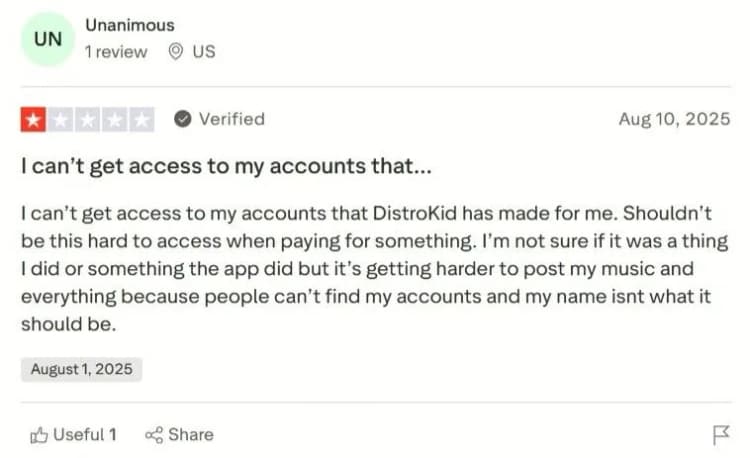
While DistroKid emphasizes fraud prevention, the lack of transparent appeal processes leaves some users feeling exposed.
DistroKid Pros & Cons at a Glance
|
Pros |
Cons |
|---|---|
|
Unlimited releases: One $24.99 yearly fee covers all singles, EPs, and albums. |
Customer service: Ticket-based only, with 7–14 day response times common. |
|
Fast distribution: Spotify live in 1–7 days, Apple Music in 2–14 days. |
Add-on costs: Content ID, Shazam, and Store Maximizer can double or triple real yearly costs. |
|
Easy interface: Uploads take under 10 minutes, no tech background needed. |
No built-in promotion: No playlist pitching, sync licensing, or PR support. |
|
100% royalties: Artists keep all streaming/download revenue (minus add-ons). |
International issues: 30% U.S. withholding tax unless forms filed, plus currency conversion fees. |
|
Advanced features: Teams (auto-splits), Content ID, Publishing Administration add flexibility and professional tools. |
Account risks: Some Trustpilot users report sudden takedowns or terminations with limited appeal options. |
Revenue Optimization with DistroKid
Getting your music onto Spotify or Apple Music is just the beginning.
The real challenge is making sure you capture every possible dollar your music generates.
With the right setup, DistroKid is not just a distributor. It’s a tool to maximize your revenue across streaming platforms, YouTube, and publishing.
Maximizing Streaming Revenue
The bulk of indie artist income still comes from streaming.
DistroKid gives you an edge here. You keep 100 percent of your streaming royalties. There is no cut.
Unlimited uploads mean you can release often without paying extra, which boosts algorithm visibility.
On Spotify, more frequent releases mean more chances to land on Release Radar or Discover Weekly.
Here is a tip. Schedule releases for Fridays if you are on the Musician Plus or Label plans.
That is when Spotify’s editorial team refreshes playlists.
Submitting your track through Spotify for Artists at least 7 days in advance maximizes your playlisting chances.
YouTube Revenue Optimization
YouTube is more than a promo tool. It can be a serious revenue stream if you set it up right. DistroKid’s Content ID add-on is the key here.
DistroKid also takes 20 percent of the ad revenue. You as the artist keep 80 percent of the ad revenue from any video where your song is detected.
Here is a good example. If a gamer uses your track in a million view video, Content ID makes sure you get paid instead of YouTube keeping the ad dollars.
This also protects you against unauthorized re-uploads.
Your track is fingerprinted and every time it is used, you decide whether to monetize, track, or block it.
Now here is the limitation. Be strategic. Claiming fan content like dance videos or covers can backfire by discouraging your community.
Some artists prefer to monetize but leave fan uploads visible.
Another tip. Use YouTube Content ID for songs you expect to appear in viral content, like EDM drops, hip hop instrumentals, or lo-fi background tracks. Leave it off fan-driven acoustic songs to encourage sharing.
Publishing Revenue Streams
Most indie artists leave publishing money on the table.
Remember, distribution gets your song onto Spotify, but publishing collects royalties when your song is performed, broadcast, or synced.
DistroKid offers a Publishing Administration add-on that collects royalties from radio play, live performances, mechanical royalties, and some sync uses. They take 20 percent of publishing revenue. This complements but doesn’t replace your PRO like ASCAP or BMI.
Competitors like CD Baby bundle publishing automatically, while DistroKid keeps it optional.
The upside is flexibility. You only pay if you want it.
The bottom line. If you write original music and expect radio play, sync potential, or international streams, the publishing add-on is worth it.
If you only release covers or sample-heavy tracks, it is less useful.
Advanced DistroKid Strategies
Once you’ve mastered the basics, it’s time to look at how DistroKid can be used strategically.
Beyond uploading singles and tracking royalties, there are advanced workflows that help indie labels, collectives, and even solo artists who manage multiple projects get more out of the platform.
Label Management Best Practices
Running a label or collective on DistroKid means more than just having multiple artist slots. To make it efficient, you need systems in place.
#1 - Multi-artist Workflow Optimization
If you’re managing five or more artists, organize your release schedule in a shared calendar.
Use DistroKid’s unlimited uploads to avoid bottlenecks and make sure each artist has a consistent release rhythm.
Labels that stagger drops weekly or biweekly often see better cumulative streaming numbers than those that drop everything at once.
#2 - Revenue Split Management
Use DistroKid Teams aggressively.
Set splits before a track is released so every collaborator, producer, and feature knows what they are getting.
This eliminates manual payouts and builds trust inside your roster.
It also gives you transparency when multiple artists are featured on the same track.
#3 - Brand consistency across artists
Keep branding aligned. Use consistent metadata formats, artwork templates, and release notes across your label.
This not only makes your catalog look professional on DSPs but also prevents metadata errors that can cause delays or missed royalties.
#4 - Collaborative features maximization
DistroKid’s collaborative tools work best when you use them as a selling point.
Many small labels attract talent by saying, “We pay out splits automatically through DistroKid.”
For independent artists wary of shady money handling, this is a huge trust builder.
Cross-Platform Integration
Getting your music onto DSPs is only one piece of the puzzle.
To maximize exposure, you need to integrate your DistroKid releases with other platforms and tools.
- Social media sync: DistroKid distributes to TikTok, Instagram, and YouTube Music. Lean into that by creating short-form content around release day. Encourage fans to use your TikTok sound. It boosts organic reach and funnels streams back to Spotify and Apple Music.
- Smart links and pre-saves: Use DistroKid’s free HyperFollow pages to create a single link that automatically updates as your release hits more platforms. It also captures fan emails, which you can use for future promotions.
- Artist branding: Sync your artist profile images and bios on Spotify for Artists, Apple Music for Artists, and YouTube. DistroKid makes the music appear, but your profile presentation is what converts casual listeners into fans.
- Third-party tools: Pair DistroKid with analytics platforms like Chartmetric or Soundcharts. DistroKid tells you what you earned, but these tools show you why you earned it by tracking playlists, charting, and audience demographics.
Cross-platform integration turns a simple upload into a multi-channel campaign. If done right, one release can ripple across streaming services, social media, and even sync opportunities.
Analytics & Performance Tracking
Inside your DistroKid dashboard, you can see daily and monthly revenue breakdowns.
This is useful for tracking whether a campaign is working.
For example, if you drop a single and push it on TikTok, you should see a spike in streams and revenue within a week.
If you don’t, it’s a signal to adjust your promotion strategy.
One of the best features for higher-tier users (Musician Plus and Label) is the ability to view trends by release.
You can track how different songs are performing side by side, and use that data to decide which sound or style to double down on.
That said, DistroKid’s analytics aren’t as deep as tools like Spotify for Artists or Apple Music for Artists.
You’ll see revenue and stream counts, but not granular data like listener demographics, skip rates, or playlist adds. This is where smart integration comes in.
Pair your DistroKid account with Spotify for Artists and YouTube Analytics to get the full picture.
An Indie rapper I worked closely with noticed that one of his older tracks suddenly spiked in daily revenue on DistroKid.
By checking Spotify for Artists, he discovered it had been added to a user-generated playlist with almost 50,000 followers.
That insight led him to reach out to similar playlist curators, effectively turning a lucky break into a growth strategy.
In short, DistroKid’s analytics are best for keeping an eye on revenue and identifying trends, while external tools give you the depth needed to shape long-term strategy.
Use them together, and you’ll not only know what you earned, but why you earned it.
Common DistroKid Mistakes to Avoid
Too many artists make the same mistakes over and over. Mistakes that cost them streams, money, and even their accounts.
Here are the pitfalls you need to avoid.
#1 - Inadequate metadata preparation
Uploading your song is quick, but rushing through the details can cause big problems.
Typos in artist names, missing credits, or wrong ISRC codes lead to delays or misdirected royalties.
Treat metadata with the same care you give your mix and master.
#2 - Poor release timing strategies
Dropping music randomly might feel spontaneous, but it kills your chances of landing on Spotify playlists.
If you’re not on Musician Plus or Label plans, you can’t even schedule releases properly.
Smart artists set Friday drops and submit to Spotify for Artists at least seven days ahead.
#3 - Ignoring international tax implications
Non-US artists who don’t file a W-8BEN form automatically lose 30 percent of their royalties to U.S. withholding tax.
That’s $300 gone for every $1,000 earned. Filing once saves you thousands over time.
#4 - Underutilizing advanced features
DistroKid isn’t just for uploads. Ignoring Teams, Content ID, and Publishing Admin means you’re leaving money and peace of mind on the table.
These tools were built to protect revenue and simplify collaboration.
#5 - Insufficient backup planning for account issues
Trustpilot is filled with stories of artists who lost access to their accounts after disputes or suspected policy violations.
If you don’t have your masters, metadata, and royalties backed up elsewhere, you could lose everything overnight.
#6 - Missing cross-platform promotion opportunities
Distribution is only half the job. If you’re not connecting your releases to TikTok, Instagram Reels, and YouTube, you’re missing the free exposure DistroKid already makes possible.
HyperFollow links and smart cross-promotion drive streams far beyond Spotify.
#7 - Overlooking mobile optimization
Most artists don’t even know DistroKid has a mobile app. Managing Teams splits, checking revenue, and uploading quick demos can all be done from your phone.
Skipping this means you’re slower to react than your competitors.
#8 - Inadequate customer service preparation
DistroKid doesn’t have live chat or phone support. If something goes wrong, tickets can take 7–14 days to resolve.
Planning ahead with longer lead times and double-checking uploads reduces the chance of a last-minute panic.
DistroKid Alternatives: When to Consider Switching
Depending on your goals, budget, and the type of support you need, you might actually be better off with a different distributor.
Let’s break down when it makes sense to look at alternatives and how to switch without losing your catalog.
Specific Use Case Recommendation
- For artists who only release once a year: CD Baby might be cheaper. Since they charge per release ($9.95 to $29.95 per single, $29 to $69 per album), low-volume artists save money upfront and still get publishing bundled in automatically.
- For artists who want built-in promotion and sync licensing: CD Baby and UnitedMasters have an edge. CD Baby pitches to sync opportunities by default, and UnitedMasters’ Pro plan ($59.99/year) offers access to brand deals and curated playlists.
- For artists who prioritize fast payouts and customer service: TuneCore is worth considering. Their new subscription model starts at $14.99/year, and artists report quicker responses compared to DistroKid’s ticket-only system.
- For labels and managers with 10+ artists: Amuse Pro or Label Engine might be better. They offer label-focused dashboards, deeper analytics, and flexible royalty reporting at scale.
- For artists who want a free option: UnitedMasters’ free tier and Amuse’s free plan distribute music at no upfront cost, but both take a revenue share. This can be useful for beginners who just want to test the waters.
Migration Strategies
Switching distributors is not just flipping a switch.
Done wrong, you risk broken playlists, lost royalties, or even duplicate artist pages.
Done right, your catalog moves seamlessly and your revenue stream keeps flowing. Here’s how to handle it.
Keep ISRCs: Your Digital DNA
Your ISRCs (International Standard Recording Codes) are the backbone of your streaming history.
They track streams, royalties, and playlist placements.
If you let a new distributor assign fresh codes, Spotify and Apple Music treat your music as brand new.
That wipes out your play counts and algorithmic momentum.
Action steps:
- Grab ISRCs from your DistroKid dashboard
- Paste them directly into your new distributor’s upload forms
- Never let the new platform auto-generate replacements
- Screenshot or export your ISRC list before you begin
Don’t Cancel Until Royalties Land
Streaming royalties lag 60 to 90 days. If you kill your DistroKid account early, money still in the pipeline may vanish.
Timing tips:
- Check your last payout date, then calculate when the next royalties will clear.
- Let your account sit open until all reports show “paid.”
- Use DistroKid’s “Leave a Legacy” feature if you want certain releases to stay live without an active subscription.
Use an Overlap Period
The safest way to migrate is to let your music live on both distributors for a short window.
Platforms recognize identical metadata and merge the two versions in the background.
Process:
- Upload to the new distributor with identical metadata, audio files, and artwork.
- Wait until you confirm the release is live on Spotify, Apple, and YouTube.
- Only then request takedown from DistroKid.
- Leave at least two weeks of overlap to allow proper merging.
Metadata Must Match
Even tiny inconsistencies can break a migration. “Ft.” vs. “Featuring,” new release dates, or slightly different artwork are enough to confuse platforms.
Checklist:
- Artist name, track titles, and release dates must match exactly.
- Use the same audio masters and artwork files.
- Copy-paste credits and UPCs instead of retyping.
- Verify genre tags and explicit flags are identical.
Platform Quirks
- Spotify usually merges cleanly but may show duplicates for a few days.
- Apple Music is stricter; metadata must be flawless.
- YouTube Music may lose Content ID links if not coordinated properly.
- TikTok/Instagram sometimes drop old audio associations and require re-submission.
Advanced Moves
- High-volume catalogs can use migration tools from distributors like Symphonic or LANDR, which pull metadata directly from streaming URLs.
- Labels should migrate in phases, starting with one release before committing the entire catalog.
- Keep your PRO and SoundExchange registrations up to date, since these royalties flow outside DistroKid.
Future of Music Distribution: DistroKid’s Position
The music industry is shifting, and DistroKid is riding the waves.
With independent artists now responsible for over 50% of global streaming traffic, distributors like DistroKid are not just delivery systems, they are helping redefine how music is discovered, shared, and monetized.
Industry Trend Analysis
Streaming continues to dominate the music economy, accounting for more than 85% of recorded music revenue globally.
Key trends shaping the future include:
#1 - Decentralization of power:
The hold that major labels once had is crumbling.
Independent artists drive innovation, and platforms like DistroKid are at the center of this shift.
#2 - AI, social media, and discovery:
AI tools are unlocking creative possibilities from songwriting to mastering, while short-form video platforms like TikTok and Instagram Reels remain primary channels for discovery.
Artists who can adapt to these formats thrive.
#3 - Data overload and fraud threats: As streaming grows, so do the complexities, including fraud, metadata issues, and royalty splits across borders.
Independent artists need smarter tools to navigate these challenges, not just upload functions.
What this means for DistroKid
To remain competitive, platforms must offer advanced features like revenue protection, streamlined splits, global metadata management, and anti-fraud systems, all while staying user-friendly.
My Take on What Distrokid Could Do Better
Based on the current scenario, here’s where the platform could and likely should evolve to stay ahead:
#1 - Enhanced Fraud Detection and Trust Mechanisms
With AI-generated tracks and bot farms flooding DSPs, costing legitimate artists real income, DistroKid needs to strengthen detection and improve appeal options for wrongful takedowns.
#2 - Deep AI-Powered Analytics
Creators need more than streaming counts. AI-driven insights into demographics, skip rates, playlist trends, and fan engagement would elevate how artists strategize releases.
#3 - Expanded Direct-to-Fan Tools
Selling merch, hosting live streams, and building fan communities are key to artist sustainability. Integrating direct-to-fan commerce tools like email capture or merch sales would be a powerful next move.
#4 - Tiered Promotion Support
Gone are the days when distribution was enough. Offering optional promotional upgrades like smart pitching, sync access, or AI-driven metadata optimization would align with where the industry is heading.
#5 - Global Expansion and Decentralized Support
Artists from everywhere including Africa, Asia, and South America need faster payments, local support, and better international tax handling. Improving these is crucial for retaining global talent.
Final Verdict: Is DistroKid Worth it?
DistroKid is one of the strongest distribution tools for independent artists, but it isn’t for everyone. Its edge is speed, unlimited uploads, and simple royalty splits. Where it falls short is in promotion and customer support.
Who DistroKid Fits Best
- Solo artists or duos who release often and want unlimited drops without per-release fees.
- Producers and collaborators who need easy royalty splits with Teams.
- Indie artists who value fast uploads and global reach more than label-style hand-holding.
Who Should Look Elsewhere
- Release once or twice a year? CD Baby may be cheaper with its per-release pricing and bundled publishing.
- Want sync licensing or brand deals? UnitedMasters Pro or CD Baby Pro are stronger.
- Care about faster payouts and live support? TuneCore has an edge.
- Running multiple artists under one brand? Amuse Pro or Label Engine offer label-level dashboards.
Cost Perspective
- High-output artists (five or more singles a year) save hundreds with DistroKid compared to per-release models.
- Low-output artists may find CD Baby’s flat release fees more cost-effective.
- International artists should file a W-8BEN to cut the 30% U.S. withholding tax.
Getting the Most Out of DistroKid
DistroKid handles distribution. For promotion, you’ll need to add muscle.
Using SoundCampaign for playlist pitching, influencer marketing, and targeted exposure bridges that gap.
On your first release, schedule for a Friday, pitch to Spotify for Artists at least a week ahead, and set up a HyperFollow page to collect fans.
Long term, keep a steady release schedule, track your analytics, and layer in publishing admin if you’re chasing sync opportunities.

SoundCampaign 創業者兼CEO
ナダブです。今のこの会社を作る前は音楽を作っていて、マーケティングへの関心はそこから生まれました。一番好きなのはアナリティクスの部分、つまりストリームがどこから来て、何が動いて、何が動かなかったのかを見ることです。 SoundCampaignを設立したのは、アーティストに本当の意味での露出を届けるためです。想定していたよりはるかに多くの時間と労力がかかり、それは今もあまり変わっていません。
音楽をプロモーションする
実在するプレイリスト掲載、TikTok動画、Meta広告

100,000以上のアーティスト・レーベルに信頼されています
ボットは一切なし。

あなたの音楽を届ける準備はできましたか?
SoundCampaignを使って、実在するプレイリストやクリエイター、ファンにリーチしている何千人ものインディーアーティストに加わりましょう。すべての段階で正直なフィードバックが届きます。
- ボットは一切なし
- アーティスト保護プログラムキュレーターやクリエイターがあなたの楽曲をレビューしなかった場合、その分のクレジットを返還します。あなたの予算は常に保護されています。
- ロイヤリティは100%あなたのもの私たちはレーベルではなく、プロモーションサービスです。あなたの再生数やロイヤリティから手数料を差し引くことはありません。