Spotifyプロモーション
How to Get Verified on Spotify in 2026 (Step-by-Step Guide)

Nadav Peleg
更新日 · 6分で読了
You think it takes money and popularity to get verified on Spotify? Nope, let me show you how to get verified on Spotify with just 1 listener.


First of all, you don’t need 10,000 followers or a record label for verification.
And you definitely don’t need to pay anyone for it. All you gotta know is how to get verified on Spotify within 15 minutes. That’s it!
Look, getting this blue tick is all about claiming your artist profile.
There’s no secret follower threshold or backdoor deals.
An artist I know from India releases tracks on YouTube. He got an entire EP there. But when it comes to Spotify, it seems he has forgotten his password.
Anyways..
With just one song and 1 monthly listener, Azfar got verified.
Don’t believe me? Just check this out:
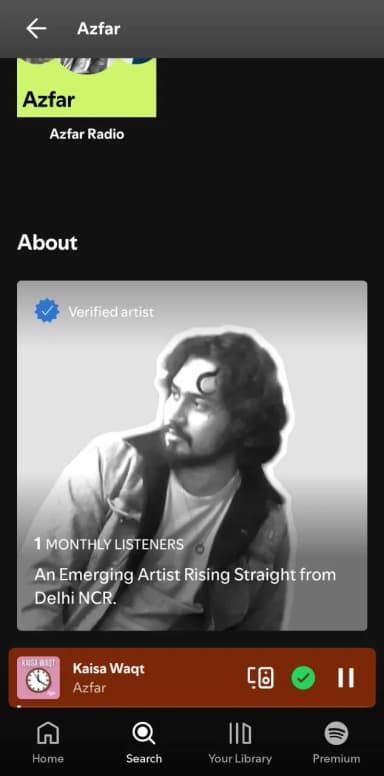
Got your hopes high already? Well, there are a few workarounds in some cases. Otherwise, it’s as easy as blinking eyes.
Let’s see in which category you’re in right now.
First Things First: Do You Even Qualify Yet?
✔️ At least one song released on Spotify (through a distributor like DistroKid, TuneCore, SoundDistro, Routenote, etc.)
✔️ Have an artist profile to claim (which is automatically created once your music is published)
✔️ Must be able to verify you own that profile (via email, social links, or distributor connection)
Step-by-Step: How to Get Verified on Spotify
Now that you've confirmed you meet the basic requirements, let's walk through the actual verification process.
#1 - Claim your artist profile via Spotify for Artists
The main way to get verified is by claiming your artist profile through Spotify for Artists. This is Spotify's dedicated platform for musicians to manage their presence.
This is how you can sign up.
#1 - Go to Spotify for Artists and click "Get Access"
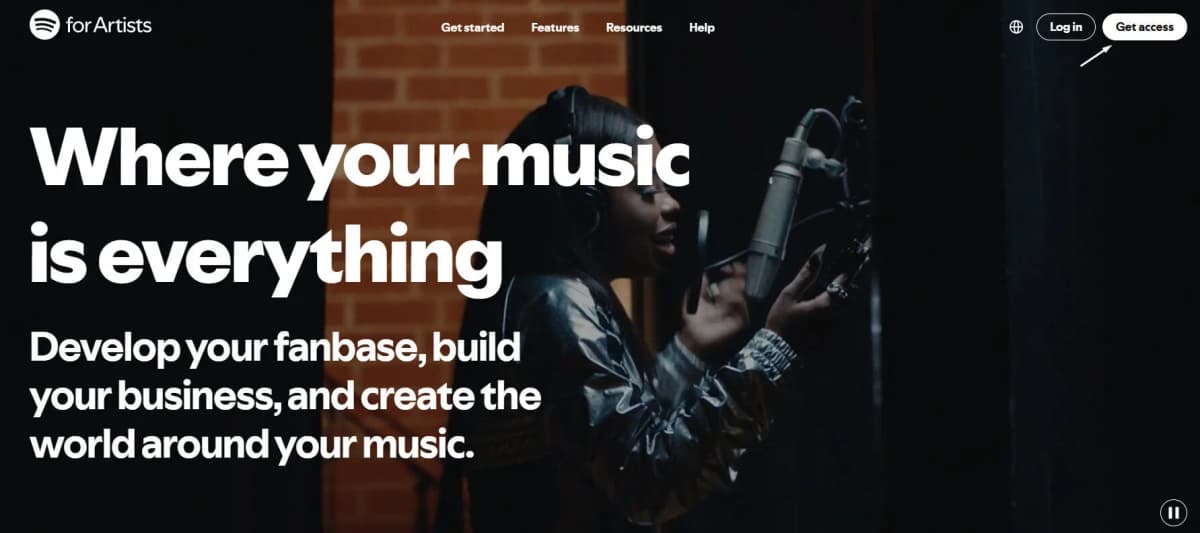
#2 - Select what feels relevant to you
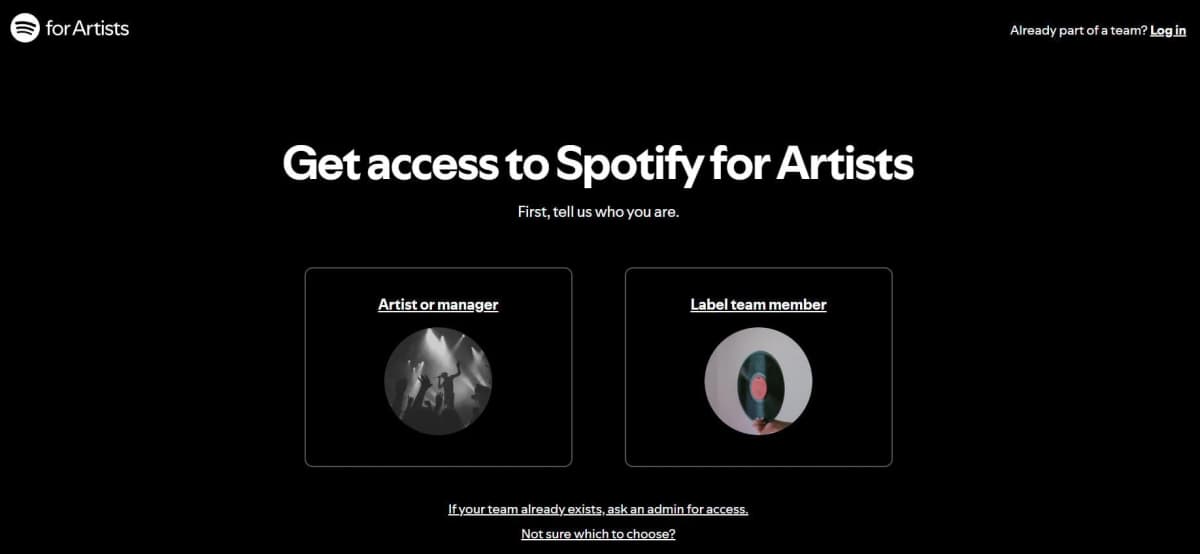
#3 - Search for the profile you wanna claim.
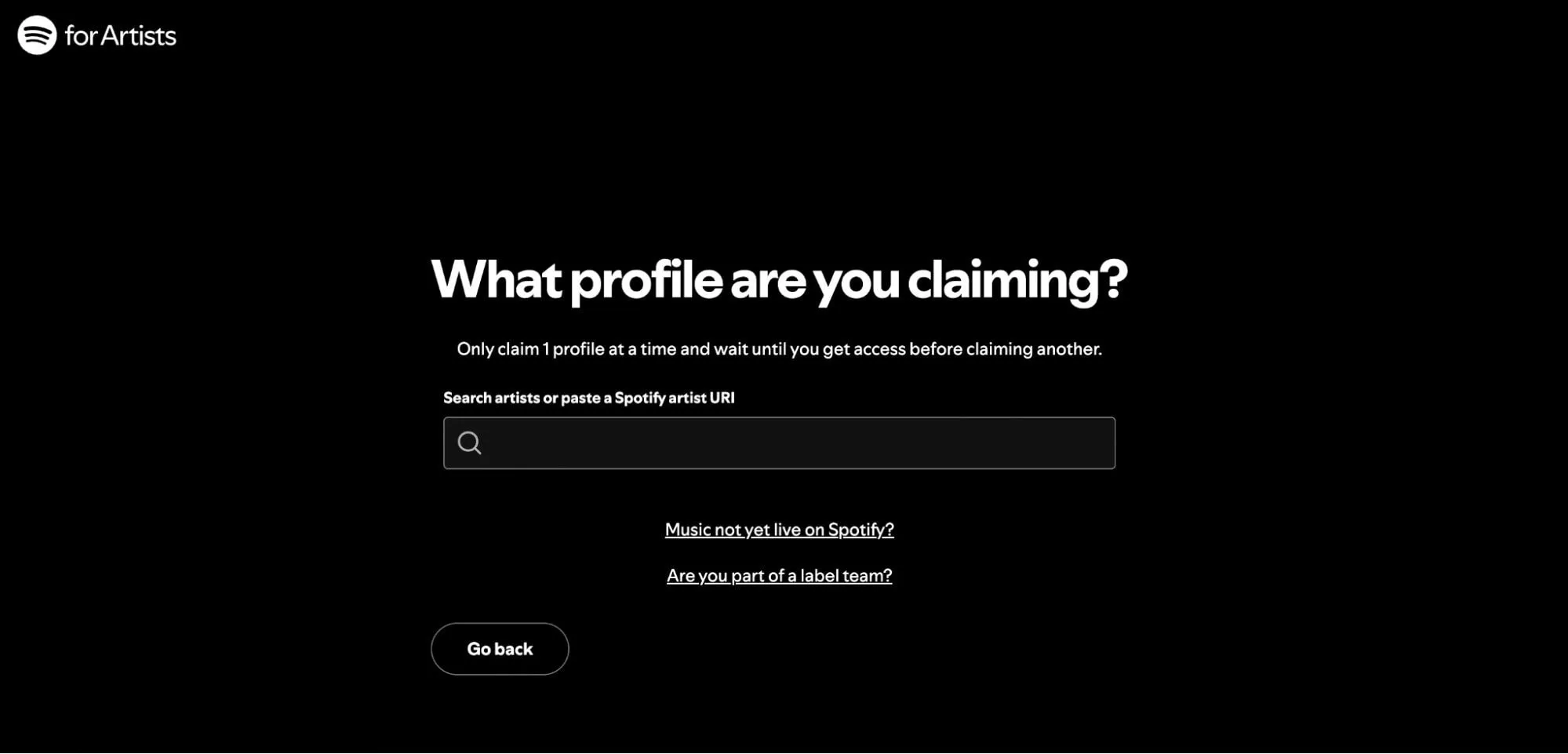
#4 - Select the right profile from the search results
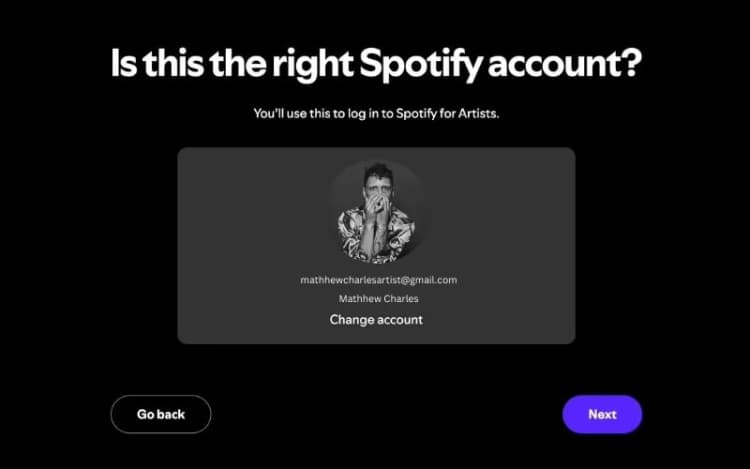
#5 - At last, add your business email and verify your profile.
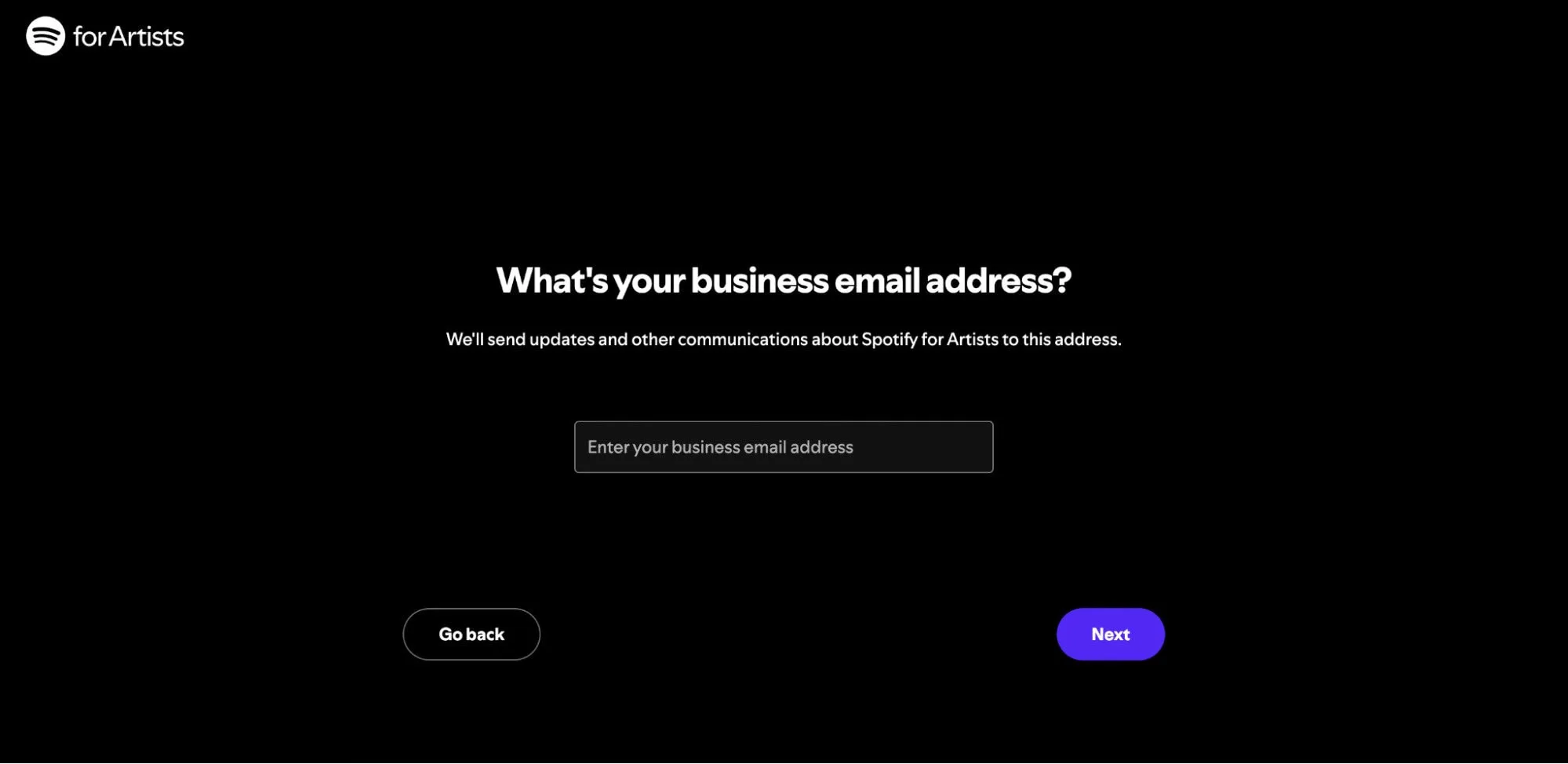
That’s it, you’ll be verified soon.
Just in case these steps seem confusing to you, here’s a 1-minute video from the official Spotify's Youtube channel that you can watch to get it done real quick: How to Get Verified on Spotify
#2 - Verification through your distributor (if applicable)
Some distributors like DistroKid and CD Baby offer direct verification services. If your distributor provides this option, you might be able to get verified without going through the Spotify for Artists signup process.
Check your distributor's dashboard for options like "Claim Spotify Profile" or "Spotify for Artists Access." These shortcuts can save you time and sometimes get you verified more quickly.
If you're using a label or larger distributor, ask your representative about their Spotify verification process. They might handle everything for you.
Here’s a tutorial from Distrokid’s official channel that can help you set up and get verified fast.
I tried to find one for CD Baby too, but it looks like there's no official tutorial that can help. So, you’re on your own with that one.
Common Problems That Might Slow Down Your Verification
Even though Spotify’s verification process is fairly straightforward, things don’t always go smoothly.
Here are the most common hiccups artists face when trying to get verified, and how to resolve them:
🚧 Problem 1: “Artist Profile Already Claimed”
You try to claim your artist page, but Spotify says it’s already claimed or part of an existing team. This can happen if:
- A label, distributor, or former manager previously claimed it
- A bandmate claimed it without letting you know
- In rare cases, an impersonator claimed it
✅ How to fix it:
- Contact Spotify for Artists support from here
- Explain the situation clearly that you’re the rightful artist (or manager) and someone else has claimed the profile
- Be prepared to provide proof (links to your official website, Instagram, etc.)
- Spotify may release the profile to you or add you as a team member
👉 Pro tip: If it’s a bandmate, manager, or label who claimed it, ask them to invite you via the Spotify for Artists dashboard under team settings because it’s the fastest route. But if they’re uncooperative or you don’t know who claimed it, go through Spotify support.
🚧 Problem 2: Your Music Is on the Wrong Artist Profile
You release music, but it ends up on someone else’s artist page. Worse, someone else’s music ends up on yours.
This happens with common stage names or metadata errors from distributors. It creates confusion when trying to claim your rightful profile.
✅ How to fix it:
- Use Spotify’s report mixed up music form
- Clearly list which songs belong to you and which don’t
- Spotify will move your releases to the correct (or a new) profile, typically within a few days.
Alternatively, contact your distributor.
Many distributors have direct communication channels with Spotify and can request the correction on your behalf.
👉 Pro tip: Once fixed, claim your corrected profile right away to avoid future confusion. Also, check if your distributor allows specifying a ‘Spotify Artist URL’ when submitting music as this can prevent future mix-ups.
🚧 Problem 3: Verification Approved, But No Blue Check
You’ve been approved and can access Spotify for Artists, but when you search for your artist page, the blue checkmark isn’t showing up.
Well in this case, you gotta understand that verification typically takes 1-7 days, but I've seen it happen in as little as 24 hours and as long as several weeks.
Here are some quick fixes that you can still opt for:
- Log out and back in: Cached data can cause delays in updating.
- Check on another device: Sometimes the badge appears on other devices before yours.
- Double-check: Are you looking at your artist profile or a personal one?
What to Do After You Get Verified?
✅ Add or update your artist bio
✅ Upload a high-quality profile photo and header image
✅ Set an Artist’s Pick (track, album, playlist, or tour date)
✅ Connect your social media and website links
✅ Submit unreleased music to editorial playlists
✅ Send your music to community Spotify playlists
✅ Check your listener and streaming analytics
✅ Add merch and tour dates
✅ Invite team members (manager, bandmates, etc.) to your profile
Now before you leave, you should know:
What Does Verified Artist Mean on Spotify?
I’m sure you’re now equipped with all the info you need to turn that tick as blue as sky.
Just remember that getting verified on Spotify isn't the same as going blue on X, Instagram, or TikTok.
Because when it comes to Spotify, you just need all the prerequisites and a claim on Spotify for Artists. Once you have that, you'll get that blue tick and you're good to go.
That's what a verified artist means on Spotify.
So, make sure you don’t pay anyone to get verified.
Even if things go south, Spotify is there to serve you every step of the way.

SoundCampaign 創業者兼CEO
ナダブです。今のこの会社を作る前は音楽を作っていて、マーケティングへの関心はそこから生まれました。一番好きなのはアナリティクスの部分、つまりストリームがどこから来て、何が動いて、何が動かなかったのかを見ることです。 SoundCampaignを設立したのは、アーティストに本当の意味での露出を届けるためです。想定していたよりはるかに多くの時間と労力がかかり、それは今もあまり変わっていません。
音楽をプロモーションする
実在するプレイリスト掲載、TikTok動画、Meta広告

100,000以上のアーティスト・レーベルに信頼されています
ボットは一切なし。
あなたの音楽を届ける準備はできましたか?
SoundCampaignを使って、実在するプレイリストやクリエイター、ファンにリーチしている何千人ものインディーアーティストに加わりましょう。すべての段階で正直なフィードバックが届きます。
- ボットは一切なし
- アーティスト保護プログラムキュレーターやクリエイターがあなたの楽曲をレビューしなかった場合、その分のクレジットを返還します。あなたの予算は常に保護されています。
- ロイヤリティは100%あなたのもの私たちはレーベルではなく、プロモーションサービスです。あなたの再生数やロイヤリティから手数料を差し引くことはありません。