음악 프로모션
How to Promote Music on YouTube in 2026 (12 Practical Tips)

Azfar
업데이트됨 · 14분 읽기
Learn how to promote music on YouTube in 2026 with proven strategies: SEO optimization, viral video tactics, YouTube ads, and algorithm hacks that actually work.


On this page
- #1 - Optimize Your YouTube Channel for Music Promotion
- #2 - Create the Right Video Types to Promote Your Music
- #3 - Use Cover Songs to Promote Your Music on YouTube
- #4 - Master YouTube SEO to Get Your Music Discovered
- #5 - Optimize Every Video for YouTube Music Discovery
- #6 - Use YouTube Premieres and Community Tab to Promote Your Music
- #7 - Stay Ahead with New YouTube Features for Musicians
- #8 - Run YouTube Ads to Promote Your Music (Step-by-Step)
- #9 - Connect YouTube with TikTok and Spotify for Cross-Platform Promotion.
- #11 - Track Your YouTube Music Promotion with Analytics
- #12 - Use Algorithm Tactics to Promote Your Music on YouTube
- Common Mistakes That Artists Must Avoid on YouTube
- Conclusion
YouTube now reaches approximately 2.5 billion people every month, making it the single most powerful platform for music discovery and promotion. If you're an independent artist trying to promote your music on YouTube, you're in the right place.
Whether you're starting from zero or trying to break through, every strategy here is built to help you promote music on YouTube
By the end, you'll have an independent music promotion plan that's more advanced than 90% of musicians out there.
#1 - Optimize Your YouTube Channel for Music Promotion
Before you promote a single video, your channel needs to look like it belongs to a real artist. This is the foundation of YouTube music promotion. So, don’t skip it.
Handle & Naming
Consistent naming makes it easier to search, tag, and remember across platforms. Claim a short, readable @handle that matches your other socials (e.g., @MiaLarkMusic).
Profile Image & Channel Art
Your visuals set the tone before anyone hears a note. They don't need to explain your entire story. They should create a vibe that makes people want to explore more.
- Profile Image: Use an 800×800 px square headshot or logo. Keep it clean, well-lit, and consistent across platforms.
- Channel Art (Banner): This is your billboard. In one glance it should hint at your sound or energy.
For instance, here are two great examples from two of my favourite artists.
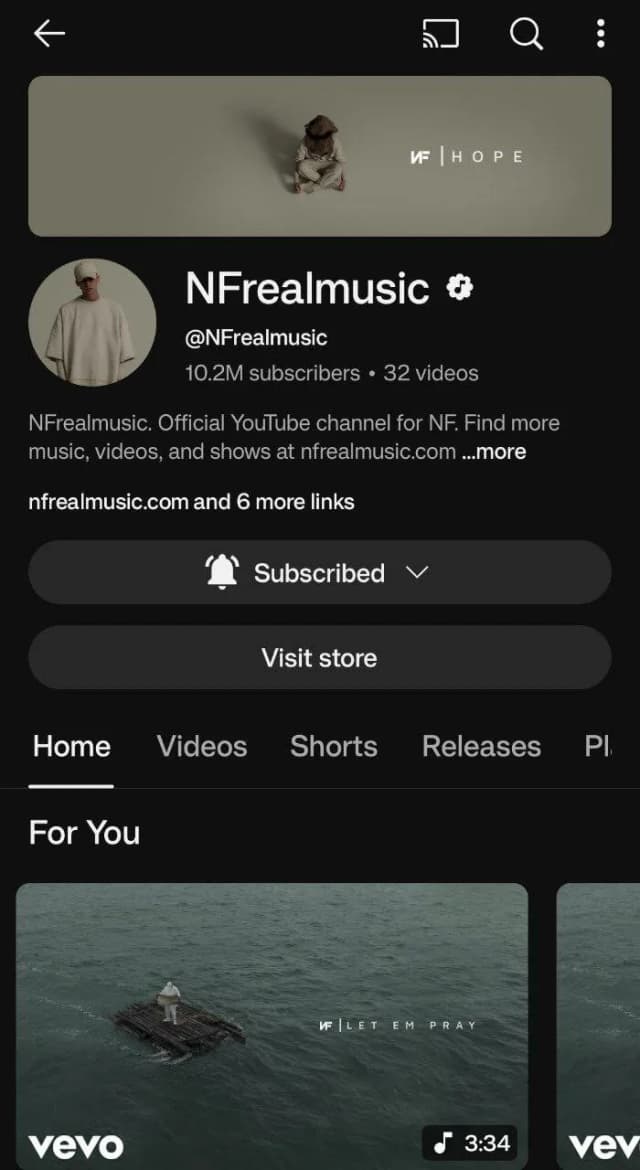
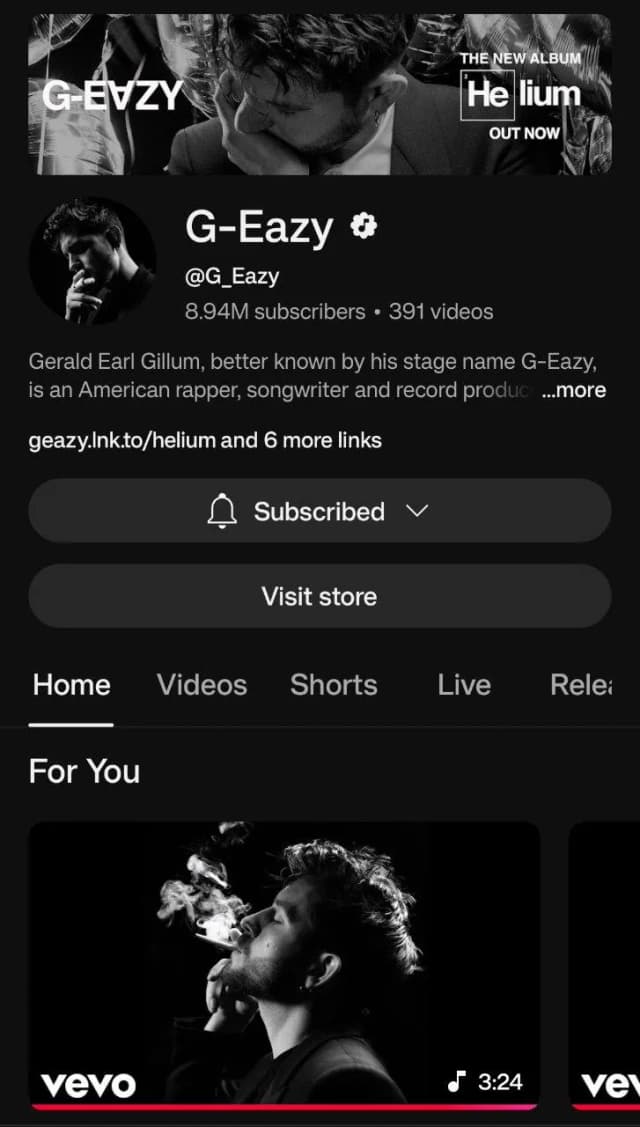
NF and G-Eazy, they both nail the vibe instantly. Within 3-4 seconds, you can tell what they're up to.
SEO-Optimized Channel Description & Links
Keep it simple, professional, and link-driven. Think G-Eazy's channel: a one-liner intro, a quick plug for the latest release, and clear links to where fans can listen, follow, and subscribe.
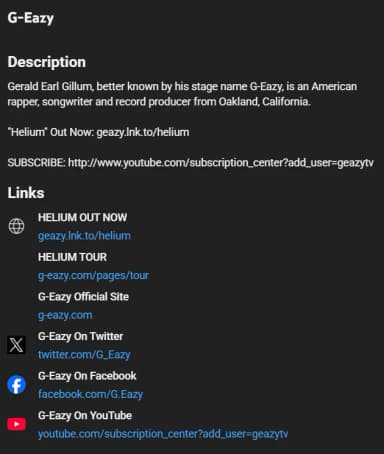
It works because it’s clear for fans, highlights the latest updates, and is built to grow listeners long term.
Here’s a template that you can use for yourself:
[Your Name] is an independent [genre] artist from [city]. New single “[Song Title]” out now ➜ [link]
Subscribe: ➜ YouTube: [YouTube subscribe link]
Stream everywhere: ➜ Spotify: [link] ➜ Apple Music: [link] ➜ TikTok: [link]
Follow: ➜ Instagram: [link or @handle] ➜ Twitter: [link or @handle]
That’s it, there’s no fluff in here. Just what you make, what’s new, and where to go next.
Channel Keywords for YouTube Music Discoverability
Add a mix of keyword phrases to improve your discoverability on YouTube. The key is balance. Don't just add random tags or stuff keywords. Instead, include a mix of 4 categories:
- Broad Keywords: Tell YouTube the general category you're in. For instance: music, music videos, live music, singer-songwriter, cover songs.
- Genre Keywords: Attract fans of your specific sound. Such as: indie pop, R&B music, hip hop covers, acoustic guitar, lo-fi beats.
- Branded Keywords: Make sure people can find you by name. Like: G-Eazy, NF Real Music, @NFRealMusic.
- Primary Keyword Phrases: Target the exact searches your audience uses. For example: Hip hop, Gangsta Music, UK Drill, UK Gangsta Music.
The genre you're in might be different. But yeah, this pretty much gives the algorithm the gist of it. Let me show you how you can add these keywords:
#1 - Go to YouTube Settings
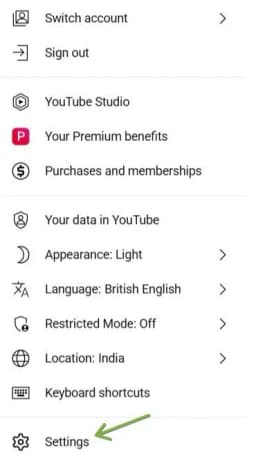
#2 - Click on "Channel status and features."
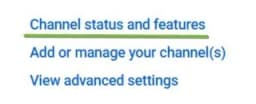
#3 - In the channel section, you'll have the basic info and keywords.
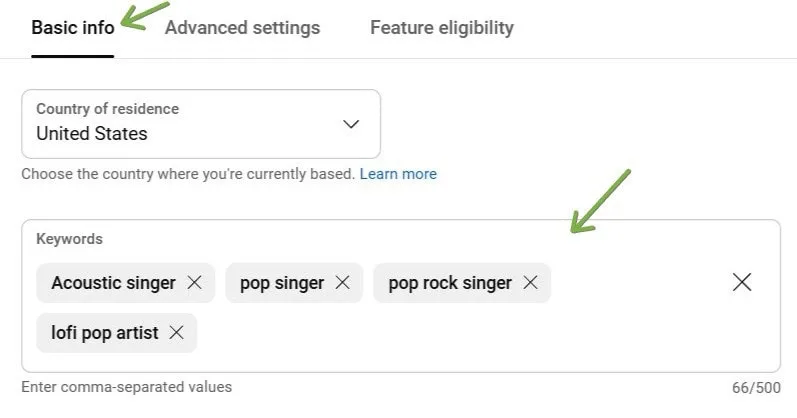
#4 - Hit “Save”
Note: This can only be done on your laptop. Don’t waste time trying it on your phone. I’ve tried it.
Create a Channel Layout That Promotes Your Music
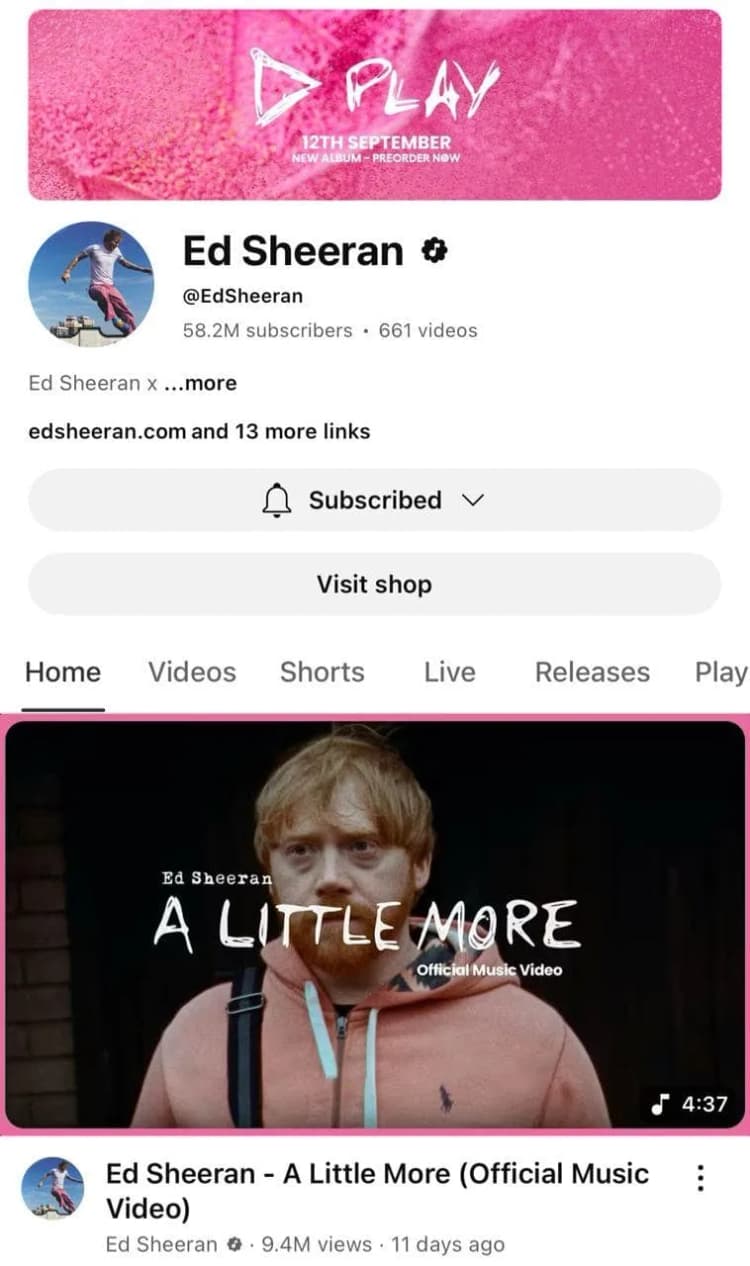
A cool storefront converts curious visitors into subscribers and fans. To be that cool, add a Channel Trailer or your latest music video in the feature. Look at Ed Sheeran's channel here. He got that 'a little more' in the feature. Looks good, right?
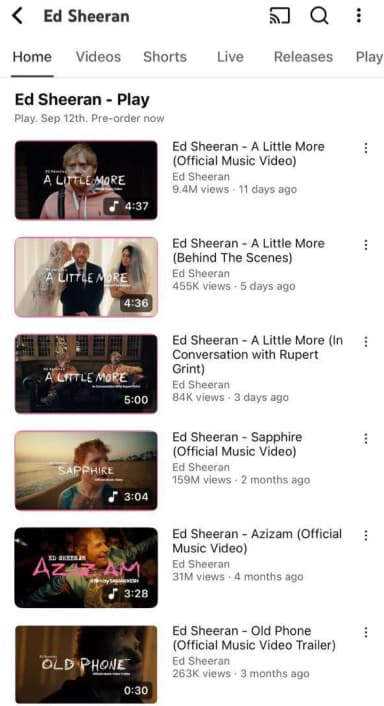
In fact, he featured a lot of songs at the 'home' section of his YouTube channel.
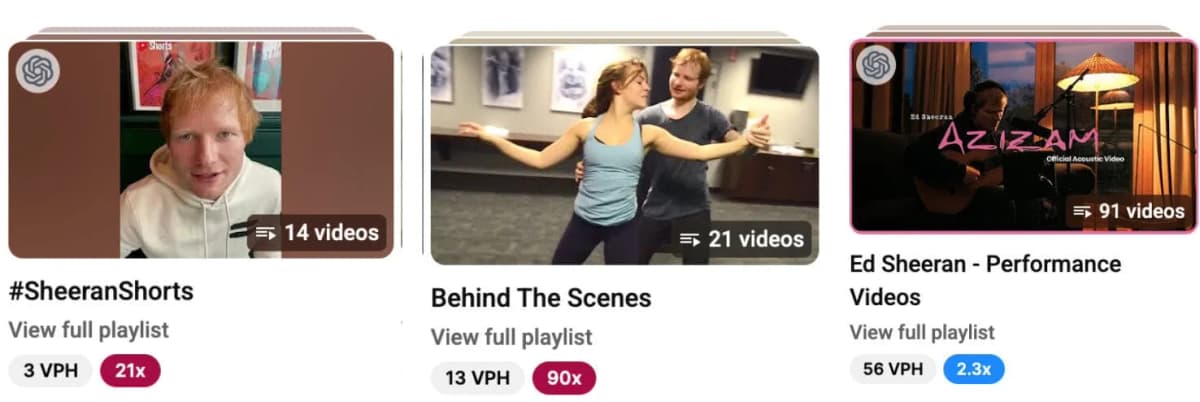
That's not it. The way he added those playlists should be quite some inspiration for most artists.
Upload Defaults
Pre-fill descriptions with streaming links, socials, credits, and a subscribe CTA. Save common tags you'll reuse. Doing this saves time, keeping every upload consistent and SEO-ready.
Thumbnails & A/B Tests
Your music will not get heard if people skip past your thumbnail. Treat it like the cover art for your video.
- Use close-up performance shots or expressive faces
- Less text or no text
- Keep colors high contrast so the image pops
- Stick to a consistent style so fans recognize your uploads
The goal is simple: make it obvious your video is music, make it look worth clicking, then double down on what works.
Billie Eilish's most popular songs could be a great inspiration for you. Her team really knows how to make these thumbnails.

I could say the same about Post Malone.

#2 - Create the Right Video Types to Promote Your Music
You don't need luck to go viral on YouTube, you need a system.
Not all videos are created equal. Some formats naturally pull in more views, shares, and new fans than others.
These are the five video types that consistently drive music discovery on YouTube.
Live Performance Videos
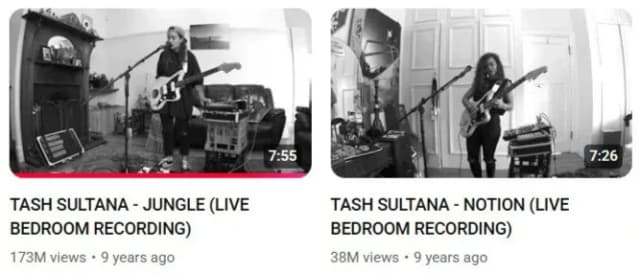
Stripped-down, raw performances are some of the most shareable content on YouTube. They capture emotion and authenticity in a way that polished music videos can't.
An artist playing a single mic setup in their bedroom can rack up millions of views simply because the delivery feels real.
This reminds me of Tash Sultana. A rockstar who rocked in her bedroom and put those live recordings online. Numbers don't lie:
Lyric Videos
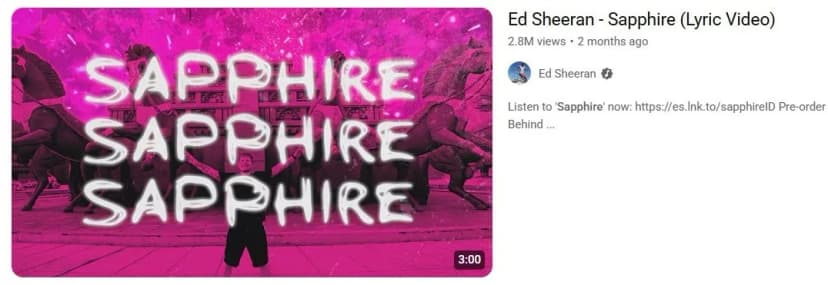
It might not seem glamorous but is incredibly powerful for YouTube search. When fans type "[song name] lyrics" into YouTube, these videos appear first, giving you organic traffic long after release day.
A standout example: Ed Sheeran's "Sapphire" lyric video racked up over 2.8M views.
Music Collaborations
Partnering with another creator allows you to tap into their audience while giving your fans something fresh. Even a simple talk about 'how you ended up collaborating with someone famous' can get you views.
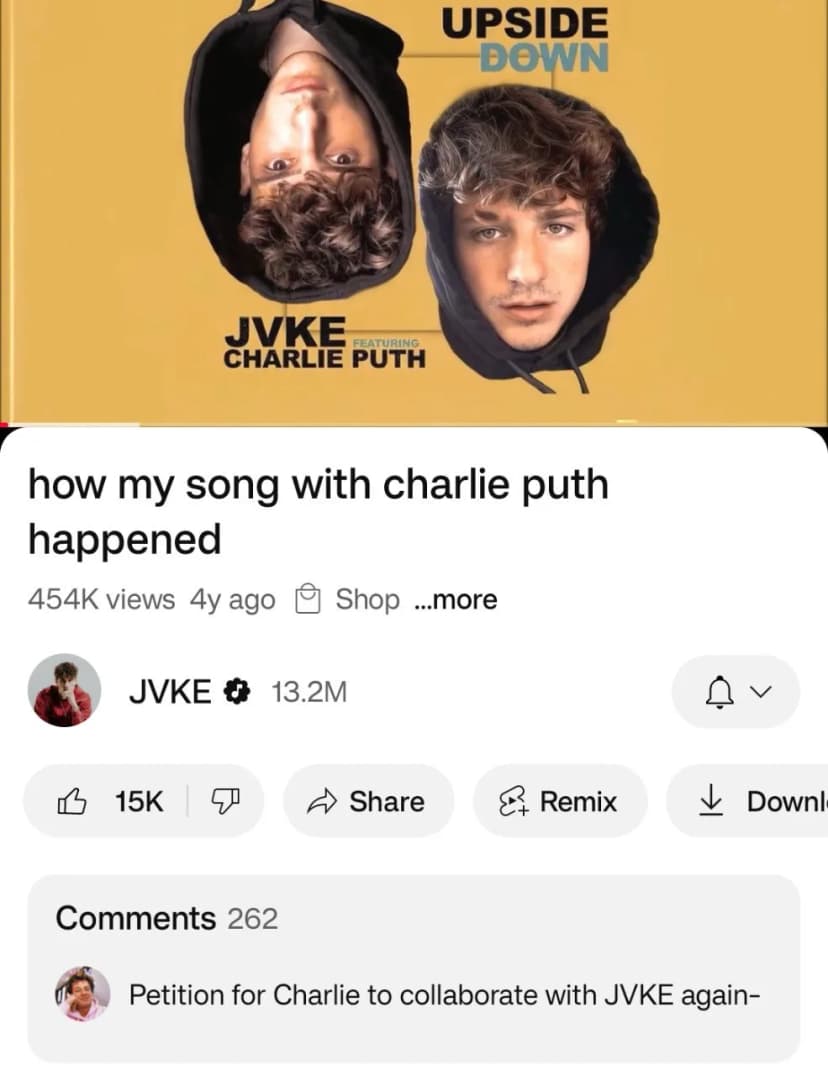
Even a ‘simple split’ collaboration can go beyond 10M+ views.
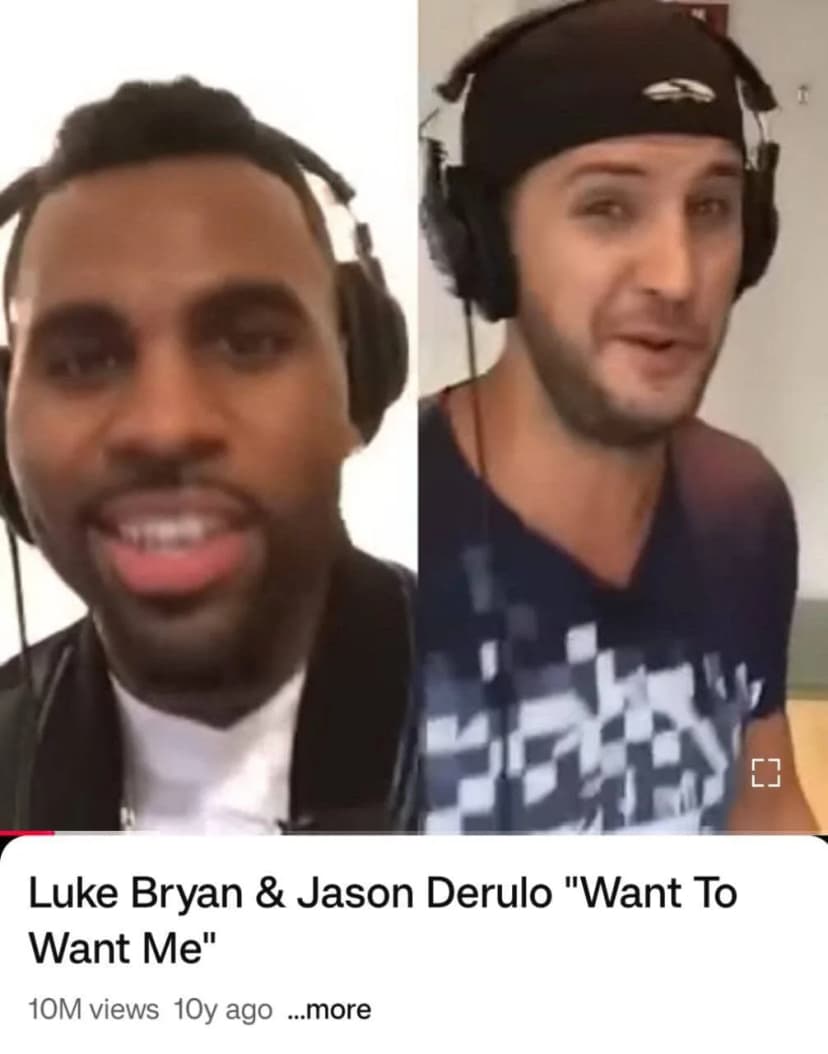
But yeah, it really depends on who you collaborate with. You can't do it with someone who doesn't have hype.
Behind-The-Scenes Content
Fans want more than polished music, they want access. Clips of studio sessions, tour prep, or even bloopers create hype.
Billie Eilish posts viral BTS content a lot.
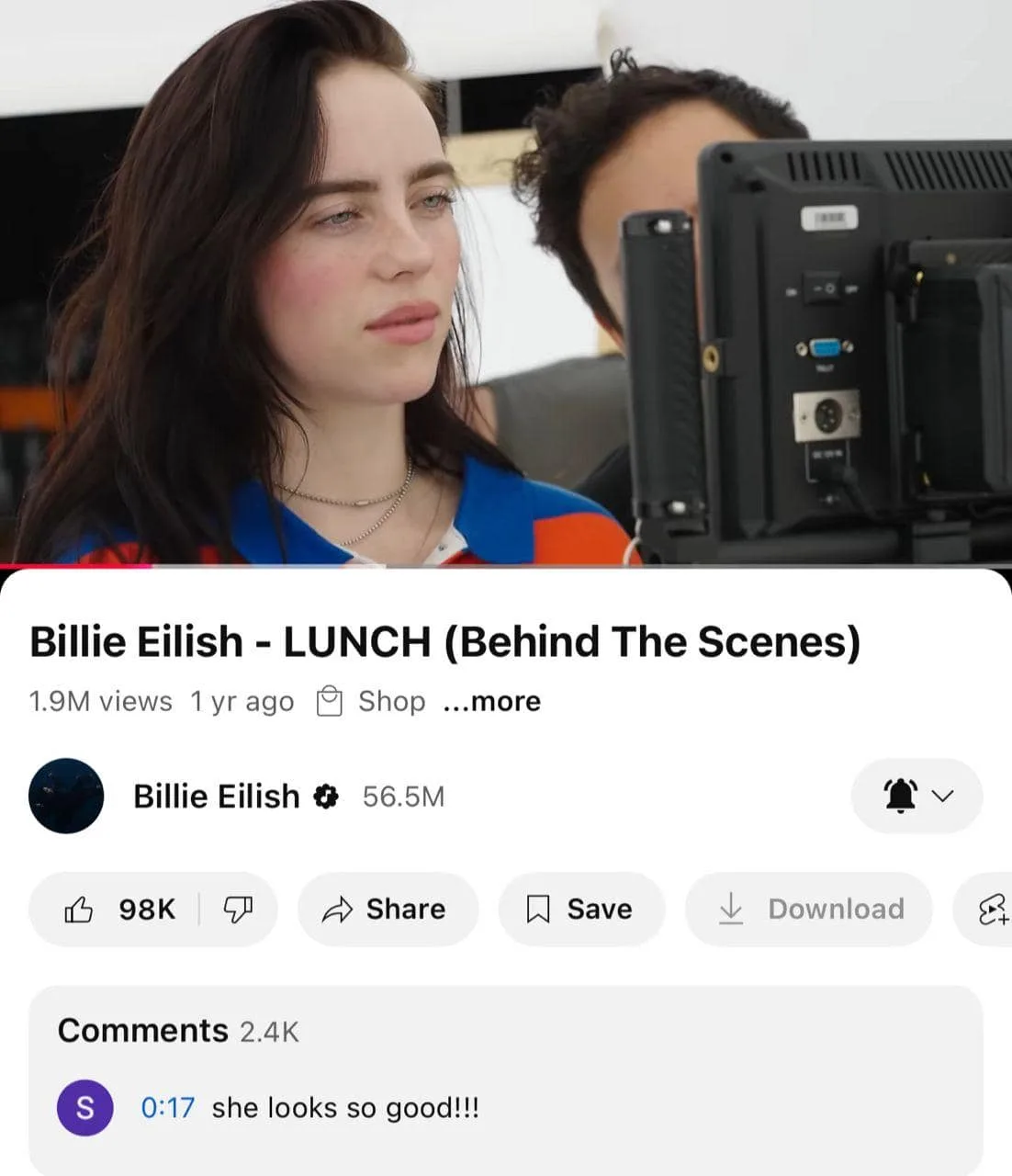
See how good it did? 1.9 million views!
Story-Based Music Videos
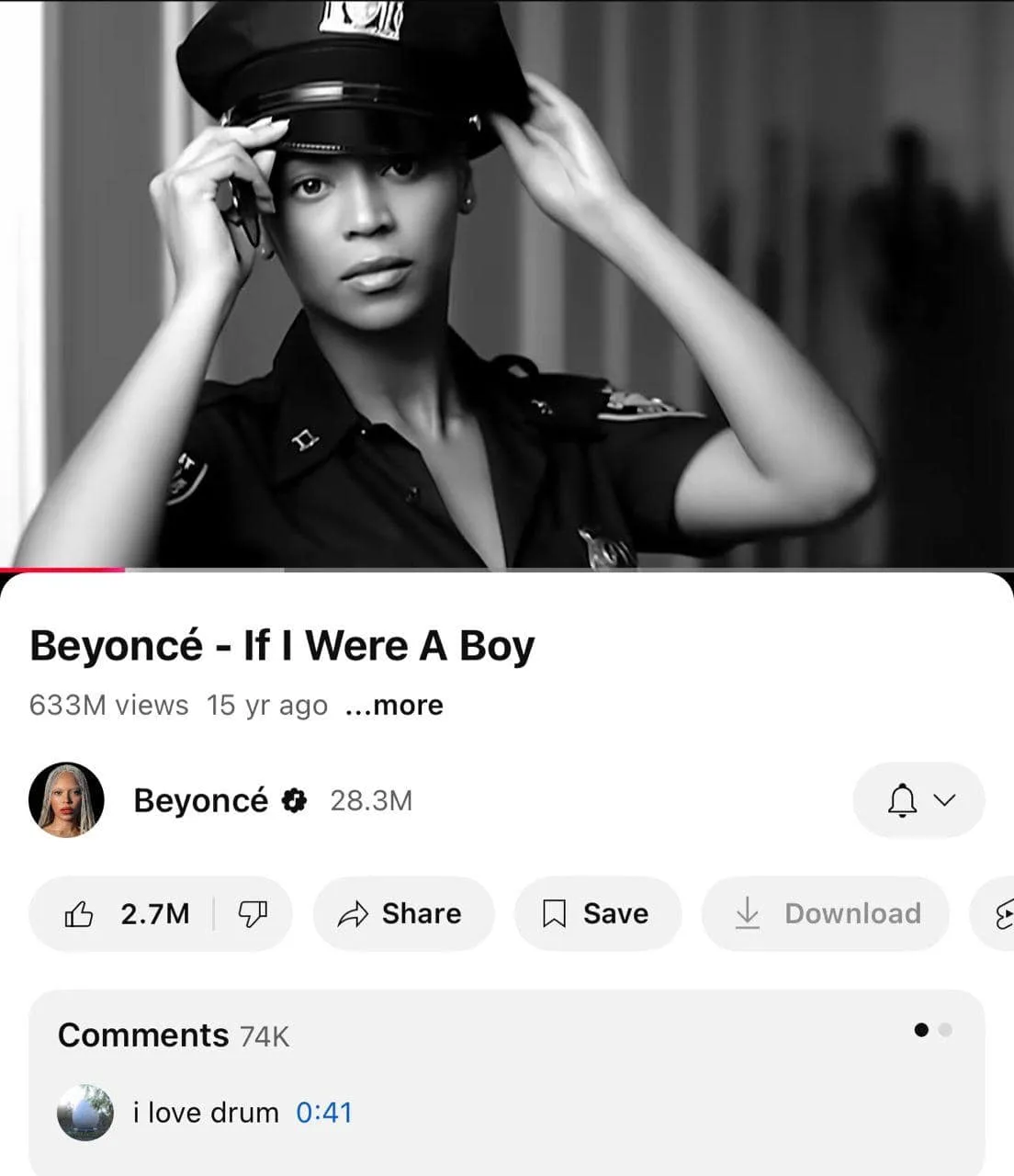
When a track is paired with a strong storyline, it becomes shareable beyond fans of the genre. Humans share stories, not just songs. A great example is Beyoncé's "If I Were a Boy."
Production Tips for Any Budget
The beauty of YouTube is that you don't need a massive budget.
A live performance can be shot on an iPhone with a ring light, a lyric video can be created in Canva, and BTS footage can come straight from your tour vlog camera.
The rule is simple: prioritize clarity, emotion, and authenticity over gear.
Viral Boost Tactics
- The Hook: The first 3 seconds are critical. Open with a striking image or a line that demands attention.
- YouTube Shorts: Think of Shorts as your rocket fuel. Quick snippets can rack up millions of impressions.
- Hijack Trending Audio: Overlay your performance with a sound that's already viral, and the algorithm pushes your clip to the same wave of traffic.
Done right, this system becomes a funnel. Shorts spark discovery, long-form deepens connection, and calls-to-action convert viewers into subscribers.
#3 - Use Cover Songs to Promote Your Music on YouTube
Cover songs are a proven way to leverage YouTube's algorithm. Instead of starting from zero, you tap into search demand for songs people already look for.
To stay safe, secure a license through DistroKid, Harry Fox Agency, or Loudr. Without one, you risk takedowns or lost monetization.
Pick songs that are trending, not just your favorites. Use YouTube Trends, Chartmetric, or TikTok Viral 50 to spot rising tracks.
For SEO, use titles like "[Song Name] Cover – [Your Name]" and add the song and artist name in your description and tags.
#4 - Master YouTube SEO to Get Your Music Discovered
In general, artists are not that technical. All they know is how to make awesome music videos and releases. That's the extent of knowledge most artists have.
Once you master YouTube SEO, that's where you can outcompete a lot of competition when promoting your music on YouTube.
This can get you started:
Keyword Research for Musicians
SEO always begins with keyword research. The most powerful are long-tail keywords - specific searches like "best acoustic cover songs for weddings" or "lofi hip hop mix."
Let me show you how using vidIQ:
- Log into vidIQ (free version works)
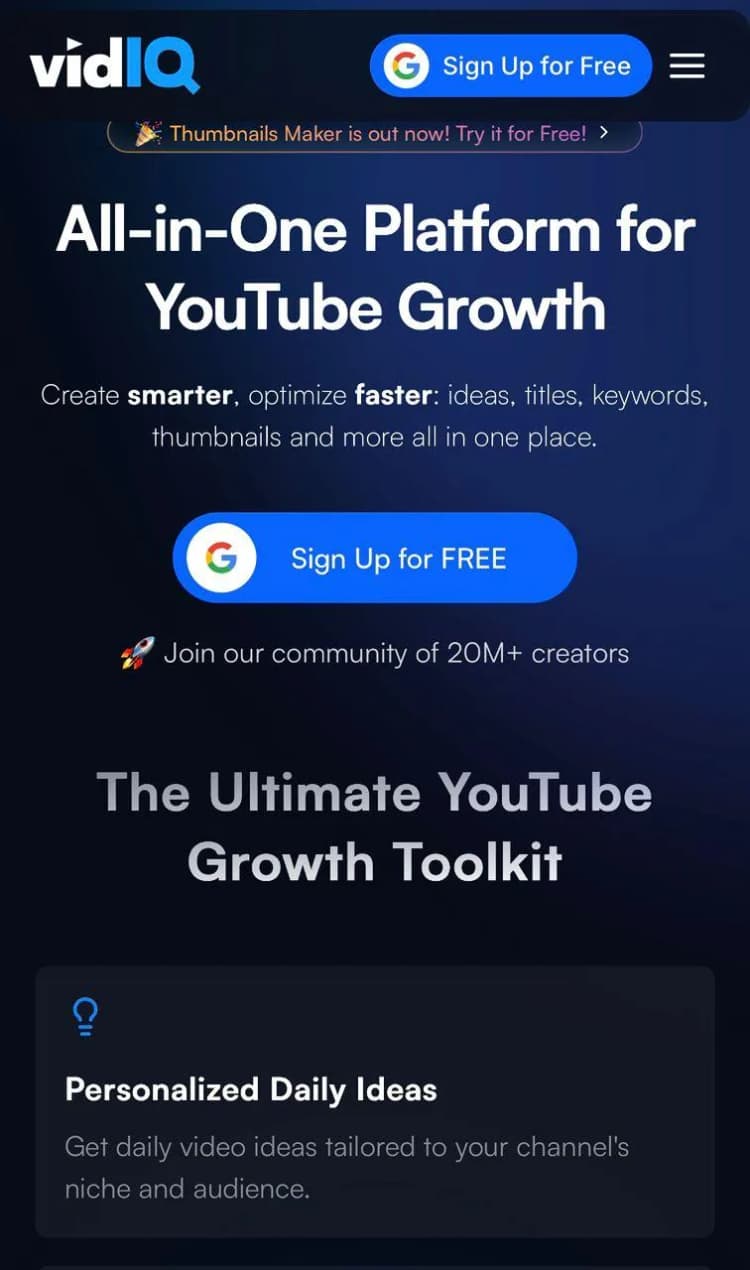
Step 2: Click on “Discover” and find “keywords”
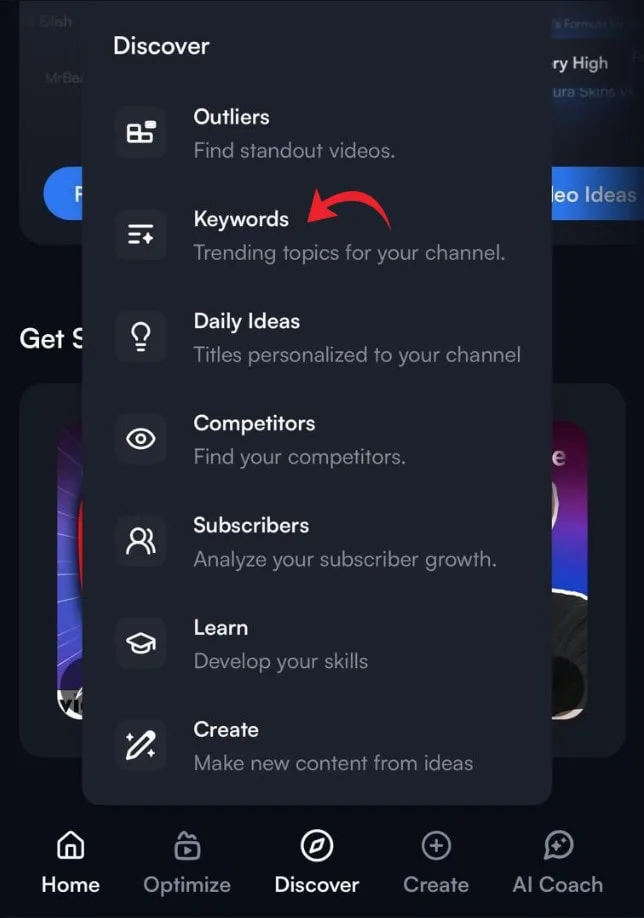
Step 3: Check "Top Keyword Opportunities" or phrases the algorithm thinks you can rank for
Step 4: Click a keyword to explore. Example: "Indie Artist"’
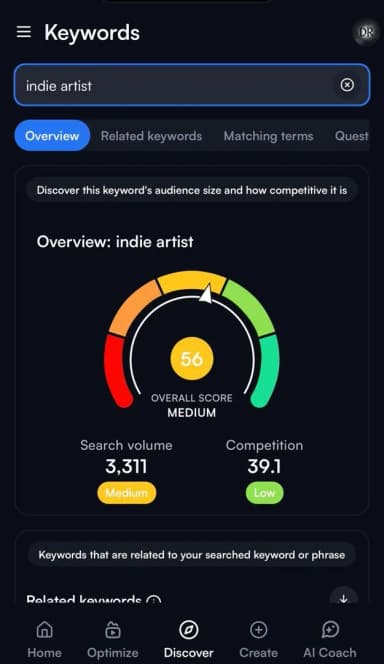
Step 5: Focus on mid-range keywords that are medium/low competition with decent volume
Step 6: Check Related Keywords & Questions
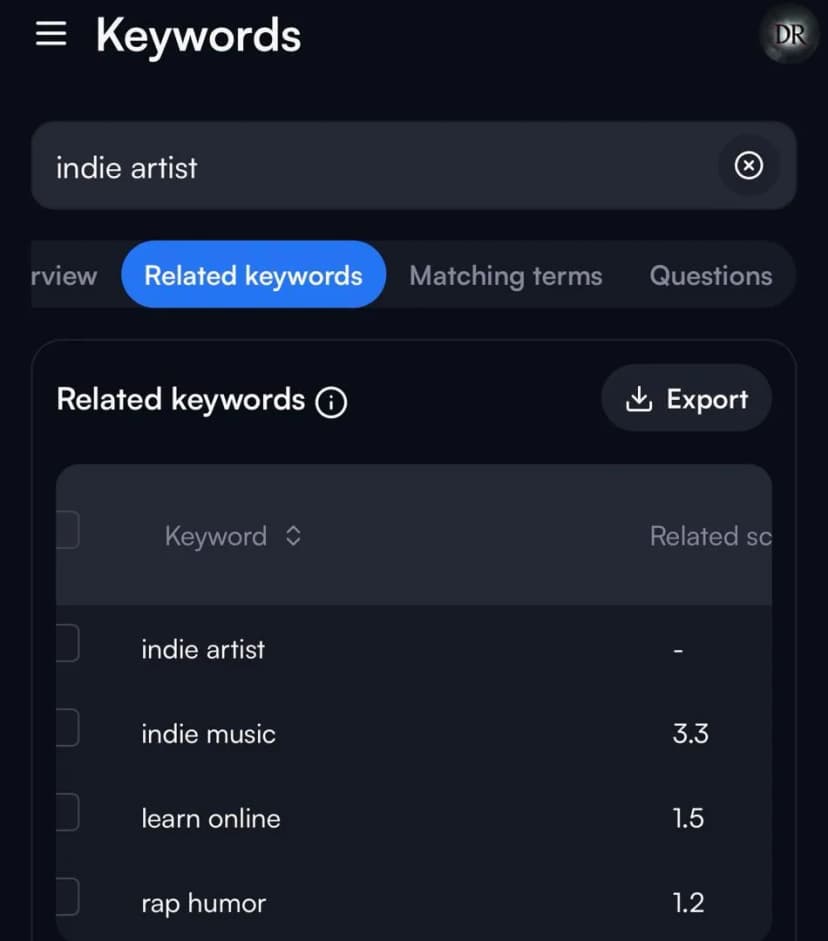
Step 7: Sort by competition: Green = easy, Red = competitive
Step 8: Try seed keywords like "lofi tracks" as vidIQ expands them into long-tail
Step 9: Save good keywords in Notepad/Docs and build music around them
#5 - Optimize Every Video for YouTube Music Discovery
Great songs might flop if the title, description, tags, and thumbnail don't signal to YouTube what the video is about.
Title Formulas That Rank and Get Clicks
- #1 Artist – Song Title (Official Music Video)
- #2 Artist – Song Title (Acoustic Session)
- #3 Artist – Song Title (Live at [Venue/City])
- #4 Artist – Song Title (Visualizer)
- #5 Artist – Song Title (Behind the Scenes)
- #6 Artist – Song Title (Lyric Video)
- #7 Artist – Song Title (Studio Version)
- #8 Artist – Song Title | Exclusive Interview
- #9 Artist – Song Title (Cover of [Original Artist])
- #10 The Making of [Song Title]
Descriptions That Feed the Algorithm
Descriptions do two jobs: convince the viewer to watch and feed the algorithm. A simple framework: intro with keywords, streaming link, credits, socials, and lyrics.
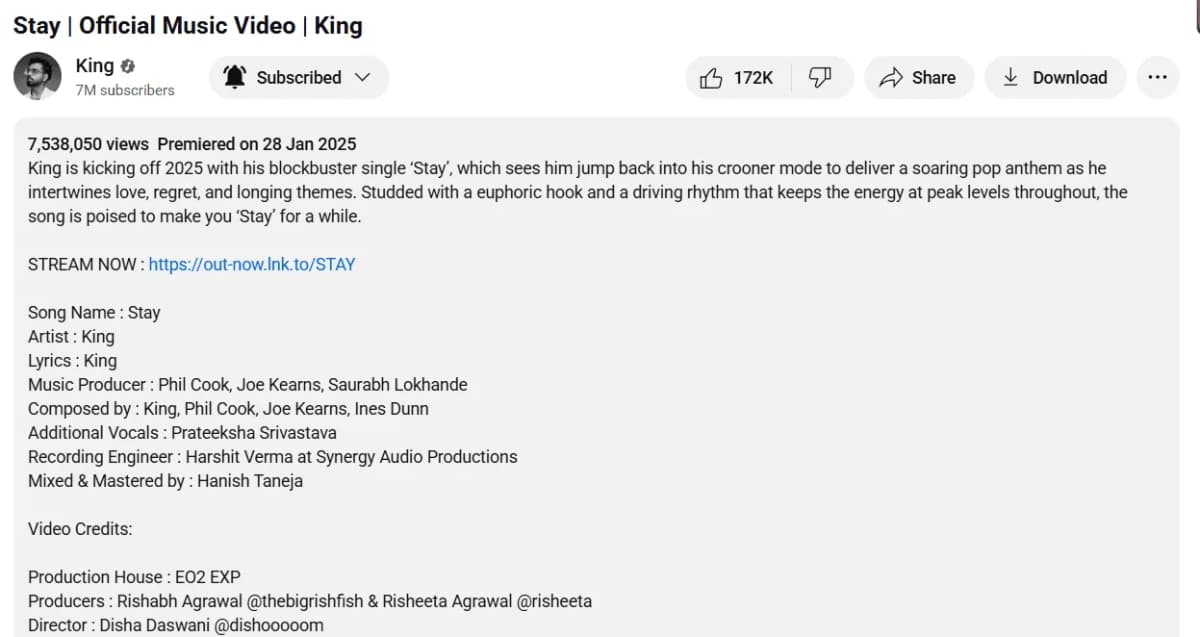
King's "Stay" is a great example of a well-optimized YouTube music description.
Tags for YouTube Music Videos
Tags still help YouTube categorize your video. Structure them like a funnel:
- Broad: music video, new music, live music
- Genre: indie pop, lofi hip hop, acoustic cover
- Song specific: [Song Title], [Artist Name Song Title]
- Trend specific: summer playlist, TikTok viral song cover
Thumbnail A/B Testing
If titles get you found, thumbnails get you clicked. Test two versions changing only one element:
Version A: full body shot → Version B: close-up face shot
Version A: bright background → Version B: darker moody tone
#6 - Use YouTube Premieres and Community Tab to Promote Your Music
A Premiere is basically a scheduled video launch that plays like a live event, complete with a live chat. Instead of quietly dropping your new music video, you build anticipation, gather your community in one place, and turn your release into an experience.
Pre-Premiere Campaign Checklist
- Announce the Premiere date across socials with a teaser
- Post a countdown in your YouTube Community Tab
- Email your list with the Premiere link
- Encourage fans to click "Notify Me"
- Schedule reminder posts 24h and 1h before launch
- Prepare pinned live chat comments
- Line up mods to keep chat active
When the Premiere goes live, the chat is your stage. Pin a comment with your merch link. Ask fans where they're tuning in from. React with them. It's not just a video anymore, it's an experience.
Premiere vs Standard Upload
|
Feature |
YouTube Premiere |
Standard Upload |
|---|---|---|
|
Audience Hype |
Countdown + notifications |
Instant publish, no lead-up |
|
Engagement |
Live chat, pinned comments, real-time |
Comment section only |
|
Promo Window |
Promotes before release |
Only after upload |
|
Algorithm Boost |
More early signals = stronger push |
Depends on organic traction |
|
Best Use Case |
Music video drops, major singles |
Regular uploads, vlogs |
YouTube Community Tab for Music Promotion
Think of it as your artist's social feed inside YouTube. Posts show up directly in subscribers' feeds and sometimes even non-subscribers.
This is what you can post in the community tab as an artist.
- Poll: "Which track should I drop next?"
- Behind-the-scenes studio pic
- 15-second rehearsal clip
- Shoutout to a fan comment
- "Guess the song" blurred snippet
- Countdown post to your Premiere
- A lyrical teaser (just one line)
- Quick tutorial tip (guitar riff)
- Throwback photo of first gig
- Challenge: "Dance to my track"
Linking tip: 1 video link for every 3-4 non-linked posts. Instead of "Watch my new video," try "This line almost didn't make it into the track. Hear it at 1:23 🎥 [link]."
#7 - Stay Ahead with New YouTube Features for Musicians
- AI-Generated Thumbnails: YouTube now offers auto-created thumbnail options. Test them against your custom designs to find what performs.
- Interactive Video Features: Adding quizzes or polls inside videos keeps fans engaged and signals the algorithm that your content is sticky.
- Shorts Integration: The platform is connecting Shorts with long-form content more deeply. Artists who test these early get rewarded before everyone else catches up.
#8 - Run YouTube Ads to Promote Your Music (Step-by-Step)
Paid promotion can put your music in front of the exact listeners who are most likely to become fans.
Types of YouTube Ads for Musicians
- Skippable In-Stream Ads: Before/during/after videos, skippable after 5s. Best for awareness.
- Non-Skippable Ads: Up to 15 seconds. Use sparingly for key releases.
- Discovery Ads: In search results and related sections. Great for genre targeting.
- Bumper Ads: 6-second, non-skippable. Punchy announcements for a new single.
Starter Budget: $5/Day
Indie artists don't need huge budgets. Run campaigns for a week, evaluate results, then scale if engagement looks promising.
Step-by-Step Campaign Setup
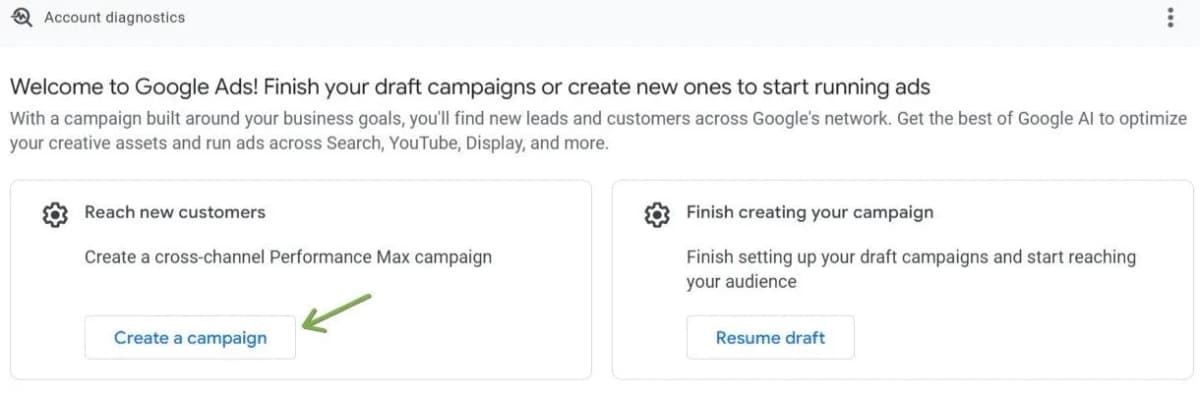
#1 - Google "YouTube Ads" and create a Google Ads account.
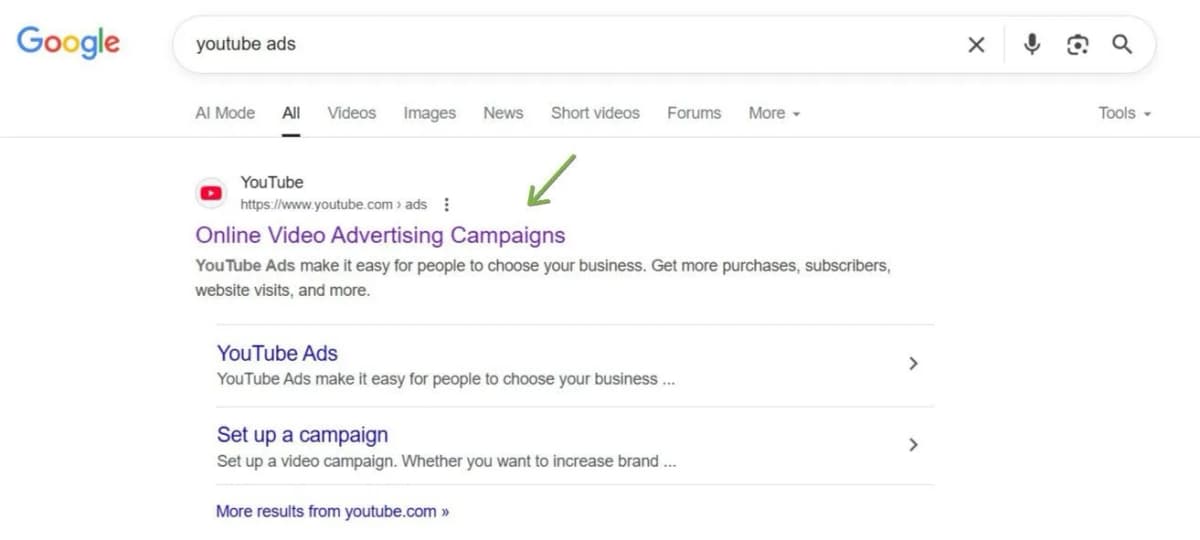
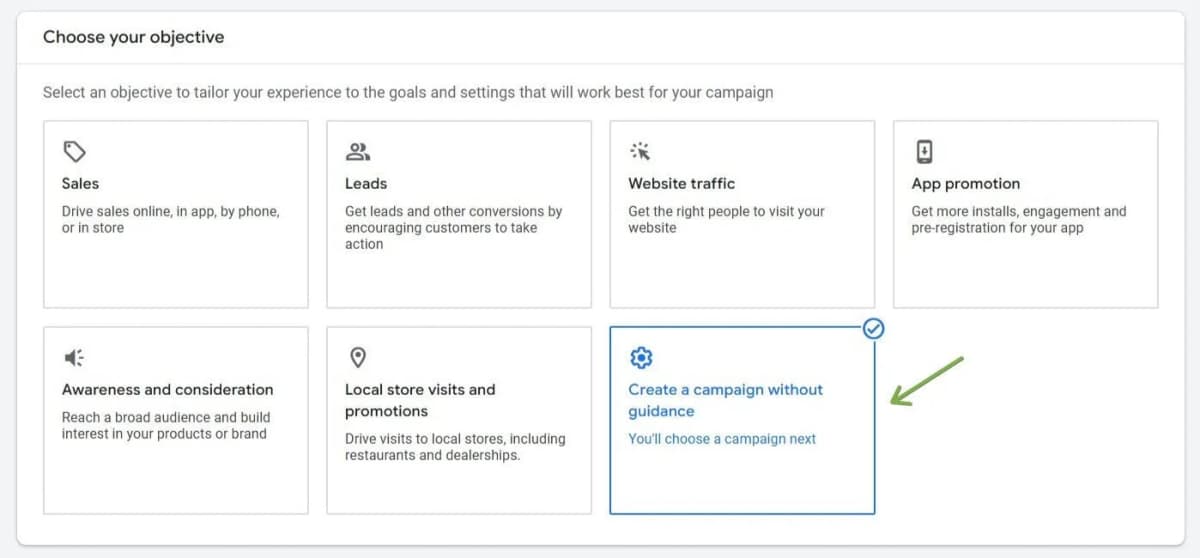
#2 - Click "Create a Campaign" → Choose "without goals guidance."
#3 -Select Video Campaign → Custom Video Campaign → Video Views
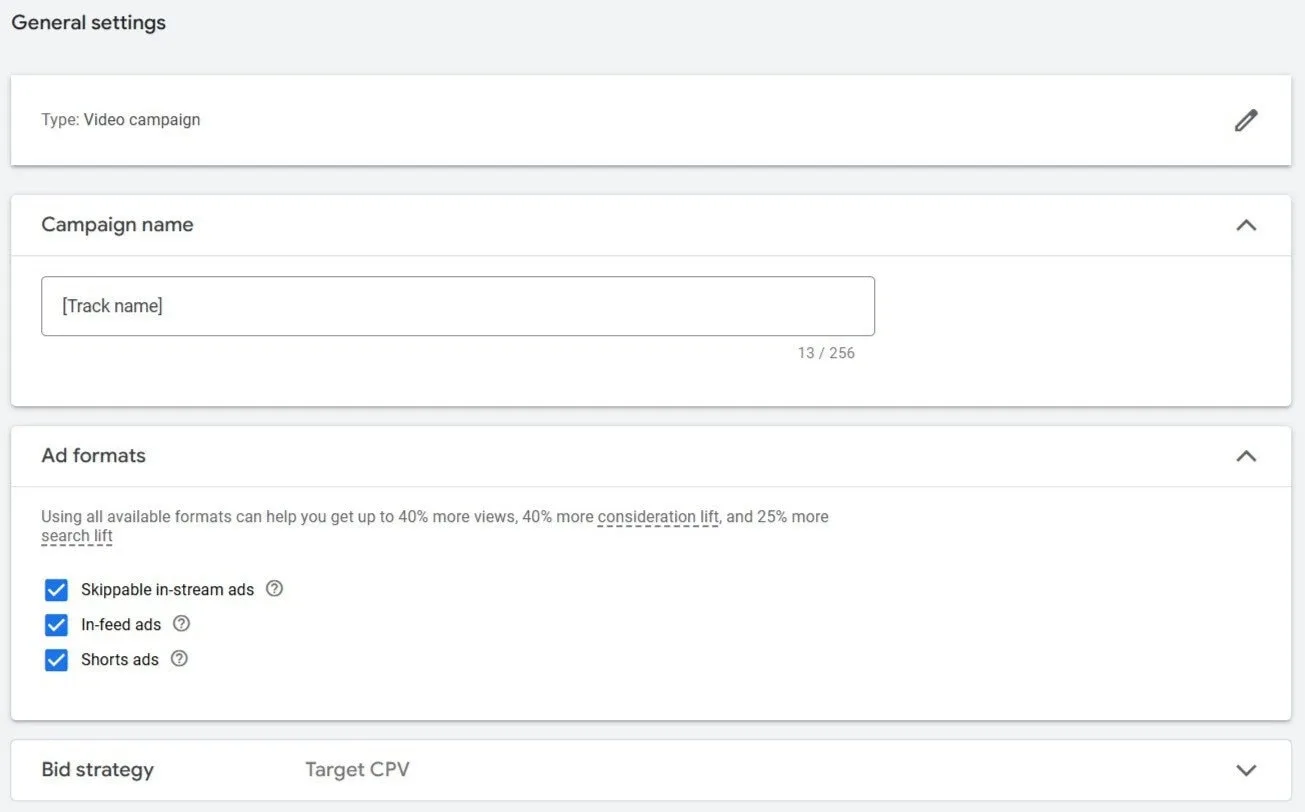
#4 - Set campaign name, CPV or CPM bidding strategy.
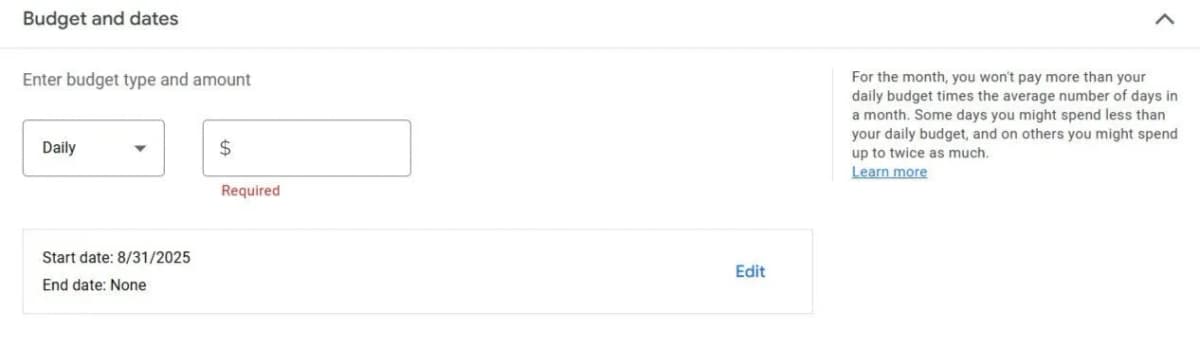
#5 - Set daily budget ($5–$20/day) and choose locations.
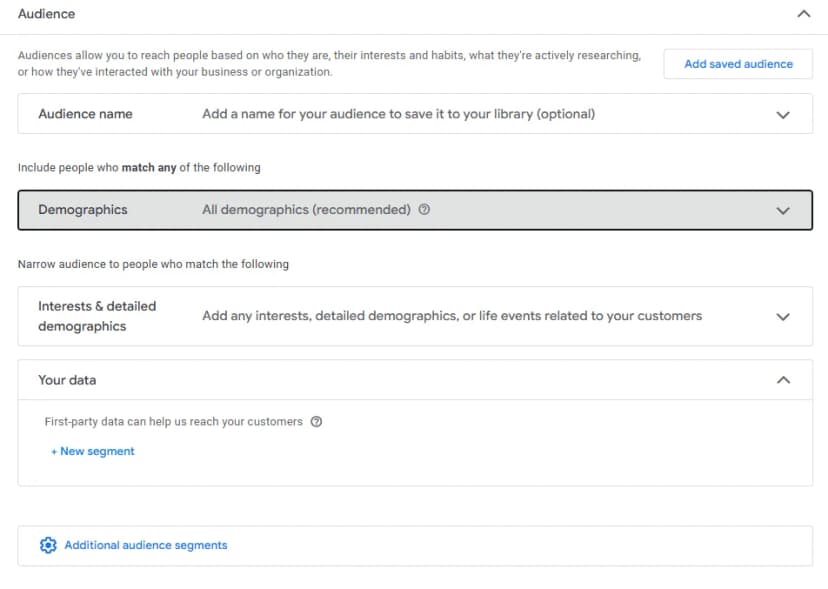
#6 - Define audience targeting: demographics, interests, keywords.
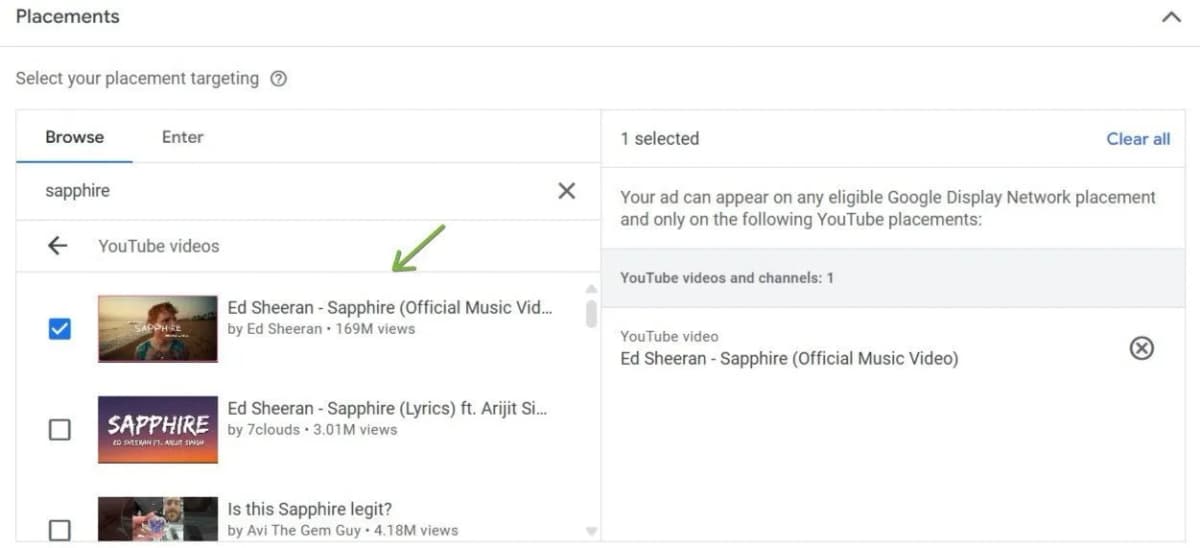
#7 - Use Placements and pick competitor artist videos to show your ad on.
#8 - Upload your video, set your bid, review and launch!
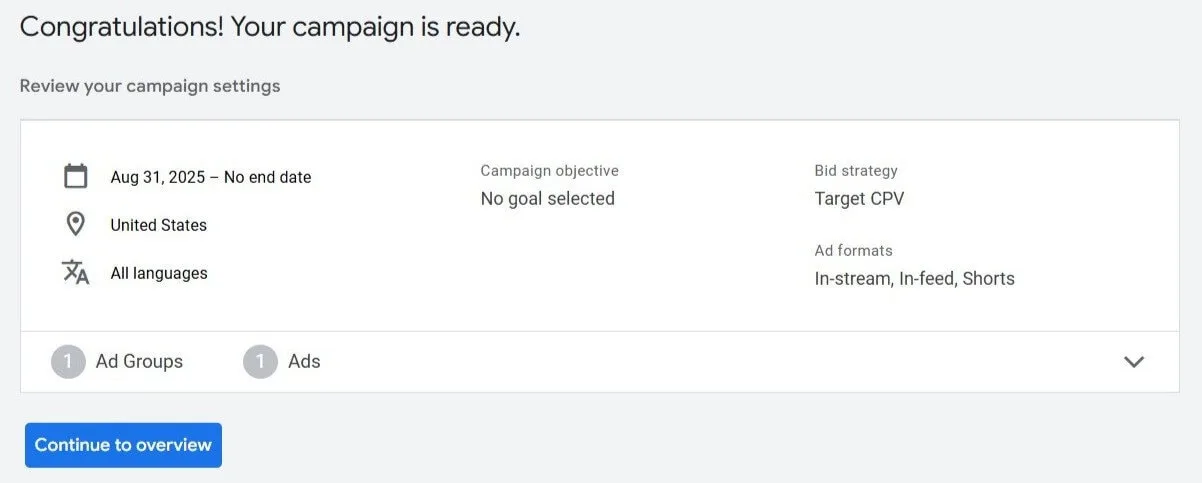
Congrats! You just launched your YouTube ad to promote your music.
#9 - Connect YouTube with TikTok and Spotify for Cross-Platform Promotion.
When an artist and a YouTuber in any other niche collabs, that's a goldmine. A music artist could join a gaming streamer, team up with a lifestyle vlogger, or collaborate with micro and macro influencers for staggered reach.
Influencer Tiers
- Micro (10k–100k subs): Niche, highly engaged. Great for authentic fan-building.
- Mid-tier (100k–500k): Balanced reach and relatability.
- Macro (500k+): Wide exposure. Ideal for big rollouts.
How to Pitch
Subject: Collaboration Idea – [Your Song Title] x [Their Channel Name]
Hi [Name],
I’m [Your Name], an artist who creates [genre] music. I think a collaboration with your channel could be a perfect fit.
I’d love to [specific idea e.g., provide original music for your next video, or join a livestream].
I’ll handle all production logistics and cross-promo to my audience. Let me know if this sounds cool to you?
Best, [Your Name]
#11 - Track Your YouTube Music Promotion with Analytics
Here are some key metrics that you can track:
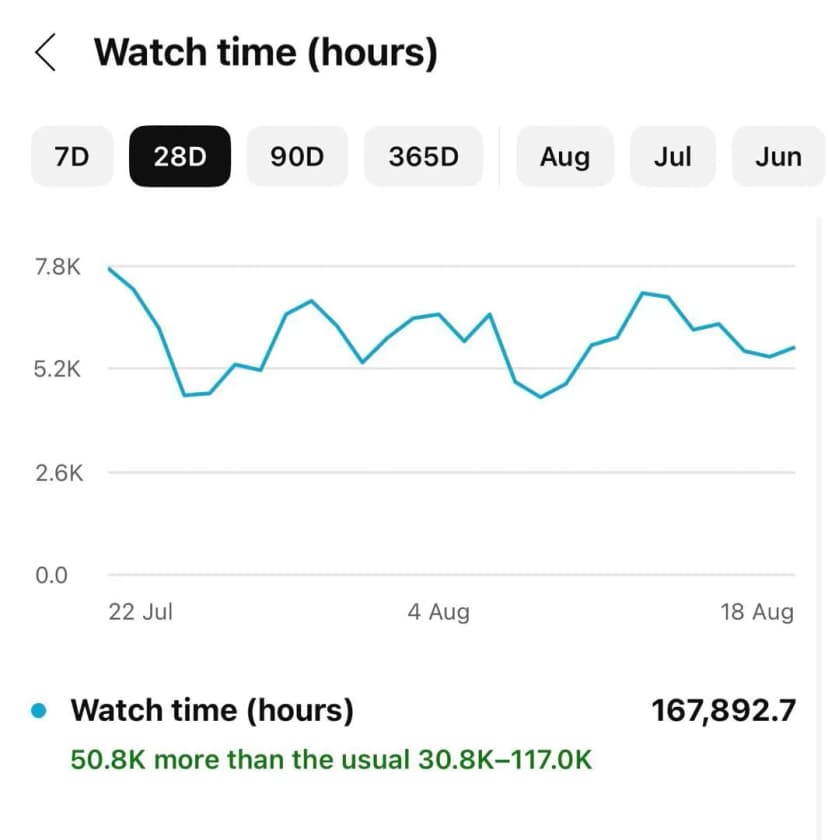
- Watch time: how many total hours people spend watching your videos.
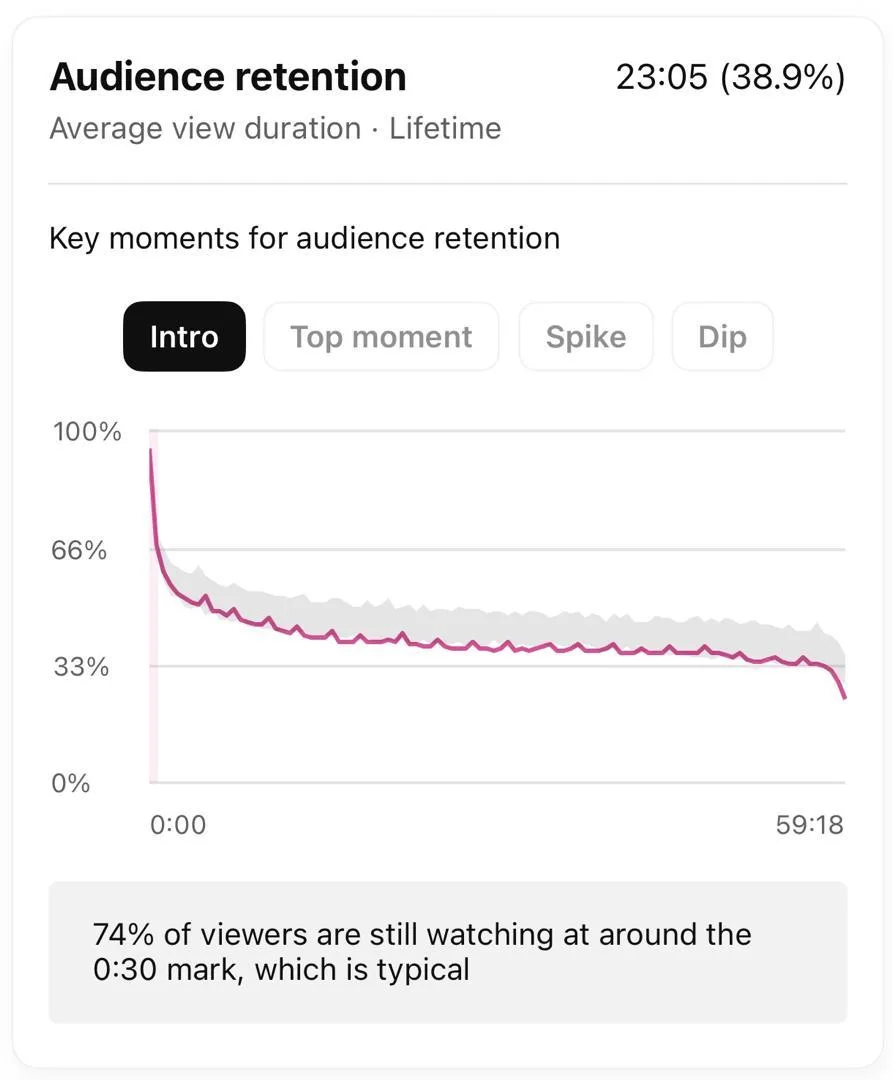
- Audience retention: how long viewers stay before dropping off.
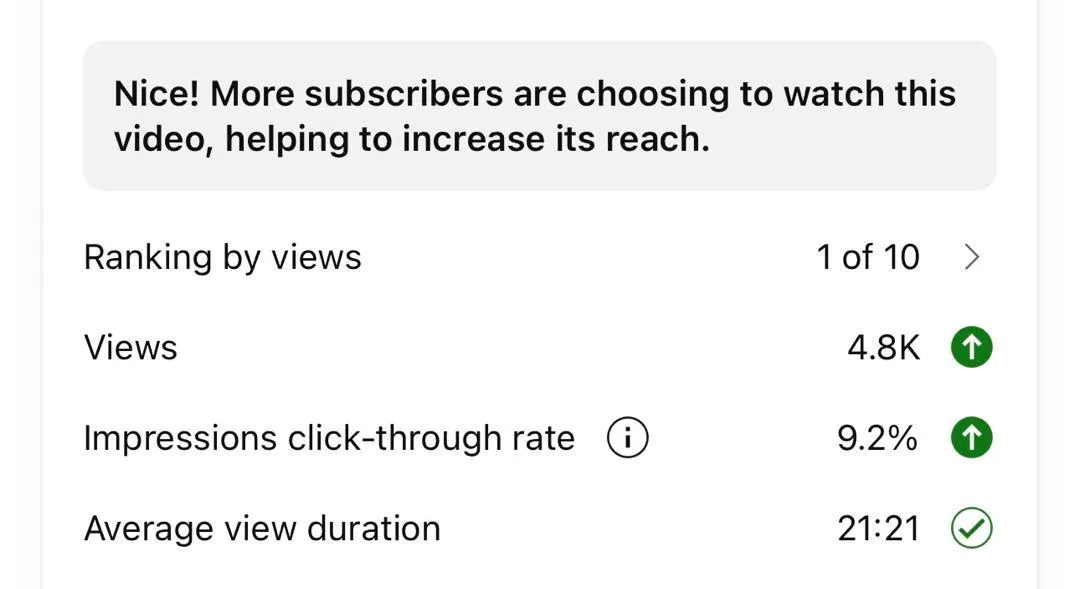
CTR: How often people click when they see your video in search.
Measuring ROI: (Revenue – Costs) / Costs. If you spent $1,000 on YouTube ads and made $2,000 in revenue, your ROI is 100%.
#12 - Use Algorithm Tactics to Promote Your Music on YouTube
Growing on YouTube is about working with the algorithm, not against it.
- Upload Timing: Research when your viewers are online using YouTube Analytics, then schedule uploads for peak hours.
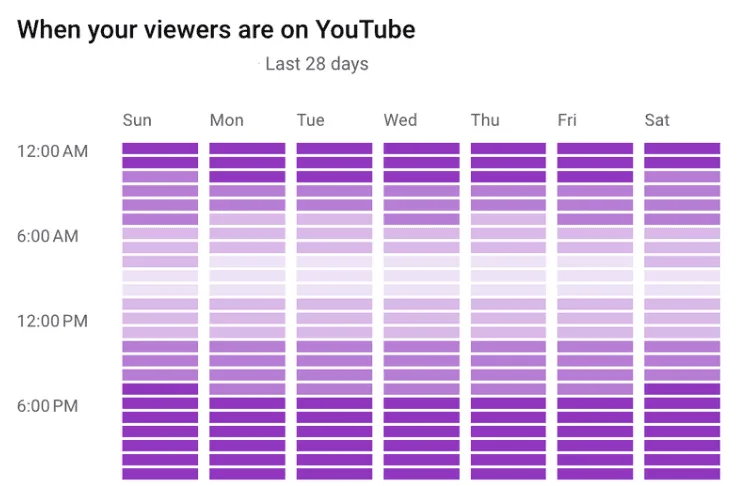
- Engagement Velocity: The first 24 hours are critical. Pin a comment, reply quickly, use Community posts to drive early engagement.
- Session Duration: Link videos into playlists so one flows into the next. The longer your audience stays, the better your channel performs.
- End Screens & Cards: Guide viewers to more content. This increases watch time and strengthens your authority.
Common Mistakes That Artists Must Avoid on YouTube
Even the most talented musicians sabotage their own success. Here are some traps you don't want to be a part of:
Potato-Quality Audio: Garage-mic “rawness” just sounds bad. Fix it with a USB condenser mic and free mastering on LANDR or BandLab.
Ignoring Copyright Basics: Using beats, you don’t own is speedrunning a flag or ban. Own it, license it, or go royalty-free and keep receipts.
Inconsistent Uploading: Posting every six months tells the algorithm you’re unreliable. Pick a schedule you can keep and show up, even with short BTS clips.
Low-Quality Thumbnails: Dark, blurry, overdesigned thumbnails kill clicks. Go high contrast, one focal point, readable text, and A/B test.
Ignoring Engagement: No replies equals no comments equals no love from YouTube. Spend 10 minutes daily responding and asking questions.
Conclusion
YouTube is still one of the best platforms for independent artists to build a real fanbase from scratch. The artists who win aren't the ones with the biggest budgets, they're the ones who show up consistently, optimize smartly, and treat every video like it matters.
Start with the basics: nail your channel setup, master YouTube SEO, and create the right video types. Then layer on Premieres, Community Tab engagement, and cross-platform funnels to accelerate your growth.
Now go make something worth watching.

마케팅 두뇌, 작가의 마음, 뮤지션의 영혼. SoundCampaign에서는 SEO를 담당하고, 마케팅상의 병목을 풀어주며, 아티스트가 실제로 앞으로 나아가는 데 도움이 되는 글을 씁니다. 저 역시 뮤지션이라, 제가 쓰는 글 대부분은 양쪽 시선에서 나옵니다. 그 일을 하지 않을 때는 어수선한 홈 스튜디오에서 곡을 쓰고 프로듀싱하며, 언젠가 차트에 오를지도 모를 사운드를 여전히 좇고 있습니다.

당신의 음악을 알릴 준비가 되셨나요?
매 단계마다 솔직한 피드백과 함께 실제 플레이리스트, 크리에이터, 팬에게 다가가는 수천 명의 인디 아티스트와 함께하세요.
- 봇은 절대 사용하지 않습니다
- 아티스트 보호 프로그램큐레이터나 크리에이터가 트랙을 리뷰하지 않으면 크레딧을 돌려드립니다. 당신의 예산은 항상 보호됩니다.
- 저작권료의 100%를 그대로 유지하세요저희는 레이블이 아닌 프로모션 서비스입니다. 스트림이나 저작권료의 일부도 가져가지 않습니다.