Distribution Musicale
DistroKid vs CD Baby: Which is the Best in 2026?

Azfar
Mis à jour · 18 min de lecture
Compare DistroKid vs CD Baby to find out which distributor fits your style, budget, and release strategy as an independent artist.


On this page
- DistroKid vs CD Baby: An Overview
- DistroKid: The Speed-Focused Distributor for Frequent Releases
- CD Baby: The Comprehensive Distributor with Artist-Centric Services
- Our Hands-On Testing Results
- Pricing: Which Platform Offers Better Value?
- Royalties & Revenue Split
- Feature Breakdown by Use Case
- Customer Support & Community Feedback
- Some Real Stories: Who’s Winning With These Platforms?
- How to Choose Between DistroKid and CD Baby
- Some FAQs You Might Have Comparing Distrokid and CD Baby
- Final Verdict!
Struggling to decide between DistroKid and CD Baby, and spending more time comparing them than actually making music?
At SoundCampaign, more than 3,000 artists have tried both platforms. We also ran our own tests by releasing real tracks through each one to see what really works and what doesn’t.
The short answer is that you can succeed with either. The long answer is where things get interesting, as we break down the details, hidden costs, and workflow quirks that truly set them apart.
DistroKid vs CD Baby: An Overview
|
Feature |
DistroKid |
CD Baby |
|---|---|---|
|
Pricing (Starter Plan) |
$24.99/year for Musician, $44.99/year for Musician Plus, $89.99/year for Ultimate |
$9.99 per single, $14.99 per album (one-time) |
|
Upload Limit |
Unlimited |
Per release fee |
|
Royalty Cut |
100% on most platforms (80% from YouTube Content ID only) |
91% royalties (9% distribution fee) |
|
Publishing Admin |
Not offered (use third-party) |
Optional publishing administration with 15% fee |
|
Analytics & Insights |
Basic stats, some plans |
In-depth analytics, more insights |
|
Promotional Tools |
HyperFollow links, social promo cards, Vizy Video Generator |
Sync licensing and marketing tools |
|
Speed to Stores |
1-7 days (can vary) |
1-2 weeks on average for major stores |
|
Video Distribution |
$99/year add-on (DistroVid) |
Included in deluxe plans |
|
Customer Support |
Variable, less predictable |
Responsive, more artists support |
|
Best For |
Fast, frequent independent releases |
Artists wanting customized service and more control |
DistroKid: The Speed-Focused Distributor for Frequent Releases
DistroKid started in 2013 and made headlines in 2015 with pop-rap duo Jack & Jack. Their album Calibraska, distributed through DistroKid, debuted at #1 on the iTunes charts.
As DistroKid founder Phillip Kaplan said:
"For the first time in history an indie artist went to #1, outselling Taylor Swift and all the majors, and can keep 100% of their sales & streaming royalties."
Here’s how it works: artists pay a yearly fee, upload unlimited music, and keep 100% of their royalties.
Use DistroKid if you’re an artist who releases music often and wants your tracks on streaming platforms quickly.
CD Baby: The Comprehensive Distributor with Artist-Centric Services
CD Baby has been around since 1998, when unsigned artists had little chance of getting their music on iTunes or Spotify.
Founder Derek Sivers created the site to sell his own CD after other platforms turned him down for lacking a label. It soon became the largest online store for independent music.
In 2008, Sivers sold CD Baby to Disc Makers for $22 million which was later acquired by Downtown Music Holdings. By 2018, CD Baby had become one of Apple Music’s preferred partners.
Here’s how it works: artists pay a one-time fee per single or album.
CD Baby is best for artists who release music occasionally or want full control over their projects.
What’s That One Big Difference Between Distrokid and CD Baby?
Here’s where things start to differ:
DistroKid lets artists keep all their earnings from most streaming and social platforms, except for YouTube Content ID, where it takes a 20% cut.
It’s a strong option for artists who want full control of their music income.
CD Baby keeps 9% of your distribution revenue, so you earn about 91% from streams and sales. It also offers publishing administration for an extra 15% of your publishing royalties.
This means you’ll earn slightly less per stream or sale than with DistroKid. However, CD Baby’s publishing and sync licensing services can help you collect royalties from more places.
Our Hands-On Testing Results
At SoundCampaign, we’ve personally tested both platforms. Here’s a quick look at how each music distribution service works, so you can see how easy it is to upload and release your music on DistroKid and CD Baby.
DistroKid Walkthrough
First, go to Upload, then select Upload Music.
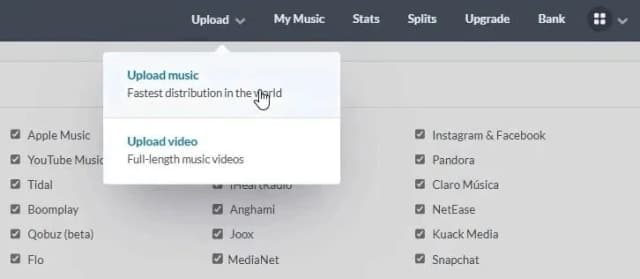
The next thing you’ll see is a checklist of all the streaming services or platforms your track will be distributed to.
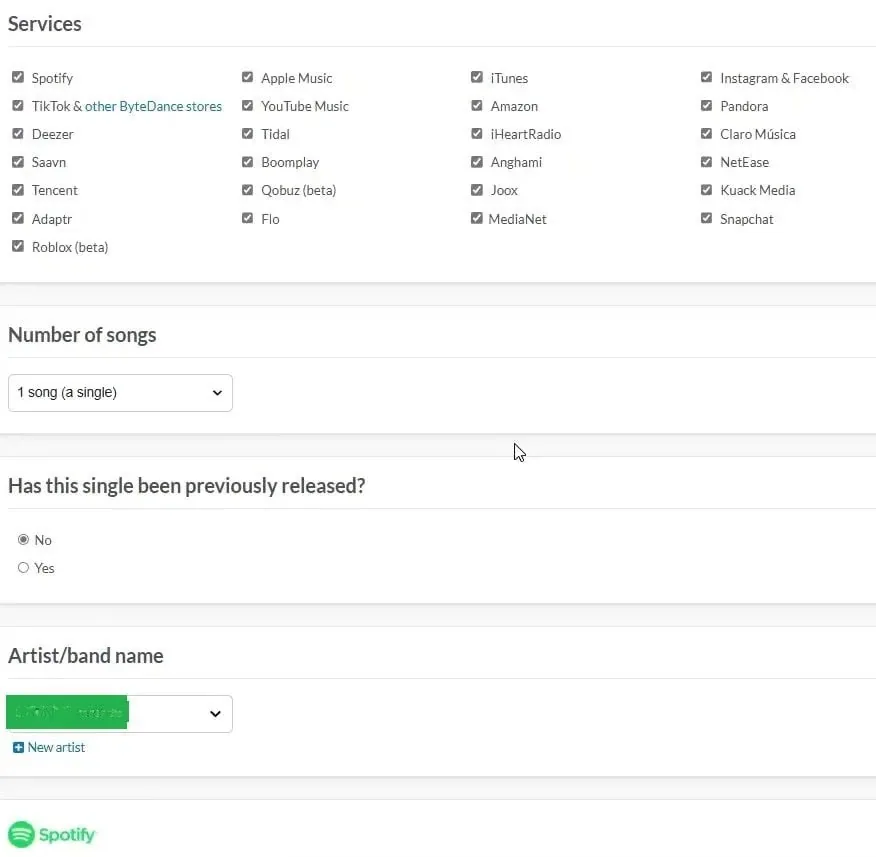
Once you’re done checking, fill in other details.
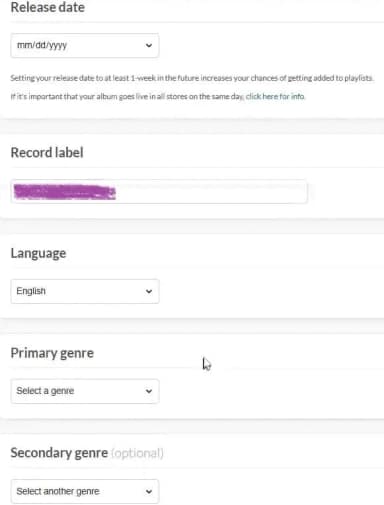
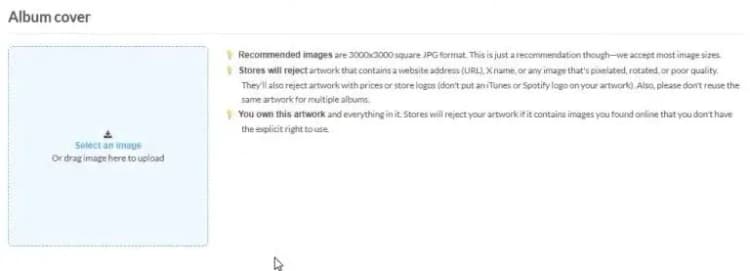
Now that’s done, add a few more details about your track. It might feel like a hassle at first, but once you get used to it, the process becomes a lot easier.

Pick some extras if you’d like. That’s totally up to your strategy.
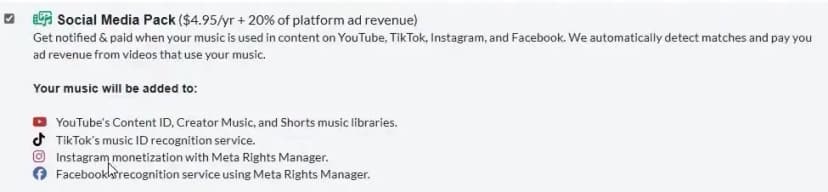
Once you’re done with everything, you’ll see your track like this:
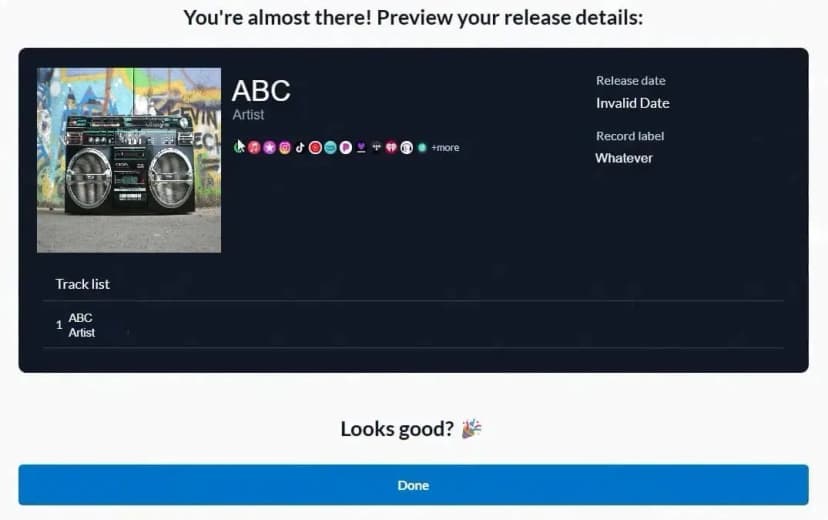
That’s it!
Click on ‘done’ and wait for 2-5 business days to get your music released.
Here’s what the SoundCampaign team have to say about DistroKid:
- Uploading: Really fast, but you can’t control or schedule when it goes live.
- Reaching Streaming Platforms: Quick uploads, though timing can be hit or miss.
- Dashboard & Navigation: Feels built for speed, not for a professional workspace.
- Customer Support: Responses are slow and feel a bit impersonal.
- Payout Tracking: Works okay, but updates take time and details aren’t very clear.
CD Baby Walkthrough
Login to your CD Baby account and click on Add New Release.
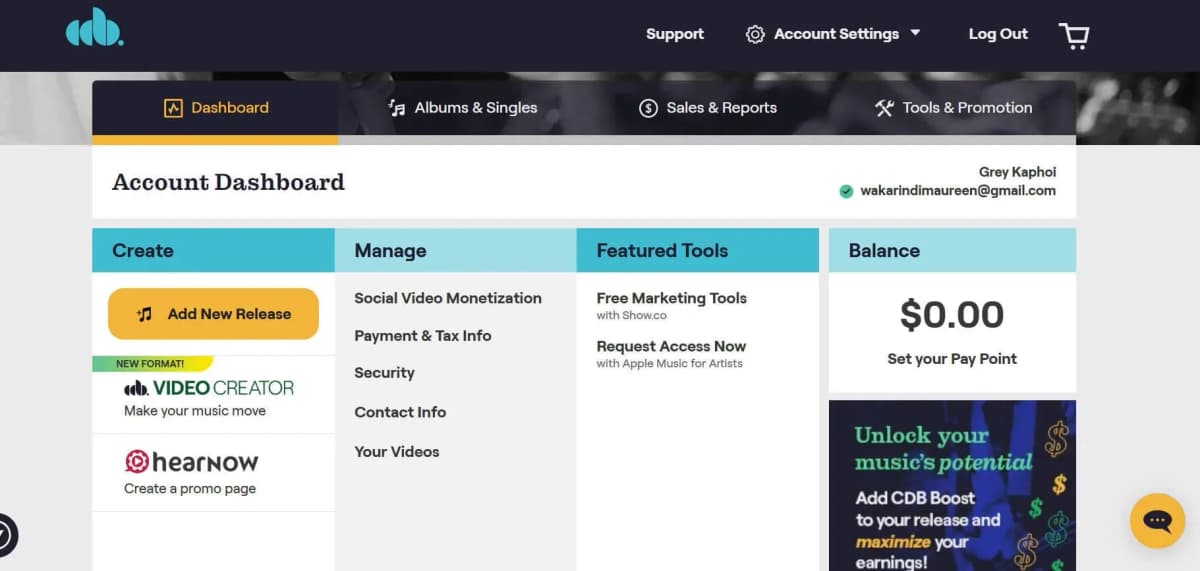
Choose your release type - single or album.
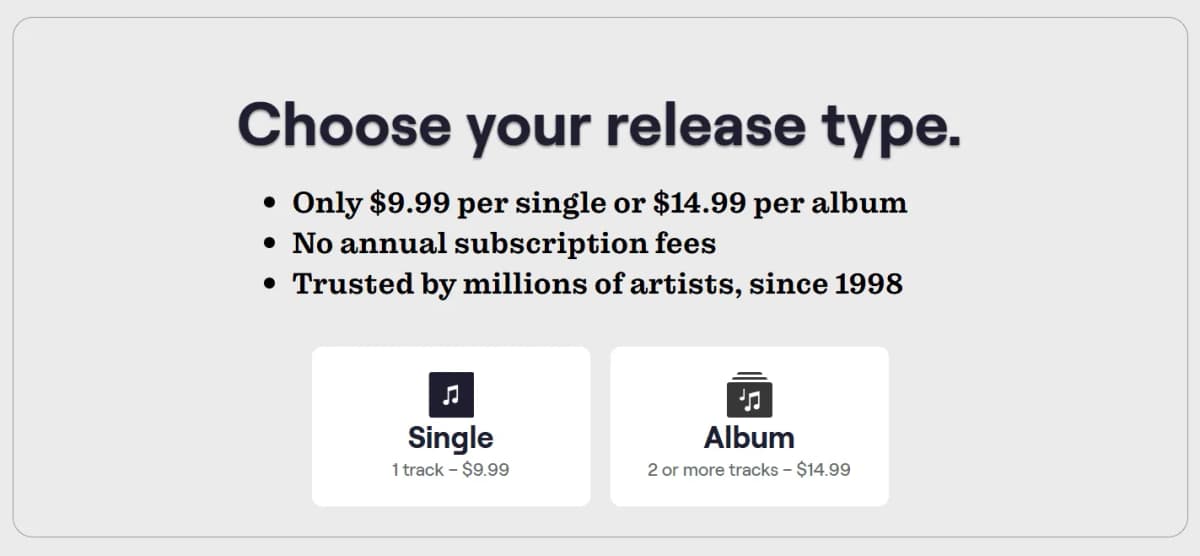
Add all the details of the track and choose a release date.
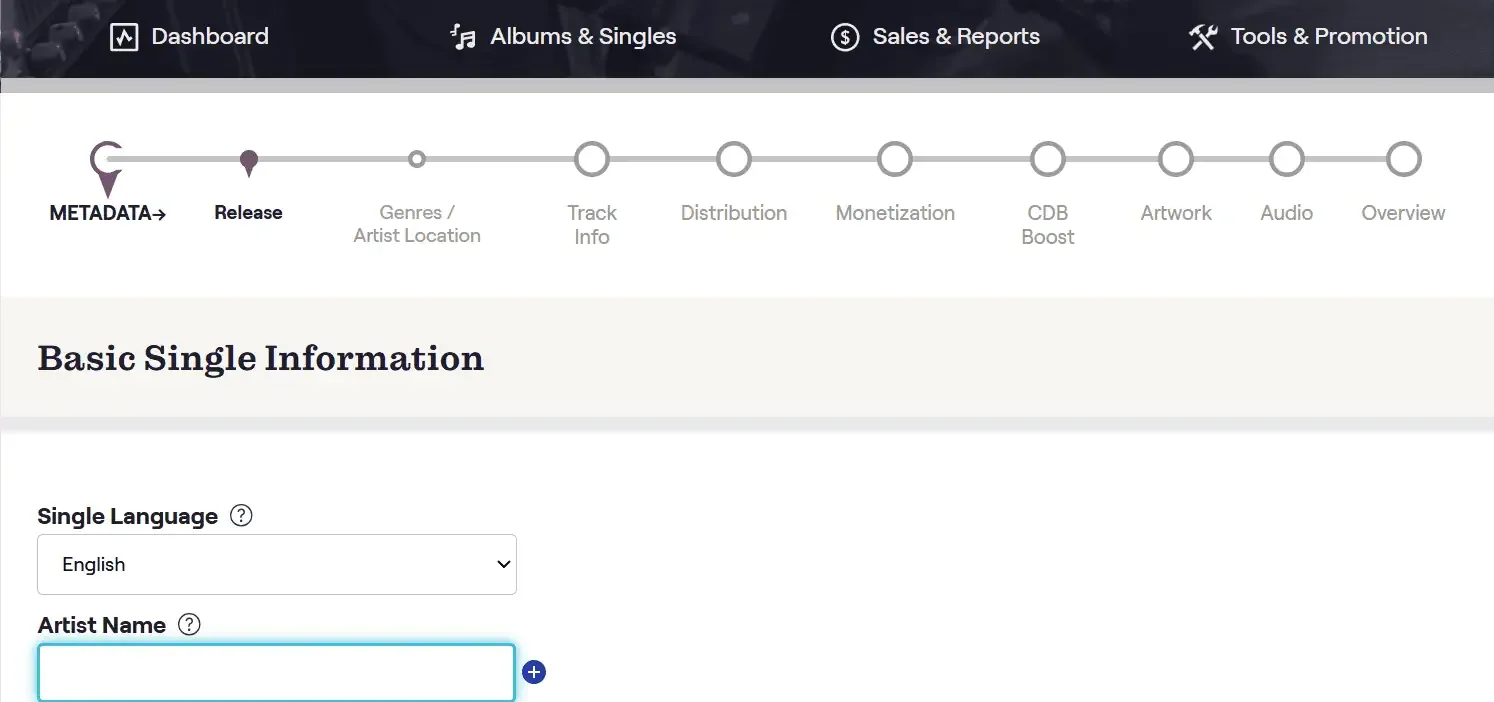
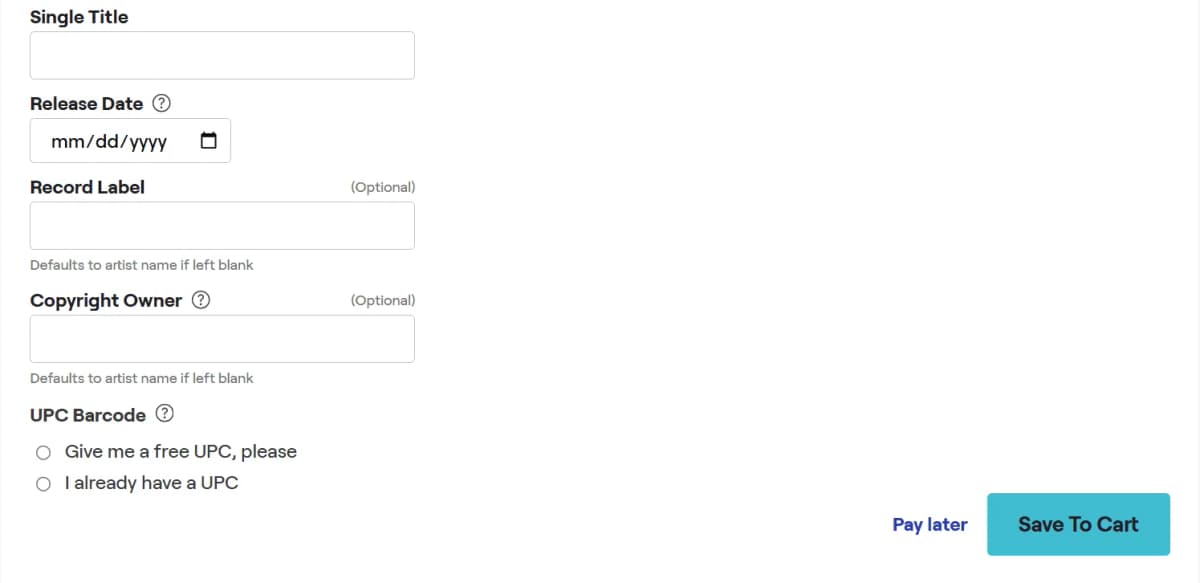
You can skip some details initially and CD Baby will remind you before you can complete uploading a release.

Once done, you'll see your title overview in your cart.
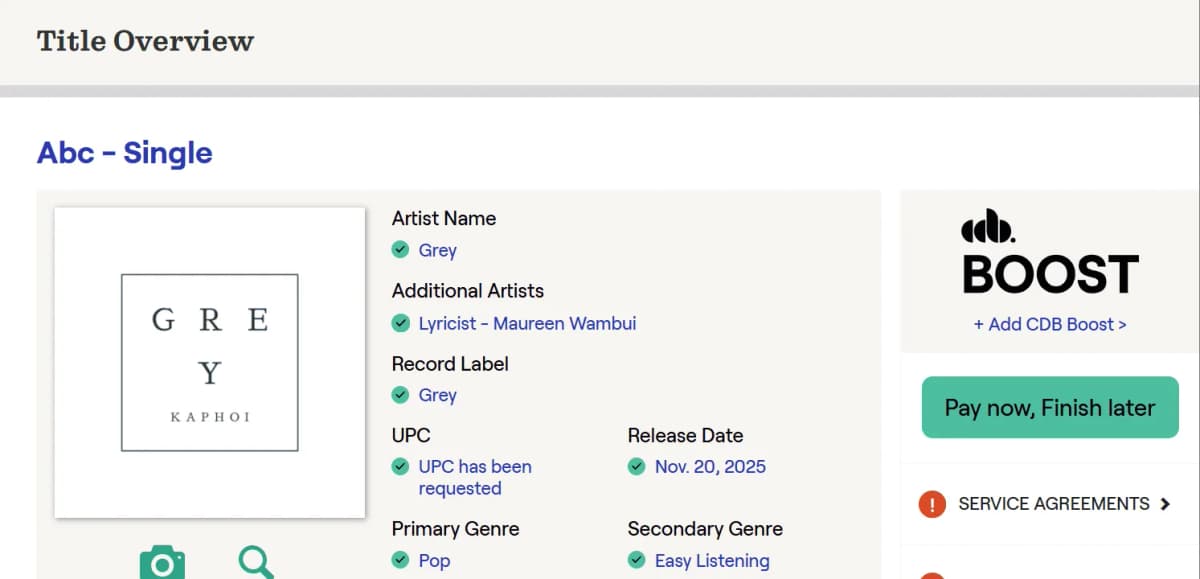
Now all you have to do is pay the one-time release fee and wait an average of 1 to 2 weeks for your music to reach digital stores.
Here’s some quick feedback on CD Baby from the SoundCampaign team:
- Uploading: Great for artists who like to plan their releases and coordinate campaigns.
- Reaching Streaming Platforms: A bit slower than DistroKid, but steady, reliable, and professional.
- Dashboard & Navigation: Clean, organized, and built for long-term growth.
- Customer Support: Helpful and responsive.
- Payout Tracking: Clear, transparent, and easy to follow.
After going through the entire process on both platforms, here’s a summary of what our team experienced while uploading singles and albums.
|
Feature |
DistroKid |
CD Baby |
|---|---|---|
|
Uploading |
Really fast, minimal control or ability to schedule release dates |
Great for planned rollouts and coordinated campaigns, with detailed metadata and release control |
|
Reaching Streaming Platforms |
Quick uploads, but timing can be inconsistent or hit/miss |
A bit slower, averaging 1-2 weeks, but steady, reliable, and professional delivery |
|
Dashboard & Navigation |
Built for speed and simplicity, less suited for professional workspace or long-term growth |
Clean, organized, and designed to support professional growth and detailed reporting |
|
Customer Support |
Generally slow responses, perceived as impersonal or automated |
Responsive, helpful, and more personalized support with artist-focused education |
|
Payout Tracking |
Functional but payouts can have delays and transparency issues |
Clear, transparent payout system that’s easy to follow and manage financials |
Pricing: Which Platform Offers Better Value?
If you’re an independent artist paying your own way, every dollar counts.
Let’s look at what each platform costs, what you actually get, and what to keep an eye on.
Here's DistroKid with its annual payment plans:
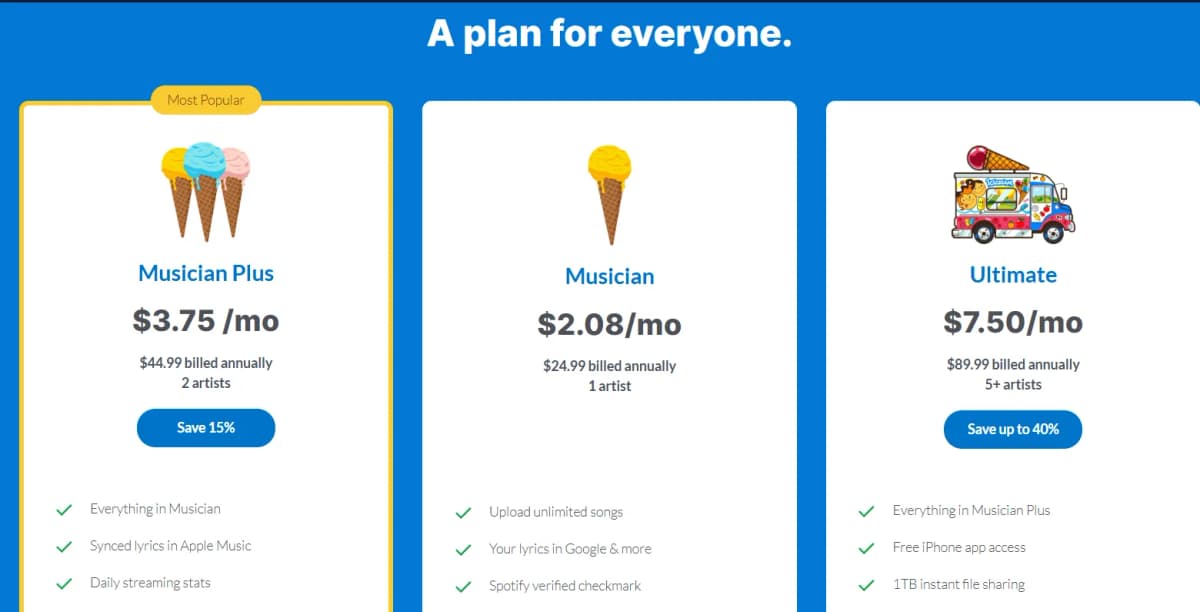
Additionally, DistroKid offers optional paid album extras that can be opted into during or after the upload process for a release, and other paid tools for artists like Mixea and Vizy.
Are they worth it, though?
In a recent conversation, a Reddit user had this to say,
"Distrokid is horrible. You have to pay a regular reoccurring fee to keep your account active and see your info, sales, etc. if you decide to stop using them, they charge you another $30 to keep your music on streaming services as a "legacy" feature and you lose all access to your Distrokid account."
You also get three free promo tools to help push your songs once they’re live - Promo Cards, Spotify Canvas Generator and HyperFollow.
With CD Baby, you pay a flat one-time fee depending on your release type:
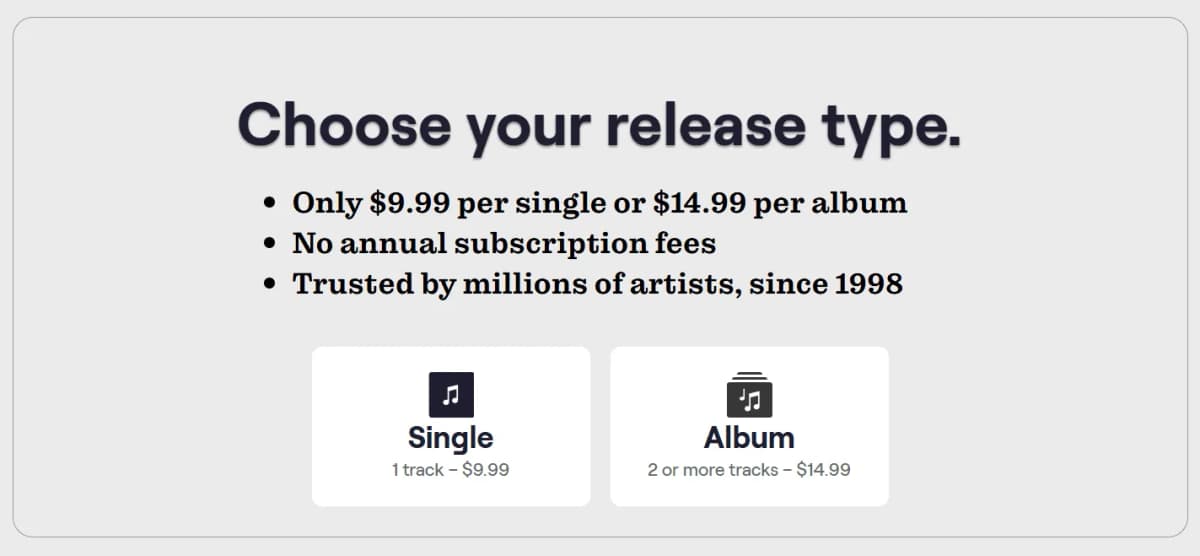
CD Baby's Tools & Promotion section gives you access to marketing and monetization options right from the dashboard.
For $25 a year, DistroKid allows you to add 1 artist. You can add 2 artists for $45 a year, and 5+ artists for $90 a year.
With CD Baby, you can manage as many artists as you want under one account. Each artist still gets their own profile on streaming platforms. For every release, just pick one main artist, then add others as primary or “featuring” if needed.
Verdict:
CD Baby is great if you want to pay once and keep your music up indefinitely. DistroKid works better if you drop tracks often and want them out fast.
Royalties & Revenue Split
Great job on uploading your music!
Now what?
The next big question is how the money gets back to you.
Let’s break down how DistroKid and CD Baby handle royalties, what you keep, how the payouts are split, and how quickly you get paid.
DistroKid: (Almost) 100% Yours
The good news is that DistroKid lets you keep 100% of your streaming and sales royalties from most platforms.
The only catch? They take 20% from YouTube Content ID revenue if you opt into that feature. Otherwise, you keep it all.
What you get:
- 100% of revenue across most platforms (including social)
- 80% of YouTube Content ID revenue
- Unlimited automated royalty splits via “Teams”
- Bi-weekly payment processing
- $6 minimum payout threshold
- 2-3 month wait for payouts (industry standard)
The cleaner approach and full social platform revenue make DistroKid particularly valuable for indie artists that are starting out.
CD Baby: Keep Over 90%
With CD Baby, you keep 91% of the revenue from your music sales and streams. They charge a 9% commission on your earnings.
Here’s the scoop:
- Pay once per release, no yearly subscriptions
- Add the CDB Boost option to collect extra royalties like mechanical and sync
- Get monthly payouts with clear reports showing exactly where your money comes from
- Use built-in marketing and licensing tools to land your music in shows, ads, and games
CD Baby’s cut is small, but their publishing and licensing support make up for it. It’s a great pick if you’re in it for the long haul and want every royalty stream working for you.
Verdict:
If you're building an audience on TikTok or Instagram, DistroKid wins. If you're looking for longevity and more support on your music journey, then go with CD Baby.
Feature Breakdown by Use Case
DistroKid sends your music to over 150 platforms worldwide, so it reaches pretty much everywhere.
The best part is how fast and simple it is. Your songs can go live in just 2 to 5 business days.
You can also use add-ons like DistroVid to distribute music videos for an extra fee, but the platform doesn’t focus much on sync or promo partnerships.
CD Baby doesn’t share the exact number of platforms they work with. But from what I’ve seen, they cover all the major ones.
The best part? You don’t have to pay a yearly fee to keep your music online. Your tracks stay live on all the top platforms now and in the future.
On a tight release schedule? Upgrade to FastForward for $29.99, which speeds up CD Baby's inspection and delivery process while giving you dedicated priority support for one year.
And if you want more than just digital distribution, CD Baby also offers vinyl pressing and CD duplication services.
Speed to Stores
- DistroKid: Anywhere between 24 hours to 7 days (note that securing cover songs licenses can take up to 14 business days)
- CD Baby: About 1-2 weeks (may vary by platform)
Verdict:
For quick drops and regular releases, DistroKid wins on speed.
If you want a broader international reach or publishing support, CD Baby is your best bet.
Additional Features
Once your song is out on streaming platforms, your job isn’t over.
You still need to promote it, track its performance, collaborate with others, and maybe even pitch for playlist spots or sync deals.
Both DistroKid and CD Baby have tools to help you with this next stage of your journey, but they focus on different things.
Here’s how they stack up on the features that matter most.
Analytics & Insights
DistroKid provides essential stats like daily sales and streaming counts (on certain plans).
Just look at this. So. Boring.
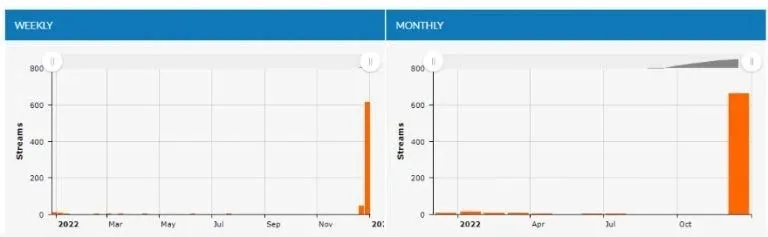
The interface looks plain and outdated, like something from the early 2000s. It’s definitely due for a refresh.
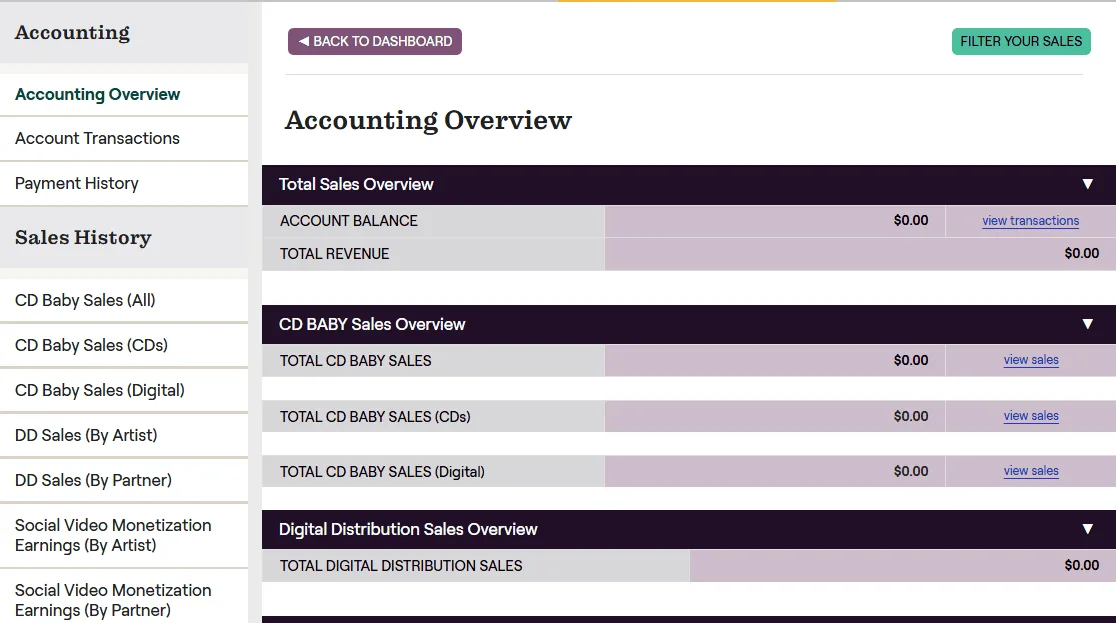
On the other hand, CD Baby has a Sales & Reports tab on the dashboard with stronger analytics and insights. You can track sales, payment history, and detailed activity from digital partners like Spotify, Apple Music, and YouTube.
It’s designed for artists trying to build a strategy from data.
Just look at these kinda stats. Pretty cool, right?
Visual & Branding Tools
DistroKid is all about speed and social buzz.
It gives you quick promo tools like mini videos and auto-generated cards for each release.
CD Baby, meanwhile, focuses on growth.
Their free musician guides are packed with marketing tips to help you level up and keep your music career moving forward.
You can check here what extras both are giving to their artists:
Promotion & Audience Growth
DistroKid gives you plenty of tools to promote your music, such as HyperFollow, Mini Videos, Meme Generators, Synced Lyrics, and more.
When someone clicks the button on your HyperFollow page, they’ll automatically follow you on Spotify. They’ll also save your album to their Spotify library right away.
But seriously, Linktree, Hypeddit, and Beacons are far better for such jobs.
CD Baby also has a bunch of great tools to help you grow your audience. You can also learn from other musicians on their DIY Musician Blog and Podcast, where they cover everything from marketing hacks to release strategies.
One artist boosted her Spotify listeners by 33% in just one week using Show.co.
Want to go beyond standard distribution? Add CDB Boost to any release for $39.99 and take your music further.
Video Distribution (Add-On)
DistroKid has an optional feature called DistroVid that costs $99 per year. It lets you upload your music videos to Apple Music, Vevo, and Tidal.
This add-on is helpful if you release videos along with your songs.
CD Baby, on the other hand, includes social video monetization in all its distribution plans for free. You just have to turn it on.
They partner with platforms like Instagram Stories and Reels to identify your songs. When someone uses your music in a video, CD Baby claims it and pays you the earnings.
Verdict:
DistroKid is for speed. Fast uploads, basic stats, DIY promo tools. No strategy, just distribution.
CD Baby gives you real tools: playlist pitching, sync licensing, detailed analytics, publishing admin. Stuff that grows your career and your checks.
As an artist, I’d say CD Baby has an upper hand here if you take your music seriously and treat it like a business.
Customer Support & Community Feedback
Both DistroKid and CD Baby have a Better Business Bureau rating of F.
The biggest red flag with DistroKid's rating is that they haven't responded to 174 of the 195 complaints filed against the business. No wonder they got an F!
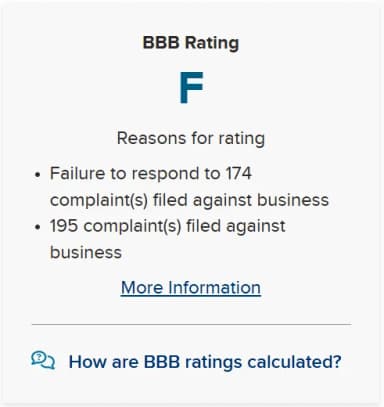
While some releases go smoothly, BBB complaints show others waiting weeks for basic help. Users also report being charged for services they never got.
Another major complaint is poor customer support, which could be because Distrokid laid off 37 support staff earlier this year.
For CD Baby, people complain about payout delays, unresponsive support that feels automated, and sudden account suspensions or music removals without explanation.
Still, DistroKid has over 36K reviews on Trustpilot with a solid 4.6 rating. Many say it’s easy to use, reliable, and fast for getting music out. Artists like how it distributes to all major platforms and social channels.
CD Baby holds a 3.8 rating on Trustpilot from 7K+ reviews. Most are positive, calling the service efficient and timely. Long-time users appreciate the fair pricing and the one-time payment option without ongoing fees.
Verdict:
DistroKid is more flexible but less predictable. CD Baby gives you structure but struggles with results.
Neither nails support. Pick the one where you will need it the least.
Some Real Stories: Who’s Winning With These Platforms?
DistroKid's Side
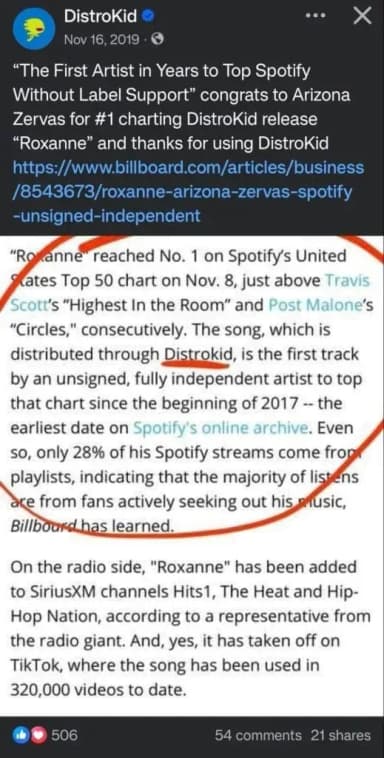
Arizona Zervas uses DistroKid to release his music. You can see the "Distributed by DistroKid" label on songs like "Homies" and "Pace."
He started using it early in his career, dropping singles quickly until his music broke into the mainstream.
DistroKid said this about Arizona Zervas:
CD Baby's Side
CD Baby features reviews from artists across multiple genres.
As multi-Grammy award-winning artist Macklemore said:
"CD Baby has always been a family to me. Over the years I’ve built a personal relationship with them. […] Their payouts and accounting are very artist friendly and that’s appreciated, because I’m a doo doo at math. But you know what? I don’t need to be good at math because I’m a rapper. And CD Baby knows that. Love those dudes."
Or check out Luminara, a Puerto Rican rock band, who said:
"We are very grateful to CD Baby because they opened the doors to a hundred possibilities around the world in local and international markets. CD Baby is the most complete tool for marketing your music around the world in a professional, practical and friendly fashion."
Verdict: After we have seen what artists have achieved with both distributors, there’s no point in taking sides here.
Both are really good at what they’re doing and have respect for each other.
How to Choose Between DistroKid and CD Baby
Choose DistroKid If:
- You’re dropping singles and EPs frequently and want fast, unlimited uploads for a low annual fee.
- Keeping 100% of your royalties from most streaming and social channels is a top priority.
- You’re comfortable managing publishing and sync royalties with third-party services.
- You want speedy distribution and basic promo tools like HyperFollow links.
- Flexibility and a DIY approach fit your workflow best.
Heads up: DistroKid’s Leave a Legacy add-on keeps your album online even if your membership lapses or your card is declined. Just check the Leave a Legacy box when uploading your release or on your album page afterward.
Choose CD Baby If:
- You prefer paying a one-time fee per release rather than a subscription.
- You’re focused on albums, EPs, or fewer, well-planned projects.
- You want integrated publishing administration, sync licensing, and royalty maximization.
- Detailed analytics, transparent payouts, and personalized customer support matter to you.
- You’re building a long-term career with diverse revenue streams beyond streaming.
The smartest move? Use both platforms!
DistroKid can be for quick and frequent drops, while CD Baby is for career-building and rights management.
Align your choice with your current goals, budget, and how hands-on you want to be with your music’s business side.
Some FAQs You Might Have Comparing Distrokid and CD Baby
Q: Can I use both DistroKid and CD Baby at the same time? A: Yes, you can use both platforms. However, avoid uploading the same song to both at once, as it can cause duplication issues on streaming platforms. If you switch distributors, take down the release from the first one before re-uploading.
Q: Which is better for releasing singles? A: DistroKid is better suited for quick single releases due to its low entry cost and fast publishing speed. It’s ideal for artists who release casually or frequently.
Q: Which platform is better for albums and EPs? A: CD Baby provides more stability and professional tools for managing larger releases like albums or EPs. It also offers better scheduling, publishing support, and metadata control. However, you will pay for each release, as opposed to an annual fee.
Q: Does DistroKid offer publishing services? A: No. DistroKid does not currently offer publishing administration. You’ll need to use a third-party service like Songtrust if you want to collect publishing royalties.
Q: Which platform distributes music faster? A: DistroKid is known for faster distribution, often getting your music live in 2-5 days. CD Baby usually takes about 1-2 weeks due to manual review processes that ensure quality and metadata accuracy.
Q: How do royalties and payouts work? A: DistroKid lets you keep 100% of your streaming royalties except a 20% cut on YouTube Content ID revenue, paying out bi-weekly with a $6 minimum. CD Baby pays about 91% after taking 9% commission, offers integrated publishing royalty collection, and pays monthly with transparent reports.
Q: Can I release cover songs on these platforms? A: DistroKid simplifies cover song licensing with an add-on service, making it easier to upload covers without separately securing licenses. CD Baby requires artists to obtain mechanical licenses upfront but offers extensive publishing support for covers.
Q: Can I switch from DistroKid to CD Baby or vice versa?
A: Yes, you can switch, but you need to follow some key steps:
- First, upload your music to the new distributor using the exact same metadata (artist name, song titles, ISRC, UPC)
- Once your music is live on the new platform, manually remove it from the old distributor
- Keeping the same metadata and codes helps maintain your streams and avoid duplicates
- Be prepared for some downtime or delays on streaming services during the switch
- CD Baby offers discount coupons to ease switching fees
- Plan carefully so you don't lose access to your music during the transition
Final Verdict!
Fact: distribution alone won’t make your music blow up.
Your strategy will.
Even the best platform won’t help if you don’t have a plan. Before picking a distributor, ask yourself:
- How often am I releasing music?
- Do I want playlist placements or sync deals to grow my audience?
- Am I building a business or just sharing songs for fun?
Once you figure that out, choosing between DistroKid and CD Baby gets much easier.
The music industry moves fast, so keep your strategy flexible. Adapt as you grow. Save this guide and revisit your plan often to stay ahead.

Cerveau de marketeur, cœur d'écrivain, âme de musicien. Chez SoundCampaign, je m'occupe du SEO, je débloque les problèmes de marketing qui traînent, et j'écris ce qui aide vraiment les artistes à avancer. Je suis aussi musicien, donc ce que j'écris vient presque toujours des deux côtés. Le reste du temps, je suis dans mon studio bricolé, à écrire et produire, toujours à la recherche d'un son qui finira peut-être un jour dans les charts.
Promouvoir ta musique
Vrais placements en playlist, vidéos TikTok et publicités Meta

La confiance de 100 000+ artistes et labels
Jamais de bots.

Étude de cas réelle
Comment SoundCampaign a mis Grant Knoche devant 460 587 auditeurs pour WOOHOO
Lire l'histoire complète
Prêt à faire entendre ta musique ?
Rejoins des milliers d’artistes indépendants qui utilisent SoundCampaign pour atteindre de vraies playlists, des créateurs et des fans, avec un retour honnête à chaque étape.
- Jamais de bots
- Programme de protection des artistesSi un curateur ou un créateur n’écoute pas ton titre, on te crédite en retour. Ton budget est toujours protégé.
- Garde 100% de tes royaltiesOn est un service de promotion, pas un label. On ne prend jamais de commission sur tes streams ou tes royalties.