Promoción en Spotify
How to Connect Spotify to ChatGPT (Full Setup Guide)

Azfar
Actualizado · 15 min de lectura
Learn how to connect Spotify to ChatGPT using plugins, extensions, and APIs. Analyze music, build playlists, and automate tasks.


On this page
- Can You Connect Spotify Directly to ChatGPT?
- Method 1: Connect Spotify to ChatGPT Using Browser Extensions
- Method 2: Use ChatGPT Plugins (ChatGPT Plus Users)
- Method 3: Connect Spotify to ChatGPT Using the Spotify API
- What You Can Do After Connecting Spotify to ChatGPT
- How Artists Can Use ChatGPT + Spotify for Music Promotion
- Promote Your Music After Optimizing Your Spotify Strategy
- Troubleshooting Spotify + ChatGPT Integration
- Conclusion
When Spotify plugs into ChatGPT, everything gets easier.
You can ask for laser specific playlists, get mood based recommendations, break down your listening habits, and manage your library through simple conversation.
This guide is for listeners who want faster discovery, curators who want sharper playlist insights, and artists who want to understand how Spotify interprets their sound.
With AI handling playlist creation and real data analysis, you get a clear view of what drives discovery or makes smarter music promotion a whole lot simpler.
Anyways, let’s connect Spotify to ChatGPT and see how you can get even more value out of it.
Can You Connect Spotify Directly to ChatGPT?
Yes, but not the way most listeners assume. The integration launched in October 2025 and now works in 145 countries. It lets ChatGPT talk to Spotify, build playlists, and control basic playback. That said, it has real limits if you want deeper insights or serious data analysis.
Let me show you how you can connect.
First, login to your ChatGPT and click on 'apps & connectors.'
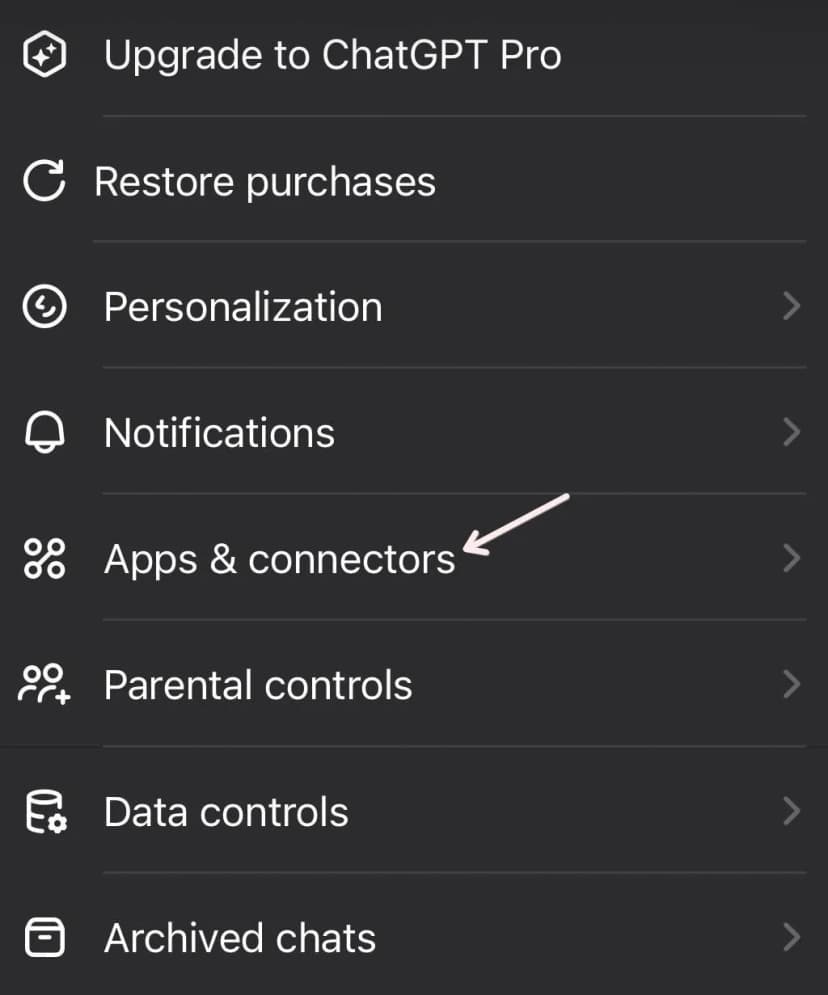
Here you'll see a bunch of apps. Pick Spotify.
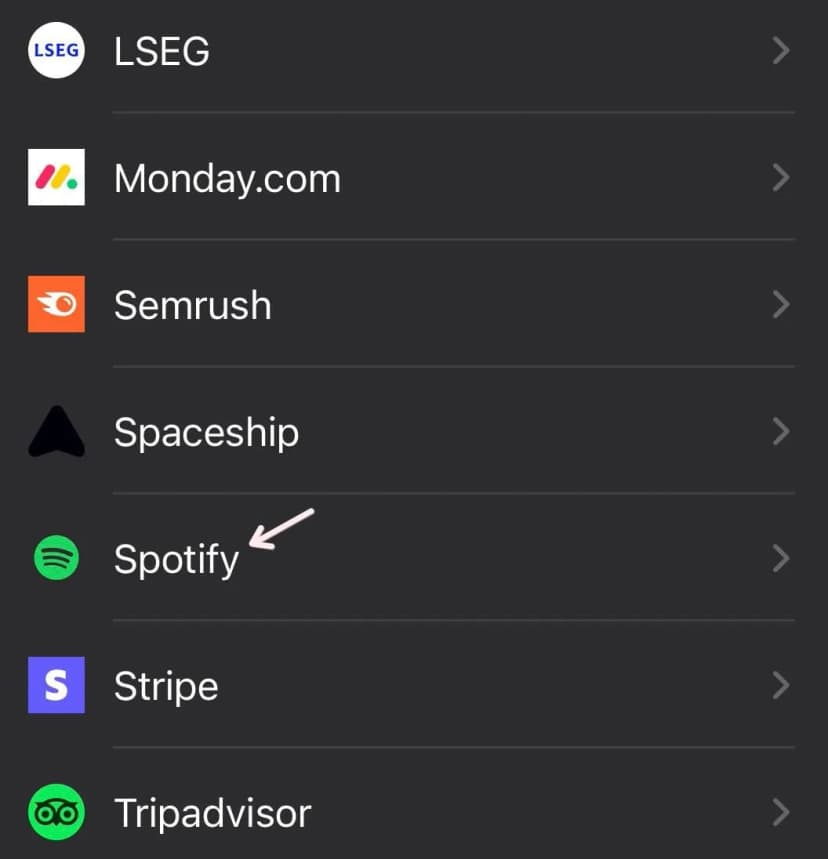
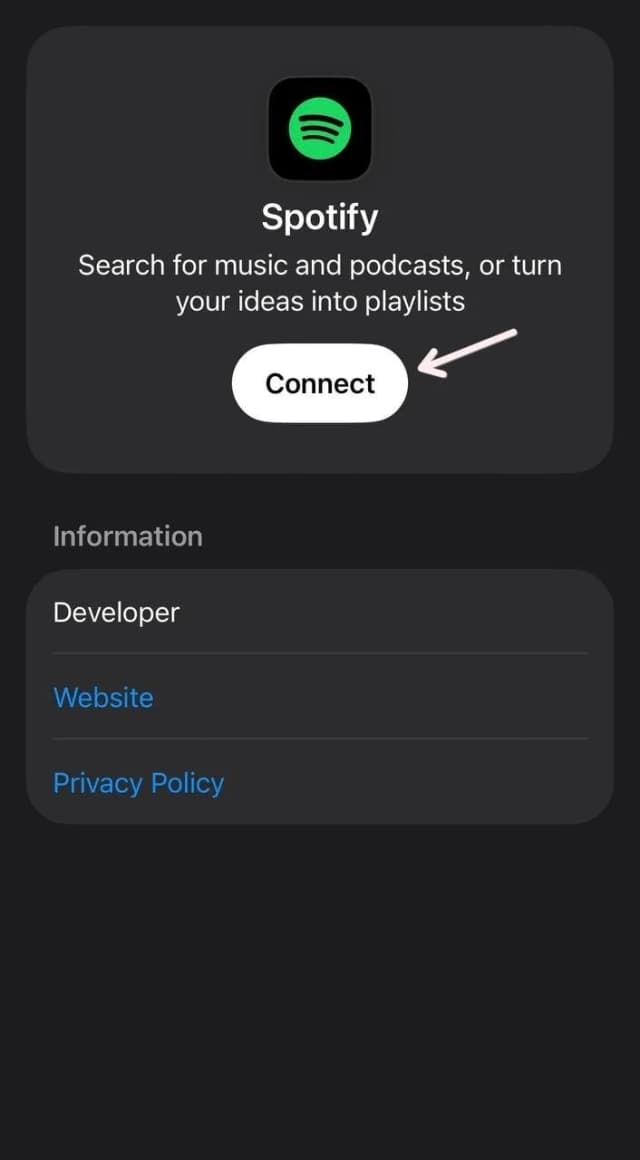
Click on 'connect.'
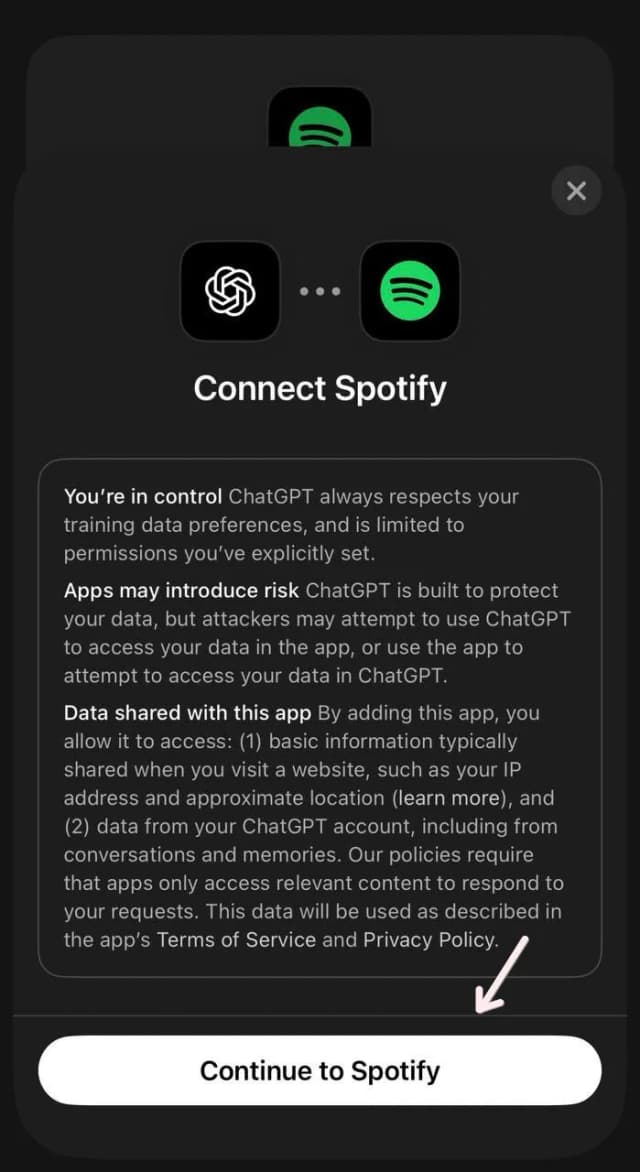
Continue to Spotify.
Agree.
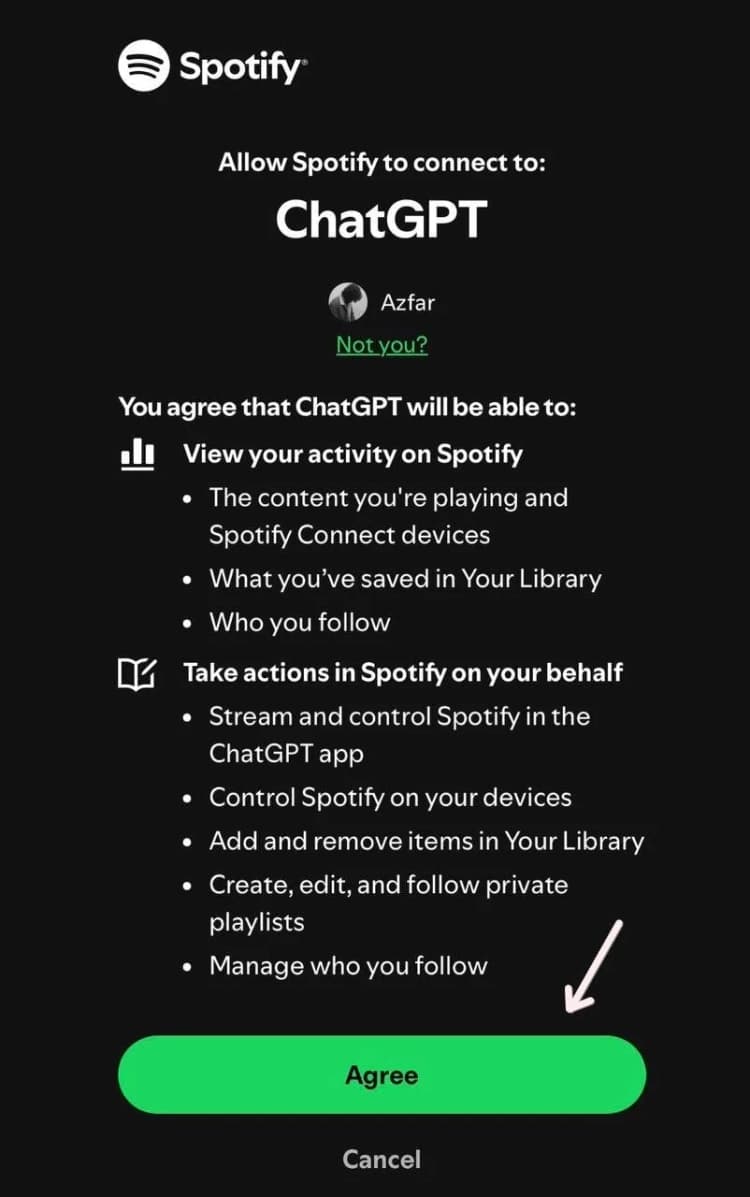
That's it. Once you're connected, you can ask ChatGPT to make a playlist of songs you'd like to have. For instance, this is what I just tried.
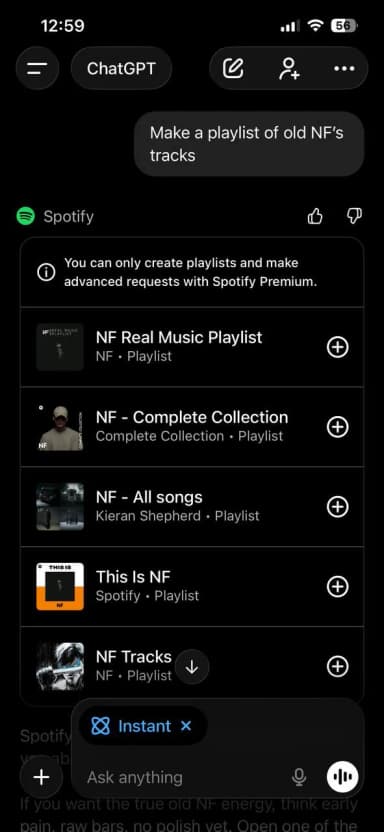
Since I don't have premium, ChatGPT gave me pre-made playlists only. But for experimentation purpose, I purchased premium and got way different results.
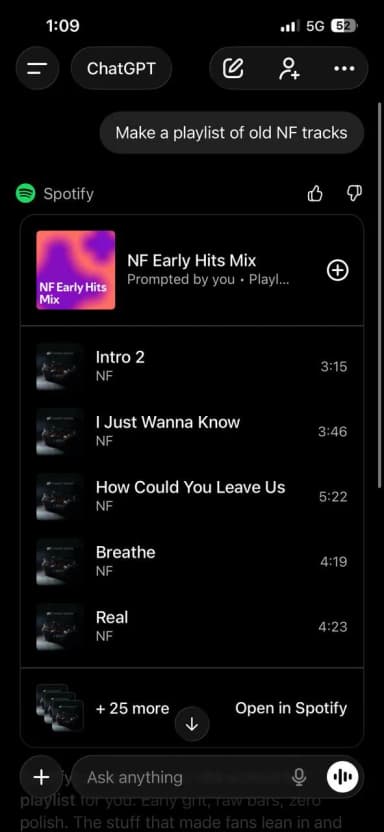
Next, I clicked on 'Open in Spotify' and got this playlist ready:
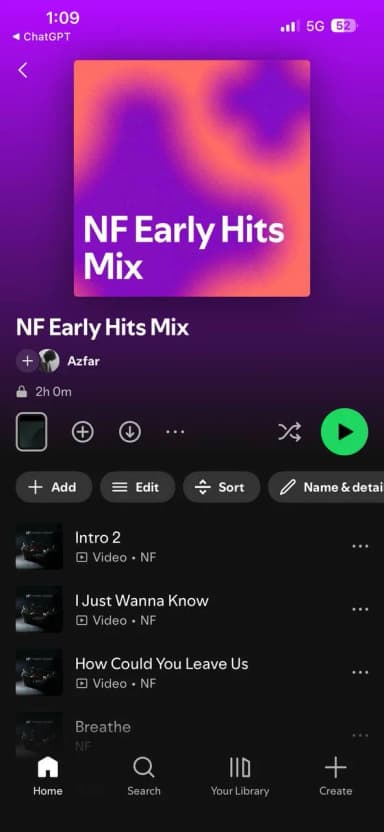
To be honest, this feature is a lifesaver for an ADHD freak like me. One minute I listen NF, next minute you might see me listening Bruno Mars.
Anyways, let me tell you a little more about this.
Current Limitations of Native Integration
The official integration is helpful, but not that powerful yet. It can build playlists and respond to your taste, but it can’t break down long-term listening data or give you the detailed insights.
Free users get these limits first. They only get access to existing Spotify playlists like Discover Weekly. There’s no custom playlists or advanced personalization.
The feature is also locked inside Spotify’s ecosystem. Anyone releasing on Apple Music, YouTube Music, or Tidal will not get cross platform discovery insights.
You also can’t why I got different results earlier. The decision process stays hidden. And once a playlist is created, it never adapts. It's a fixed snapshot rather than an evolving mix.
What You Can Do Today
To unlock real control, you need outside tools.
Plugins and no code platforms like Zapier, Appy Pie Automate, and n8n let you trigger custom workflows. You can pull data from Spotify, ask ChatGPT to analyze it, and then push actions back into Spotify.
The Spotify Web API offers the deepest access. It gives audio features like energy, danceability, tempo, acousticness, and more. When combined with ChatGPT, you can study how Spotify categorizes your sound and how your tracks compare to others in your genre.
You can also export your Spotify data and feed it into ChatGPT for manual analysis. It is simple but effective.
Why Artists Want Spotify ChatGPT Automation
Artists need accurate genre tags, mood descriptions, and consistent language across platforms.
Doing this manually takes time. ChatGPT helps you automate the process and keep everything aligned.
Artists also need clarity on what makes a track discoverable. Spotify now prioritizes saves, playlist adds, and completion rates. With ChatGPT connected through automation or APIs, you can study your own releases, compare them to similar artists, and see what patterns lead to better visibility.
Timing also matters. The first two weeks of a release send strong signals to Spotify’s algorithm. Automation helps you act faster, monitor engagement, and adjust strategy during this window.
Playlist strategy is another key piece. The more you understand the traits of playlists your music fits into, the easier it becomes to position your sound correctly.
How This Helps Artists With Promotion and Discovery
This fits naturally with SoundCampaign’s focus on helping artists understand how Spotify works.
ChatGPT powered workflows help you study playlists where your music belongs, check your metadata across platforms, and test different descriptions before release. You can track which choices lead to stronger engagement and better algorithmic placement.
Independent artists finally have access to insights that were once limited to labels. You can optimize your metadata, sharpen your artist profile, and build smarter release strategies based on real data.
SoundCampaign wants artists to make informed decisions. With Spotify connected to ChatGPT, you can do exactly that.
Method 1: Connect Spotify to ChatGPT Using Browser Extensions
There are no official browser extensions that connect Spotify to ChatGPT in the way most people want. However, a couple of third-party extensions do exist. I learned about them through some crazy artists I personally know.
Tab Tunes: Reads your webpage and uses ChatGPT to select Spotify tracks. Plays music automatically in your Spotify app. Requires Spotify Premium and an OpenAI API key. Great for mood-matching while browsing.
SpotGPT: Converts natural language prompts into Spotify recommendations and playlists with an open-source vibe.
All of these pull data from Spotify’s Web API. No coding required.
And by the way, I have not tested them myself. Setting them up can be complicated, and they may carry security or reliability risks. Use them at your own risk.
Pros & Cons of Extension-Based Integration
While extensions are a great starter for music pros looking to explore AI tools, they have limits.
Pros:
- Lets you create custom prompts for niche playlists
- Can analyze your data to provide insights for artist
- No limitation to what you can do if you know coding
Cons:
- Browser only, no native mobile app
- Complicated setup and might not be safe due to 3rd party usage
- API limits can throttle heavy usage
Method 2: Use ChatGPT Plugins (ChatGPT Plus Users)
Being a ChatGPT Plus subscriber, you can use plugins that create playlists, analyze tracks, and get tailored music recommendations.
Here's a list of plugins you can get started with:
|
Plugin |
Spotify Playlist Creation |
Track Search |
Best For |
|---|---|---|---|
|
✅ |
Limited |
Good for natural prompt → playlist |
|
|
PlaylistAI |
✅ |
Some search |
Strong for vibe-based playlists |
|
Playlist Follow |
✅ |
Discovery focus |
Playlist creation & find music |
|
SpotiFind |
❌ |
✅ |
Helps search Spotify links |
How to Enable Spotify-related Plugins
There's no toggle button to enable or disable Spotify-related plugins. Just go to ChatGPT and search any plugin from the above list like this:
Step 1: Open ChatGPT and search your plugin like this:
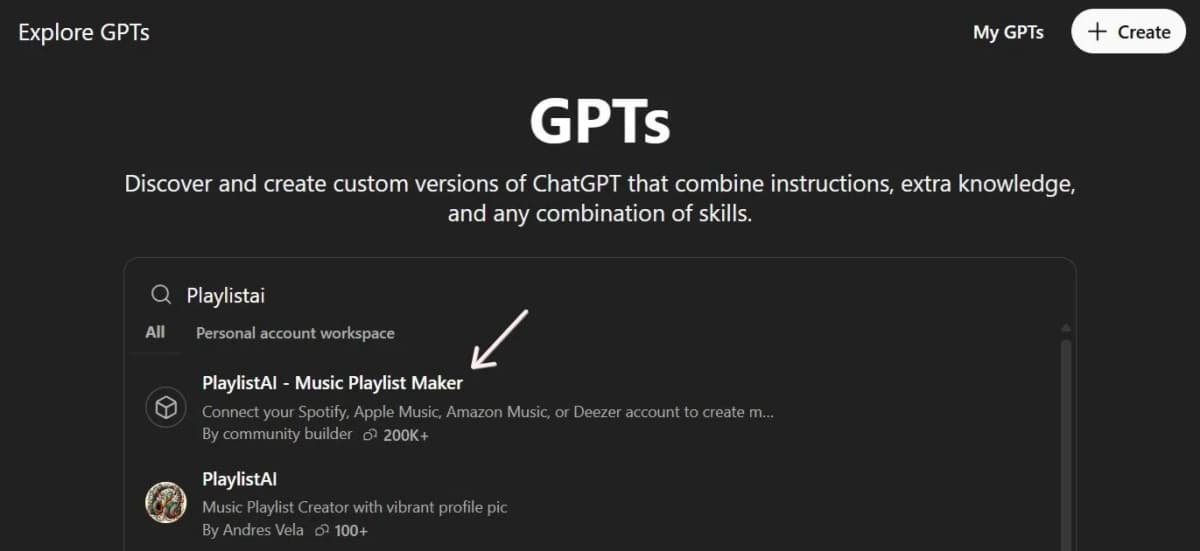
Step 2: Start chatting with your plugin. That's it.
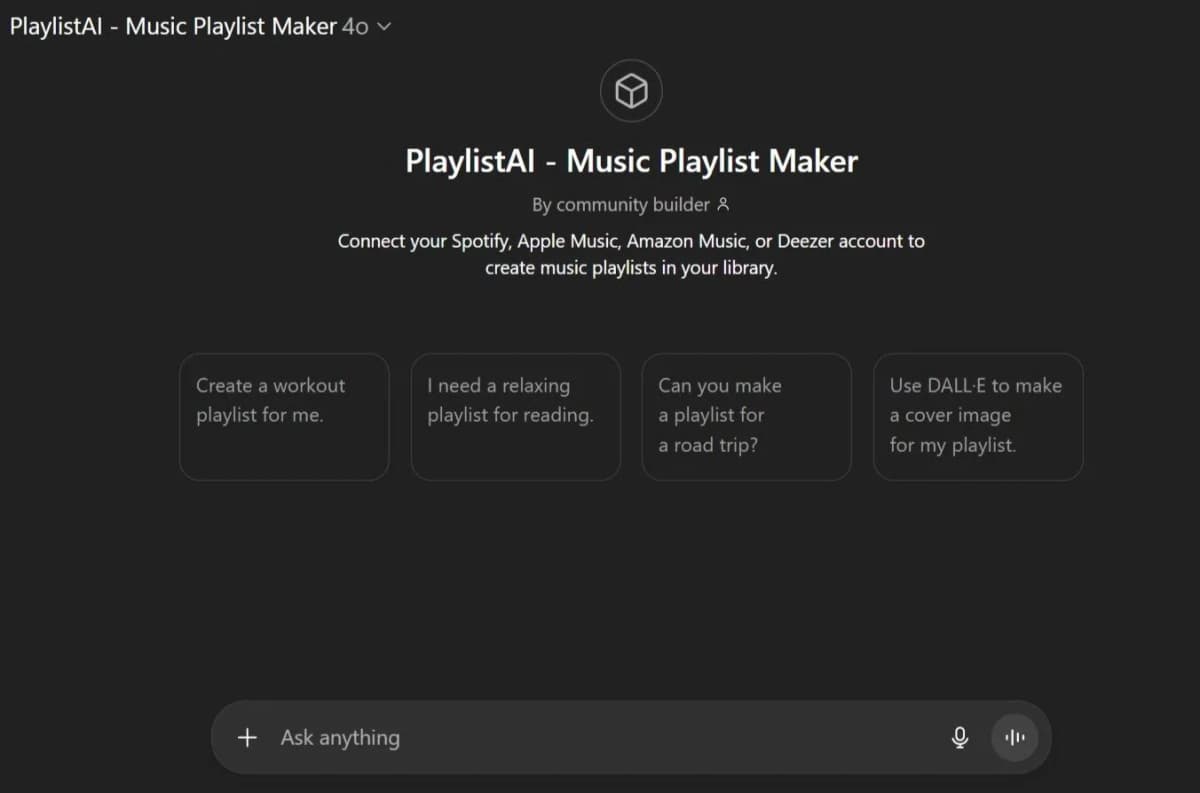
Don't know what to say? In that case, here are some:
Example Prompts for Playlist Creation & Track Analysis
|
Category |
Example Prompts |
|---|---|
|
Playlist Creation |
“Create a playlist of upbeat electronic songs like Porter Robinson and Madeon.” “Generate a chill study playlist with mostly instrumental tracks around 70–90 BPM.” |
|
Track/Artist Exploration |
“Find me songs similar to ‘Blinding Lights’ by The Weeknd.” “What are the top 10 tracks by Tame Impala with high energy and danceability?” |
|
Track Analysis |
“Analyze ‘Electric Feel’ by MGMT for energy, tempo, and mood.” “Compare the audio features of ‘Get Lucky’ vs ‘Lose Yourself to Dance’.” |
|
Playlist Tweaks |
“Remove tracks from this playlist that are slower than 80 BPM.” “Add 10 song suggestions to make this playlist more mellow.” |
Plugin Limitations & Workarounds
Plugins aren’t flawless and have some limitations:
- May not control real-time playback or handle advanced analysis
- May not generate automated mood-based playlists
- Free Spotify accounts are limited to shuffle-only playback
- Old plugins may lag or hit rate limits if you make too many requests
- Availability can be inconsistent, as some plugins appear/disappear, are region-restricted, or require re-authentication if tokens expire.
What are the workarounds? You can mix with the main Spotify app integration for broader access. Or build custom GPTs with Spotify API keys if you're techy. Revoke access anytime in ChatGPT settings if needed.
Quick Tips for Success
✅ Use specific seed artists, moods, or BPM ranges in prompts
✅ Ask for reasons (“why these tracks?”) to get analytical insight
✅ Break large tasks into steps (search → analyze → curate)
✅ Save or export playlists once finalized
Method 3: Connect Spotify to ChatGPT Using the Spotify API
You can skip the official ChatGPT–Spotify connector and connect directly to Spotify’s Web API using your own scripts or tools. Then use ChatGPT to analyze and interpret the data those scripts return.
Creating a Spotify Developer Account
To use the Spotify Web API, you need a Spotify Developer account linked to a regular Spotify login.
Sign in to the Spotify for Developers site, accept the terms, and open the Developer Dashboard. There, you create an app to get credentials like a Client ID and configure redirect URIs and permissions.
Setting Up Client ID, Secret, and Redirect URL
When you create an app in the Spotify dashboard, you receive a Client ID and a one time Client Secret. Store both securely and never expose them in public code.
To access user data such as play history, you must use OAuth.
Set a redirect URL that exactly matches the value in your app settings.
After the user grants permission, Spotify returns an authorization code. You exchange that code for an access token and include the token in the Authorization header for Spotify API requests.
If you want a step-by-step walkthrough, this video explains how to analyze your songs using the Spotify API.
Using ChatGPT to Interpret Your Spotify Data
Raw Spotify responses look like a jigsaw puzzle made of numbers and IDs, with half the pieces upside down. Not exactly friendly.
This is where ChatGPT helps. You give it cleaned or anonymized parts of your Spotify API data, and it can summarize, group, or explain what the data shows.
For example, you can share top tracks and audio features like energy or danceability and ask ChatGPT to spot patterns, find outliers, or suggest playlist ideas.
You can also turn API data into tables or CSVs and use ChatGPT to label segments, suggest genres, or recommend next steps.
Here are Some API Use Cases for You
|
API Use Case |
What the Spotify API Provides |
How ChatGPT Helps |
|---|---|---|
|
Track Recommendations |
Suggests tracks based on seed artists, tracks, genres, and audio features |
Explains why tracks were recommended and curates them into playlists or themes |
|
Genre Analysis |
Genres from artist data tied to tracks, aggregated into a genre breakdown |
Summarizes taste in plain language and groups micro-genres into broader styles |
|
Play History Insights |
Recent plays, top tracks, timestamps, and listening context |
Interprets habits, moods, and time-based patterns, and suggests playlist ideas |
|
Market & Playlist Analytics for Artists |
Playlist placements, market availability, and playlist types by country |
Translates data into strategy by spotting momentum, gaps, and targeting opportunities |
What You Can Do After Connecting Spotify to ChatGPT
Once you connect Spotify to ChatGPT, you basically get a super-smart, talkative music assistant. It can shape playlists, read your listening habits, and even help you level up as an artist.
Generate Personalized Playlists
Want a late-night focus playlist full of 2010s electronic? Just ask.
Because your account is linked, ChatGPT tailors the playlist to your taste and can even save it directly to Spotify. It’s using your listening profile plus Spotify’s catalog to build the perfect set.
Analyze Your Spotify Listening Data
Upload your Spotify history, and ChatGPT turns messy logs into insights: top artists, time-of-day trends, and skip behavior.
Ask questions like “When do I listen to the most hip-hop?” or “Which artists dominated my last three months?” and get clear answers, charts, and smarter recommendations beyond the yearly Wrapped snapshot.
Review and Break Down Your Own Songs (artists)
Feed ChatGPT your lyrics, track titles, genres, or press releases. It can describe your sound in fan-friendly language and summarize how your songs perform in playlists.
It also helps you tighten your bio, editor pitches, and the way you label your music for prompts.
Get Playlist Suggestions Relevant to Your Music
Listeners can discover your tracks via prompts like “moody indie rock for a rainy night.”
As an artist, you can ask which playlists your music fits in and use those ideas for pitching, editorial targeting, or creating starter playlists that feature you alongside similar acts.
Musician Kaila Love uses ChatGPT to seed her tracks and find “similar indie pop acts,” creating starter playlists alongside bigger names.
Improve Music Marketing Strategies using Data Insights
With Spotify integration, the path from fan prompt to getting on Spotify playlists to follow is smoother than ever.
ChatGPT can read your Spotify data alongside your content and turn that information into clear strategy.
You can see which songs hold attention, where listeners drop off, and what that means for future releases or campaigns.
You can also generate email ideas, TikTok hooks, ad copy, or content themes based on real listening behavior.
How Artists Can Use ChatGPT + Spotify for Music Promotion
You can improve your Spotify promotion by connecting ChatGPT to your Spotify account. When you pair it with music promotion tools like SoundCampaign, you can pitch playlist curators more clearly and professionally.
Using ChatGPT to Analyze Spotify Playlists You Want to Pitch
To land on a playlist, connect Spotify to ChatGPT and use it to analyze the vibe, genres, and listener data.
For example, you can request an analysis of the playlist Chill Vibes Only, including BPM range and main artists.
ChatGPT can spot patterns and assess whether your track fits, helping you pitch better.
How ChatGPT Helps You Write Better Pitch Messages
Weak pitches get ignored. ChatGPT helps you fix that.
Give it playlist analysis and ask it to write a pitch email that matches your track Neon Nights to a specific indie playlist.
It can suggest personalized hooks based on shared listener tastes or matching vibes. You adjust the tone, send the message, and move on.
Using ChatGPT to Optimize Your Artist Profile
Your profile is your first impression, and ChatGPT can help you optimize it through Spotify integration. Try a prompt like: “Spotify, review my artist profile – suggest bio tweaks and top track picks.”
It can recommend search-friendly keywords, eye-catching header images, and playlist placements based on your history. Updating your profile regularly keeps it algorithm-friendly and helps turn more fans into followers.
How SoundCampaign Helps Artists Reach Curators
With SoundCampaign, you can pitch directly to verified playlist curators, earn real placements, and grow your streams and fan base.
All curators and playlists are regularly reviewed. There are no bots or fake plays, only real listeners streaming your music.
SoundCampaign works with over 1,000 active curators. Your track is matched with playlist owners who actually listen and decide if it fits.
These case studies from our artists are some examples of how it worked out for others.
Plus, our Artist Protection Program has you covered. If curators don't listen or review your song, you don't get charged at all as we have an artist protection program.
Promote Your Music After Optimizing Your Spotify Strategy
Why Playlist Placements Matter
Getting on the right playlists is one of the fastest ways to grow your audience and streams. By 2025, Spotify had over 4 billion playlists, including 3,000+ editorial ones like Today’s Top Hits and Fresh Finds. Algorithmic playlists like Release Radar and Discover Weekly boost reach further, with 66% of users regularly listening to personalized playlists.
How SoundCampaign Works for Playlist Promotion
SoundCampaign connects your music with vetted playlist curators. You upload your track, choose playlists by genre and size, and receive real time feedback.
You get updates by email and inside your account while the campaign runs.
Final results appear after the campaign ends. Campaigns start at $80, and you can relaunch at any time to pitch your track to a new group of curators and creators.
Launching a Campaign on SoundCampaign
Launching a campaign on SoundCampaign is as easy as posting a pick on Instagram. Just visit the homepage and click on 'get started.'
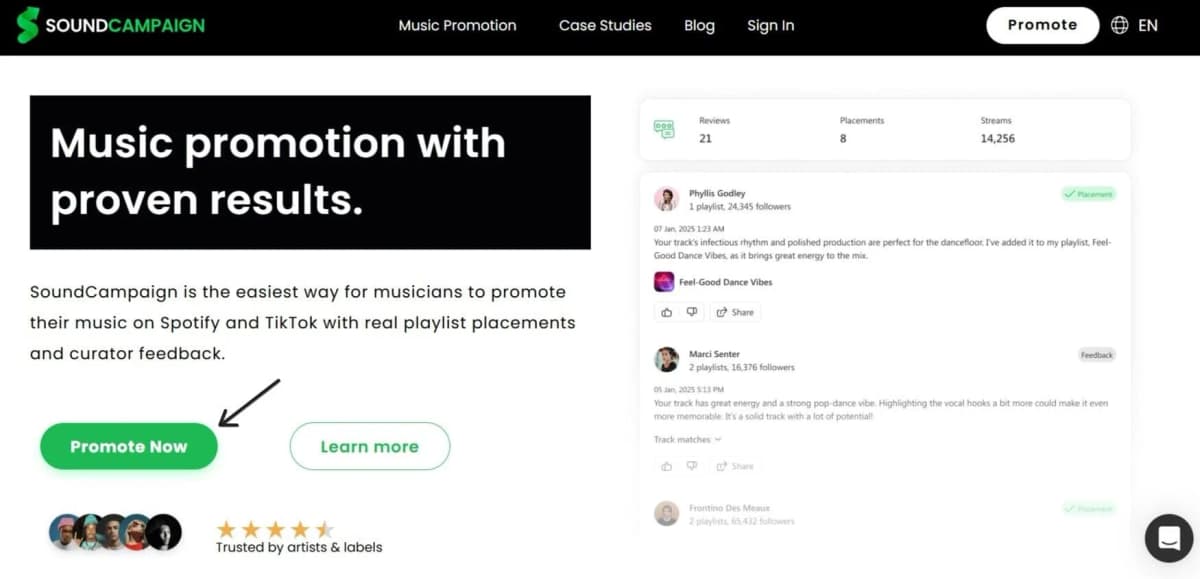
That's it. Once you click on that button, you have to answer a couple questions, create your account, and get started.
These two guides from our help center can really help you get started:
- How do I create my first Spotify campaign?
- How to set up your Spotify campaign after getting an approval from our curators
Troubleshooting Spotify + ChatGPT Integration
So far you must have understood that there are several problems that you might face. But that's not it, here are some more that we haven't addressed yet.
|
Issue |
Fixes / Tips |
|---|---|
|
Login Errors |
Clear browser cache or app data Try incognito mode or a different browser Log out of Spotify and ChatGPT, then reconnect from a fresh chat |
|
Authentication Fails |
Check your region (145+ countries supported) Turn off VPNs Revoke access in Spotify's "Apps" section and retry |
|
API No Results |
Add more listens if your history is thin Make prompts specific (e.g., "indie rock, high energy") Free accounts hit shuffle limits, so use Premium Test on web if mobile fails |
|
Plugin Vanishes |
Prefix prompts with "Spotify," (e.g., "Spotify, playlist for gym") Use English only Update ChatGPT app and restart device Try web version if mobile fails |
|
Permission Denied |
Revoke Spotify in ChatGPT settings under connected apps Unlink ChatGPT in Spotify account settings Reconnect fresh If this persists, wait 24 hours or contact support |
Conclusion
AI is a powerful tool for an artist’s journey. It helps you understand how fans respond to your music and create moods, playlists, and promo ideas that connect. Instead of generic playlists, you build focused track selections that match your brand and drive engagement on TikTok or Instagram.
AI also simplifies data analysis, track discovery, and audience growth. By using ChatGPT plugins or connecting through the Spotify API, you can refine your playlist strategy and improve performance on Spotify.
To take the next step, SoundCampaign promotes your music through real playlist curators and real fans. Launch your first campaign and turn AI driven discovery into consistent stream growth.

Cerebro de marketing, corazón de escritor, alma de músico. En SoundCampaign me encargo del SEO, destrabo cualquier cuello de botella de marketing que aparezca, y escribo lo que realmente ayuda a los artistas a avanzar. También soy músico, así que casi todo lo que escribo viene de los dos lados. Cuando no estoy haciendo nada de eso, estoy en mi estudio destartalado, escribiendo y produciendo, todavía persiguiendo un sonido que algún día quizás llegue a las listas.
Promociona tu música
Playlists reales, videos de TikTok y anuncios en Meta

La confianza de más de 100,000 artistas y sellos
Sin bots, nunca.

Caso real
Cómo SoundCampaign puso a Grant Knoche frente a 460,587 oyentes con WOOHOO
Leer la historia completa
¿Listo para que escuchen tu música?
Únete a miles de artistas independientes que usan SoundCampaign para llegar a playlists reales, creadores y fans, con comentarios honestos en cada paso.
- Sin bots, nunca
- Programa de Protección al ArtistaSi un curador o creador no reseña tu tema, te devolvemos el crédito. Tu presupuesto siempre está protegido.
- Conserva el 100% de tus regalíasSomos un servicio de promoción, no un sello. Nunca nos quedamos con un porcentaje de tus streams o regalías.