音楽プロモーション
How to Release a Single in 2026 (Step by Step Guide)

Nadav Peleg
更新日 · 12分で読了
You have no idea how to release a single? In this blog, I'll share practical strategies that can help you get fans from every single you put out there.


On this page
- Step 1: Choose Your Distributor
- Step 2: Set the Release Date and Work Backwards
- Step 3: Final Audio Ready (No Surprises)
- Step 4: Artwork + Visual Assets
- Step 5: Upload Your Single Correctly (Metadata + Credits)
- Step 6: Claim and Prepare Artist Profiles
- Step 7: Pre-Save Campaign (Simple, Not Fancy)
- Step 8: Playlist Pitching
- Step 9: Pre-Release Promotion Plan (Content Batching)
- Step 10: Release Day Checklist
- Step 11: Post-Release Momentum (2–4 Weeks)
- Optional: Press Release + EPK (If You’re Pitching Media)
- FAQs
- Conclusion
Since I started SoundCampaign, I’ve seen the same mistake over and over again. Artists create a great track, upload it to Spotify, and hope it somehow gets heard. Best case, they share it on Instagram or in a WhatsApp group where the same people see it.
That’s not how this works.
In this guide, I’ll walk you through how to release a single the right way, based on a decade of experience, so each release actually builds momentum instead of disappearing after a couple of days.
Step 1: Choose Your Distributor
Your distributor controls where your music goes and how fast you get paid.
When choosing the best music distributor, check this before signing up:
- Does it cover platforms like Spotify, Apple Music, TikTok, Instagram, YouTube, etc?
- Pricing model. Flat fee or commission?
- Payout timing. Weekly, monthly, or minimum threshold?
- Split payments for collaborators?
- ISRC retention if you ever switch distributors?
- Takedown and re-release control?
- Access to data and artist profiles?
- Support response speed?
- Rights ownership and exclusivity?
Common mistakes
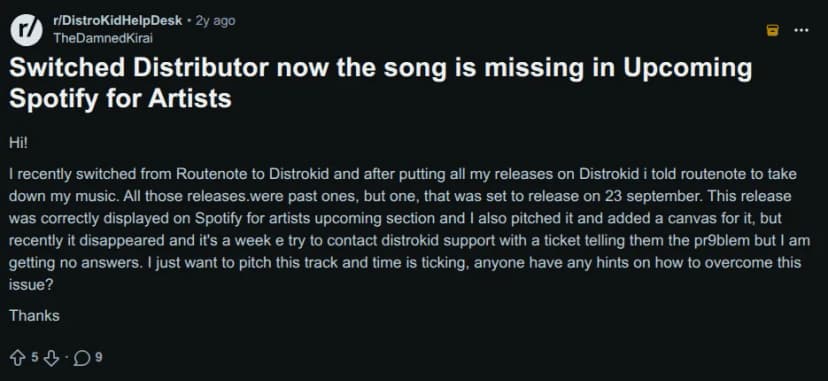
- Choosing based on price only: Cheap distributors often limit control and slow support. These issues usually show up once a song starts performing, when timing matters most.
- Not checking payout rules and takedown control: Delayed payouts, minimum thresholds, or frozen funds during takedowns can block re-releases and cause playlist drops.
You don't want to be one of the Reddit users who post like this:
Step 2: Set the Release Date and Work Backwards
Never upload your single “when it’s ready.”
Pick a date. Then plan backwards.
For example, uploading to Spotify on a Monday for a Friday release often misses editorial review. The result: no algorithmic or editorial lift.
What needs lead time
- Spotify editorial pitching (minimum ~7 days, safer at 14+)
- Platform review and approval
- Pre-save setup
- Content creation
Follow this realistic timeline for best results:
|
When |
What to do? |
|---|---|
|
3–6 weeks before |
Choose your distributor, set the release date, get the final master ready, and prepare artwork, metadata, and short-form content. |
|
2–3 weeks before |
Upload the song, submit your Spotify pitch, set up your pre-save, and start lining up playlist outreach through curator platforms like SoundCampaign or direct outreach. |
|
1 week before |
Start posting teasers, remind your audience, and begin reaching out to playlists, blogs, and curators. |
|
Release day |
The song goes live, you post across platforms, update all links, and actively engage with listeners. |
|
Weeks 2–4 after |
Keep posting content, share milestones, re-pitch the track, and double down on what’s working. |
Common mistakes
- Uploading late and missing playlist pitch windows: Uploading too close to release removes your chance to pitch to editorial playlists. The song goes live with no early playlist support and limited reach.
- Promoting before links exist: This wastes attention as fans click, find nothing, and are less likely to return when the song finally drops.
Step 3: Final Audio Ready (No Surprises)
This is where small mistakes turn into big delays.
Even Kanye West ran into this. After The Life of Pablo was released, he kept making mix changes for months. It worked for him, but most artists don’t get that grace.
Before uploading, confirm:
- Final mastered WAV
- Clean version if the song is explicit
- Instrumental ready if possible
Common mistakes
- Uploading the wrong master and catching it too late: Fixing it requires reprocessing the track, which can delay approvals and affect early visibility.
- Forgetting the explicit flag and scrambling for last-minute fixes: Platforms flag it, updates take time, and playlist or short-form access can be reduced.
Step 4: Artwork + Visual Assets
In 2026, audio doesn’t travel alone.
You need
- Platform-approved cover art
- Updated artist photo
- Optional lyric video or visualizer
- 5-10 vertical short videos (7-30 seconds)
Songs supported by short-form video usually get more saves than audio-only releases. Lil Nas X’s breakout hit gained huge traction through TikTok trends. Short clips using the song spread widely, helping the track cross over into mainstream charts and stream counts.
Common mistakes
- Creating visuals after the song is already out: The song gets tested before your content is ready and you miss the early attention window.
- Using low-res cover art: It looks unprofessional and can get rejected or appear blurry in playlists.
Quick Rules (All Platforms)
✅ Always use a square image (1:1)
✅ Use JPG or PNG formats
✅ Higher resolution (like 3000×3000) is better for quality and scaling
✅ Cover art that is too small or not square may be rejected or look blurry
Step 5: Upload Your Single Correctly (Metadata + Credits)
Metadata isn’t cosmetic. It’s what platforms use to:
- Match songs to artist profiles
- Feed your music into playlists
- Recommend to listeners who actually like your style
This step is the difference between “released” and “discoverable.”
Wrong genre = wrong algorithm bucket = lower playlist fit = fewer saves.
Must-check fields
- Track title exact spelling
- Primary artist name consistent everywhere
- Featured artists formatted correctly
- Genre and mood selected accurately
- Explicit flag correct
- Songwriter and producer credits added
- Lyrics submitted
- ISRC confirmed
Common mistakes
- Misspelling names or using different artist formatting across platforms
For example, uploading “Micheal Connor – Growing Together” instead of “Michael Connor – Growing Together” can make platforms think there are two different artists, splitting your music and your stats.
- Choosing the wrong genre, which sends your song to the wrong audience and hurts playlist chances
Pro tip: Copy and paste artist names and titles from one master sheet. Never type them from memory.
Step 6: Claim and Prepare Artist Profiles
Before anyone saves your song, they click your name and what they see matters. An empty profile doesn’t look “new.” It looks unfinished.
Make sure you have:
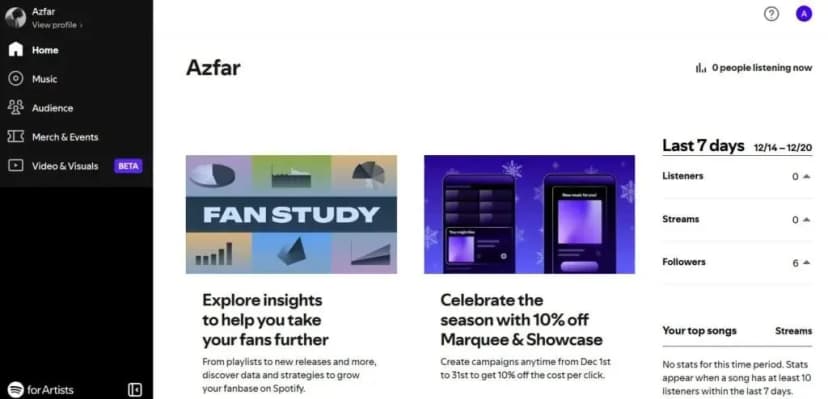
#1 - Access to Spotify for Artists.
Here's my claimed artist profile:
#2 - Access to Apple Music for Artists.
#3 - An updated bio, photos, and links
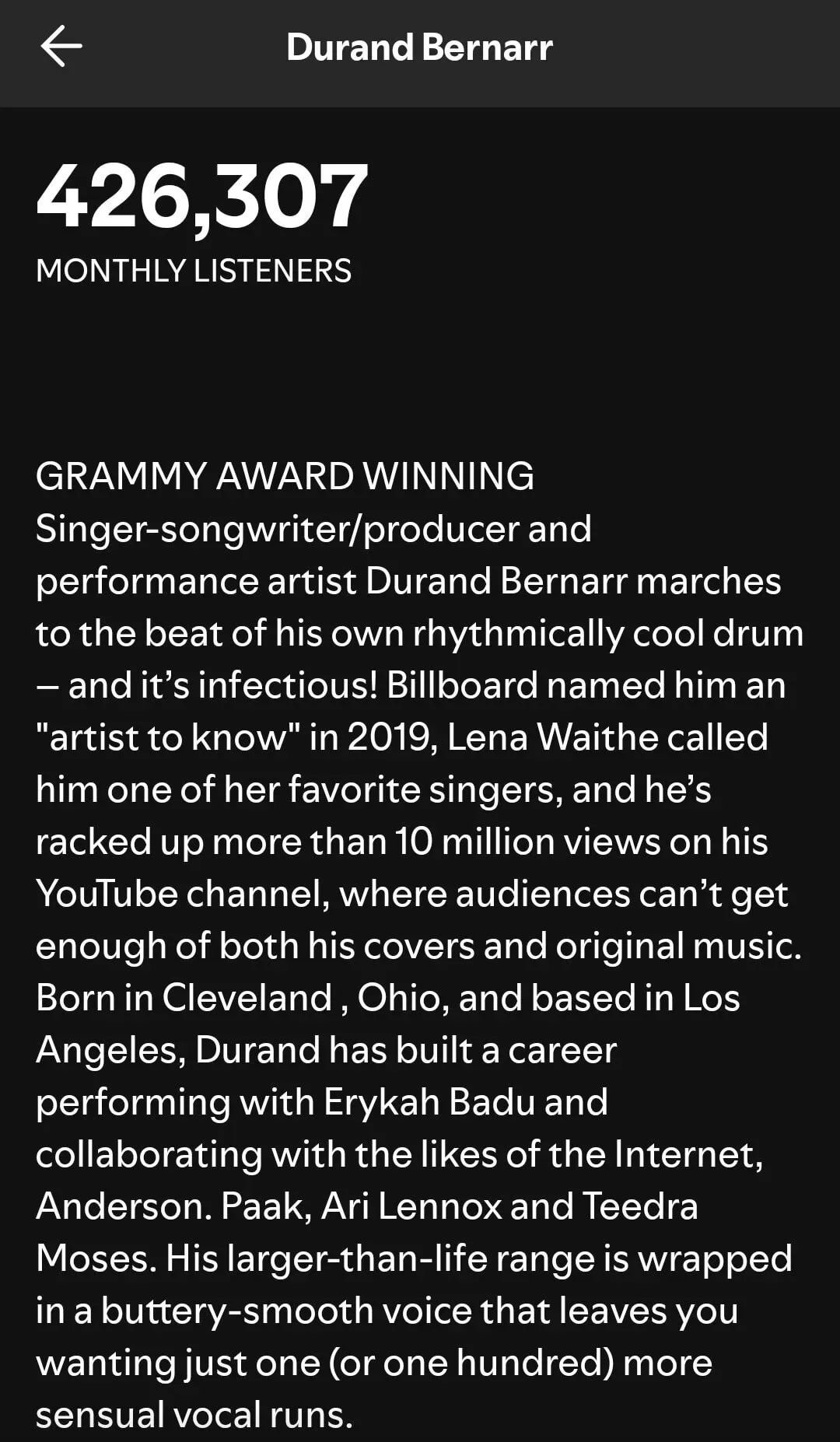
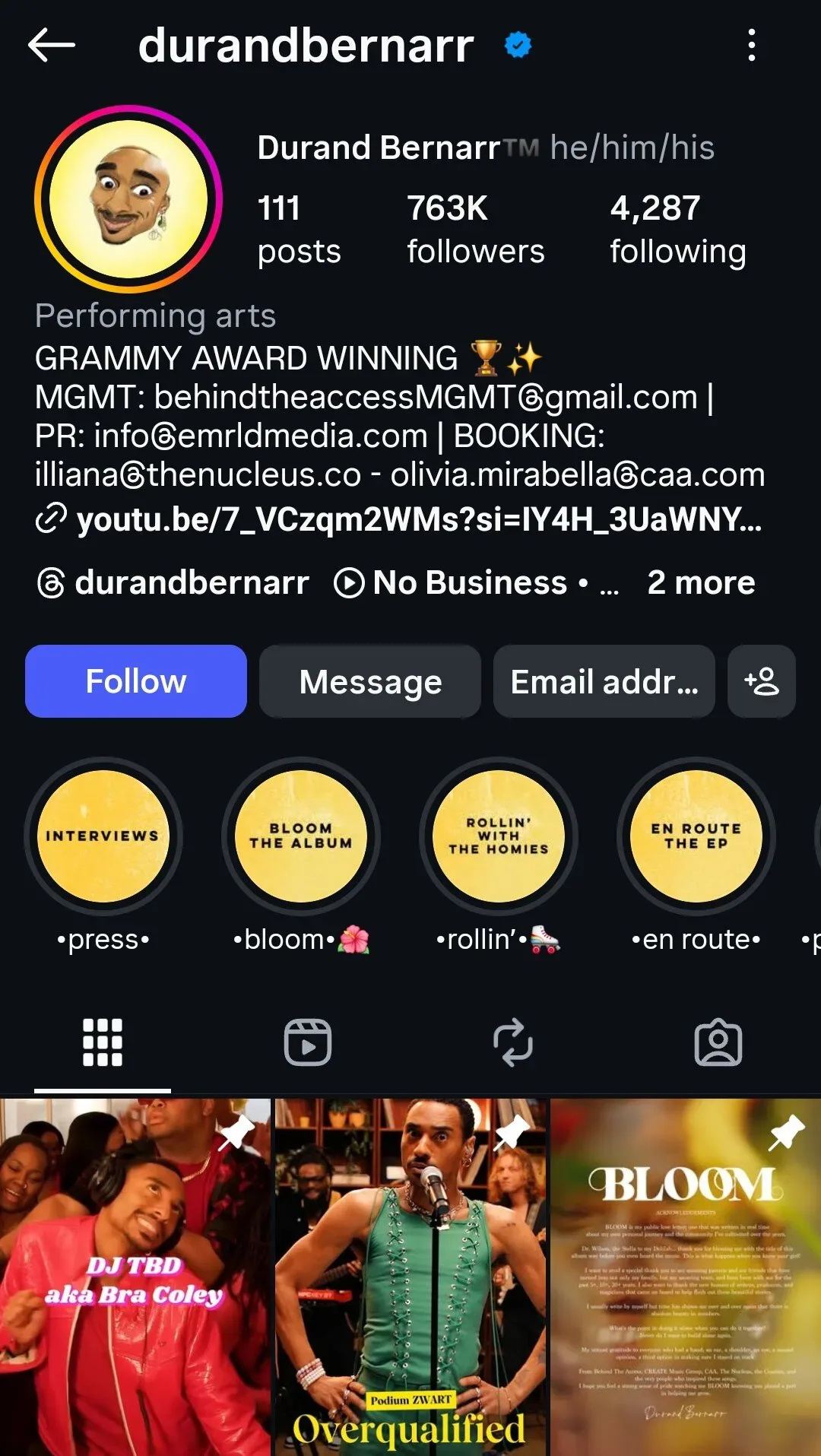
Be like Durand Bernarr: his Spotify and Instagram profiles already show that he's a Grammy winner just days after the ceremony.
#4 - Canvas, clips, or an artist pick ready if you’re using them
Just in case you don't know much about it, this Spotify clips guide can help you out.
Common mistakes
- Waiting until release day to claim your profiles: People click your name as soon as the song drops. If your profile isn’t claimed, you lose control at the exact moment attention hits.
- Leaving your profile empty or outdated: An empty or old profile kills trust fast. Listeners and curators check it before committing. If it looks neglected, they move on.
Step 7: Pre-Save Campaign (Simple, Not Fancy)
Pre-saves help when they’re real but hurt when they’re inflated.
Simple beats clever here. You only need:
✅One landing link
✅One clear CTA
✅Email capture if possible
Focus on real people saving, not big-looking numbers. Real pre-saves usually turn into day-one streams and saves. Fake or forced ones don’t and music platforms notice the difference.
Common mistakes
- Treating pre-saves like a trophy: High numbers don’t matter if people don’t stream later.
- Using too many links: One link works best as too many options slow people down.
Step 8: Playlist Pitching
Playlists are still one of the main ways people discover new music. The right Spotify playlist puts your song in front of listeners who already want that sound.
If you want a shot at editorial playlists, submit your pitch in Spotify for Artists at least two weeks before release. Keep it short and give editors context, not hype.
What to include in your pitch
- Genre and mood
- Comparable artists
- A one-line story hook
For example:
Afro-pop track built around live percussion and call-and-response vocals. Inspired by Burna Boy’s rhythmic phrasing with a stripped-back, intimate tone.
Btw, here are some Spotify playlist pitch examples that work.
Want to seriously improve your chances? Here are some more blog resources for you.
- How to Submit Music to Spotify Playlists
- Spotify Playlist Placement: The #1 Masterplan for Musicians
- How to Contact Spotify Playlist Curators (6 Easy Steps)
When pitching independent curators, the rules are simple: show that you’ve done your homework.
Send them:
- A streaming link
- A short bio
- A one-line hook
- A clear reason your song fits their playlist
Generic copy gets ignored. Personal notes get opened.
And if you’re trying to break into Spotify community playlists, that’s where SoundCampaign comes in. It connects you with real curators, gives you feedback, and helps you pitch your music the right way instead of guessing.
The goal isn’t to get on any playlist. It’s to land on the right ones, and the SoundCampaign artist case studies show why that matters.
Sound interesting? This is how you can create your first Spotify campaign.
Common mistakes
- Vague pitch copy: Saying “great vibes” or “genre-blending track” tells curators nothing. They need to quickly understand the sound, mood, and why it fits their playlist.
- Wrong genre tags: If the genre doesn’t match the music, the song lands in the wrong bucket. That means fewer relevant playlists and weaker algorithm testing.
- Paying sketchy playlist services: Guaranteed placements usually mean botted or low-quality playlists. Best case, nothing happens. Worst case, the single gets flagged or removed.
Step 9: Pre-Release Promotion Plan (Content Batching)
This is where momentum is built.
Start with these 4 content buckets.
|
Content bucket |
What to post |
Why it works |
|---|---|---|
|
Teaser |
Short clips that introduce the sound |
Grabs attention fast without overexplaining |
|
Story / hook |
Why the song exists. One clear angle |
Gives context and emotional buy-in |
|
BTS / process |
Studio moments, writing clips, real context |
Builds trust and connection |
|
Lyrics & reactions |
Lines that hit. First listens. Honest responses |
Shows impact and social proof |
Pro Tip: Post 2–4 times a week. Consistency beats volume. Also make sure every post points to one link. That focus keeps things simple and helps more people actually click.
Common mistakes
- One teaser post then silence leads to attention fading and momentum dying
- Posting without a clear CTA gives people no clear next steps to act meaning no results
Step 10: Release Day Checklist
Use this as a quick release-day audit.
- Is the single live on all platforms?
- Is your link in bio updated and working?
- Is your main release post pinned?
- Did you post one short video and one story sequence?
- Are you replying quickly to comments and DMs?
- Did you clearly ask for saves and playlist adds on your posts?
Common mistakes
- Posting once and disappearing: One post isn’t a launch. If you vanish right after, engagement drops and the algorithm stops testing the song.
- Sharing broken or wrong links: People won’t hunt for your song. If it doesn’t open instantly, they’re gone.
Step 11: Post-Release Momentum (2–4 Weeks)
This is where most artists stop and that’s why most songs stall.
Don't be like them, here's the play:
|
Action |
What it means in practice |
|---|---|
|
Repurpose content into 10–20 shorts |
Turn BTS, lyrics, or moments from the song into short videos instead of creating new ideas |
|
Share milestones |
Post saves, playlist adds, or comments to show momentum and social proof |
|
Re-pitch to curators |
Reach out again once you have early traction to strengthen your pitch |
|
Run a second content wave |
Post fresh clips 7–10 days later to restart attention |
|
Review data and plan next release |
Look at saves, streams, and completion rate to improve the next drop |
Here are 10+ post ideas you can start using today to promote your single
- “Before / after” clip: Play the demo for 3 seconds → cut to the final release
- Behind the scenes recording booth moment, fans love the process
- Your first reaction video after hearing the master
- One lyric on screen: Plain text, no explanation
- “I wrote this because…” Then play the hook.
- Live room performance: phone on a stand, one take
- Fan comment highlight
- First community playlist add, simple screenshot to thank the curator
- Algorithm moment: “This just hit Release Radar”
- Save milestones: “1,000 people saved this!”
- “Didn’t expect listeners in [city/country]”
- Week-one reflection
Common mistakes
- Stopping after 48 hours: Most songs don’t peak on release day and algorithms are still testing in the first week. When you stop posting early, you cut that test short and the song stalls before it has a chance to grow.
- Not learning from performance data: Streams aren’t enough. Saves and playlist adds show what actually worked. Ignoring those signals means you repeat the same mistakes on the next release instead of improving.
Optional: Press Release + EPK (If You’re Pitching Media)
Only do this if you’re actually reaching out to blogs or press. Keep it tight. No fluff.
Your press release must include:
- A one-line hook that explains why this release matters
- The release date
- Streaming links
- A short artist bio
- One quote (artist or team)
- Your contact info
A good EPK answers this question in under 60 seconds: “Can I write about this artist right now without emailing back and forth?”
Your Electronic Press Kit, or EPK should include:
- Your artist bio (tight, clear, no fluff)
- High-quality photos and cover art
- Top 3-5 streaming links
- Social media handles
- Performance footage (if available)
- Press highlights and notable wins (playlist adds, syncs, etc.)
- Key stats: monthly listeners, engagement rate, followers
- Contact info for you or your manager
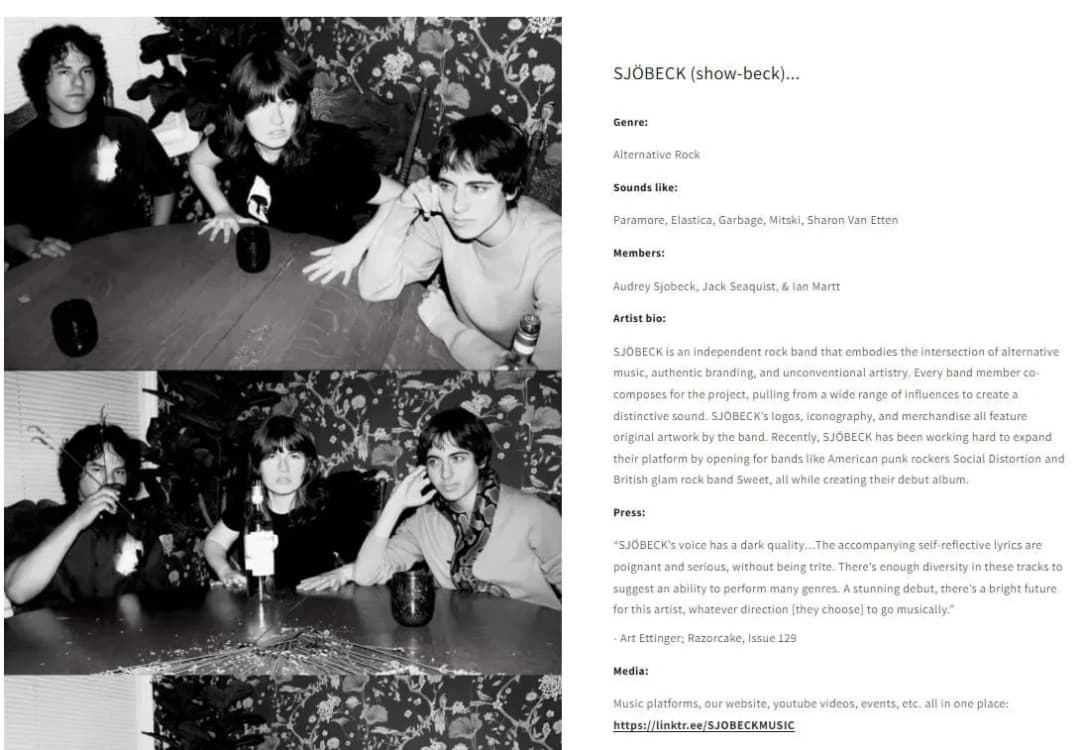
I love how indie rock band SJÖBECK made their EPK design clean, professional, and easy-to-navigate.
I’d recommend using Canva, Wix, EPK Builder, or IndieFlow to build your own EPK. Remember to keep it simple, organized, and polished to showcase your music, bio, videos, and press highlights.
FAQs
How long does it take for a single to go live?
Typically 3-7 days after approval. It can take longer if metadata needs fixes or platforms flag issues.
How far in advance should I upload?
At least 3-4 weeks if you want access to Spotify editorial pitching and a clean rollout.
Do I need a pre-save?
No. It helps, but only if real fans are saving.
How do I pitch Spotify editorial playlists?
Through Spotify for Artists, before release. You can submit one pitch per song, and it must be live in the system but unreleased.
What metadata matters most?
Artist name, track title, genre, credits, and the explicit flag. Mistakes here affect discovery and attribution.
Do I need a music video?
No. Short-form vertical video performs better early on and is more widely used across platforms.
How often should I release singles?
Every 4-8 weeks is realistic and sustainable for most artists.
Conclusion
Don’t stop at release day. That's where most artists make a mistake.
Keep pushing the single for 2-4 weeks. Pay attention to what’s actually working, double down on it, and carry those lessons into the next release.
That’s how you build momentum.

SoundCampaign 創業者兼CEO
ナダブです。今のこの会社を作る前は音楽を作っていて、マーケティングへの関心はそこから生まれました。一番好きなのはアナリティクスの部分、つまりストリームがどこから来て、何が動いて、何が動かなかったのかを見ることです。 SoundCampaignを設立したのは、アーティストに本当の意味での露出を届けるためです。想定していたよりはるかに多くの時間と労力がかかり、それは今もあまり変わっていません。
音楽をプロモーションする
実在するプレイリスト掲載、TikTok動画、Meta広告

100,000以上のアーティスト・レーベルに信頼されています
ボットは一切なし。
あなたの音楽を届ける準備はできましたか?
SoundCampaignを使って、実在するプレイリストやクリエイター、ファンにリーチしている何千人ものインディーアーティストに加わりましょう。すべての段階で正直なフィードバックが届きます。
- ボットは一切なし
- アーティスト保護プログラムキュレーターやクリエイターがあなたの楽曲をレビューしなかった場合、その分のクレジットを返還します。あなたの予算は常に保護されています。
- ロイヤリティは100%あなたのもの私たちはレーベルではなく、プロモーションサービスです。あなたの再生数やロイヤリティから手数料を差し引くことはありません。