Distribución Musical
How to Upload Music to Spotify as an Artist & Get paid

Nadav Peleg
Actualizado · 13 min de lectura
You're having a tough time finding that upload button on Spotify? No worries, this guide can help you understand how to upload music to Spotify in 5 minutes.


On this page
- Step 1: Gather What You Need Before Uploading (Don’t Skip This)
- Step 2: Learn Why Spotify Doesn’t Have an Upload Button Like YouTube
- Step 3: Let’s Upload Your Music to Spotify
- Step 4: Claim Your Spotify for Artists Profile
- Some Common Mistakes That Might Kill Your Release
- The Final Step: Get Noticed on Spotify (Optional)
- Before You Leave…
When I started my career as a musician, I used to upload my tracks on YouTube. I thought that was enough.
And then, one day a friend of mine ended up calling me a YouTube artist. And no, he didn’t stop there.
He mocked me because I didn’t know what distributors even mean.
That conversation felt like a tight slap in the face.
And even when I tried, ‘broke me in the past’ learnt that it takes $20 to upload on Spotify.
But luckily, another friend of mine taught me a free way too.
Now that you’re here, looks like you’re in the same shoes right now. No worries, let’s make sure you don't have to read another guide to understand how to upload music to Spotify on your own.
Step 1: Gather What You Need Before Uploading (Don’t Skip This)
This might sound like you already got it. But in reality, no you don’t get it at all. The reason being, you’ve never uploaded a track on Spotify, Apple Music, or any other streaming platform.
So, make sure you pay attention to what I’m gonna tell next.
Finished, Mixed, and Mastered Track
Don’t try to upload a RAW track of yours. It’s like trying to premiere a half-painted canvas.
There’s a difference between “done” and “done right.”
If you want your song to stand next to pro releases, it needs to sound like one. Also, don’t take the loudness of your track for granted.
If it’s not -14 LUFS, Spotify will itself turn down the volume of your track. And if that happens, you’ll definitely get why your bass doesn’t sound like it does offline.
Cover Art, Profile Avatar, and Heading Banner
The cover of your track speaks faster than your music. So, make sure you keep all the requirements in check.
File format: JPG or PNG (TIFF is technically allowed, but why complicate your life?)
Resolution:
- Cover art: At least 640x640px (but you can aim higher for 3000x3000px as it’s the gold standard)
- Profile avatar: Minimum 750x750px
- Header banner: 2660x1140px
File size limits:
- Max 4MB for cover art
- Max 20MB for profile or header images
Aspect ratio: For cover art, 1:1 (square) only. No wide banners. No tall crops.
Metadata
Metadata isn’t optional. It’s the foundation that tells Spotify (and every other platform) who you are, what the song is, and where it belongs.
When you upload your track, you’ll need three key things:
- Track title
- Artist name
- ISRC code
The title should match what you want fans to see. Avoid any typos or weird symbols.
Your artist name must be consistent across every release. Same spelling. Same formatting. Otherwise, Spotify might create a duplicate profile or split your catalog.
The ISRC code is a unique ID for your song that tracks plays and ensures you get paid royalties.
Most distributors will generate one for you. But you can also get your own through your national ISRC agency if you prefer handling it yourself.
Basically, clean metadata helps your track:
- Show up in search
- Get recommended
- Land in playlists
- Get your royalties paid to you, not someone else
Ownership & Rights (Very Important)
You can't just upload any track you made and expect Spotify to let it slide.
To release music legally, you need to own or license 100% of the rights to everything in your track.
That includes:
- Instrumental
- Vocals
- Beat
- Samples
If you’re working with collaborators like producers, co-writers, or vocalists, you need clear agreements on who owns what.
Handle splits before uploading, not after.
For covering someone else’s song, you need a mechanical license.
In the US, this is managed by the Mechanical Licensing Collective (MLC). It keeps everything compliant and gets everyone paid.
Now let’s talk about samples.
This is where a lot of indie artists mess up.
It doesn’t matter if it’s one second or twenty.
If you’re using a sample, you need explicit clearance from the owner of the original recording and composition.
There is no "safe zone" or length that magically makes it legal. If you don’t have permission, you can’t use it.
Failing to clear a sample can lead to takedowns, lost royalties, copyright issues, and even getting blacklisted by your distributor.
Step 2: Learn Why Spotify Doesn’t Have an Upload Button Like YouTube
When I started uploading tracks on YouTube, I thought I’d do the same on Spotify.
But as soon as I opened my Spotify, I saw there’s no upload button.
You know why they don’t have any? That’s because…
Spotify Uses Distributors
Unlike YouTube or SoundCloud, Spotify is not a content hosting platform.
It’s a licensed music streaming service that operates under strict legal and technical frameworks. Here’s what that really means:
Licensing & Liability
Spotify pays royalties to rights holders under complex licensing agreements with record labels, publishers, and collecting societies.
If they allowed direct uploads from anyone, they'd also take on direct legal liability for copyright infringement, unlicensed samples, or fraudulent metadata.
By using distributors, Spotify outsources that risk.
Distributors are responsible for vetting content, managing rights, and ensuring everything meets legal standards before it ever touches Spotify’s servers.
Think of it like this: Spotify doesn’t want to police millions of uploads themselves. They want middlemen who can verify, clean, and clear tracks before they arrive.
Metadata Standards & Ingestion Systems
Spotify’s backend is optimized for bulk ingestion via pre-approved partners.
These distributors send music to Spotify’s content ingestion pipeline using DDEX feeds (a global metadata standard for digital music distribution).
This ensures that:
The right track gets assigned to the right artist profile
All metadata (ISRC, UPC, splits, lyrics, etc.) is structured and standardized
Tracks are delivered with artwork, audio, and licensing info in one go.
If Spotify let everyone upload directly, they’d have to build a full content management system, not just for files, but for verifying metadata, correcting errors, resolving conflicts (e.g., two artists with the same name), and handling royalty distribution.
That’s a lot of infrastructure and room for errors.
Fraud Prevention
Music streaming fraud is already a huge issue.
Fake streams, botted uploads, plagiarized tracks, and God knows what else. All of it costs Spotify and legitimate artists money.
Distributors act as a first line of defense, using fraud detection tools and manual review to block suspicious activity.
If Spotify opened the gates to direct uploads, they’d be hit with an avalanche of low-quality or outright fraudulent content, and no scalable way to catch all of it.
Spotify Did Try Direct Uploads (It Didn’t Work)
Fun fact: In 2018, Spotify tested a feature that allowed artists to upload directly via Spotify for Artists. But by mid-2019, they shut it down.
Why? Because it:
Created confusion around royalties and licensing
Led to inconsistent metadata and artist mismatches
Duplicated the work of existing distributors
Offered no major benefit to Spotify’s ecosystem
Got in between industry politics and major labels’ pressure
In short: it was a mess. Spotify realized that letting artists self-upload added friction and risk for them and for artists. So, they just simplified everything for themselves.
Top Music Distributors for Indies
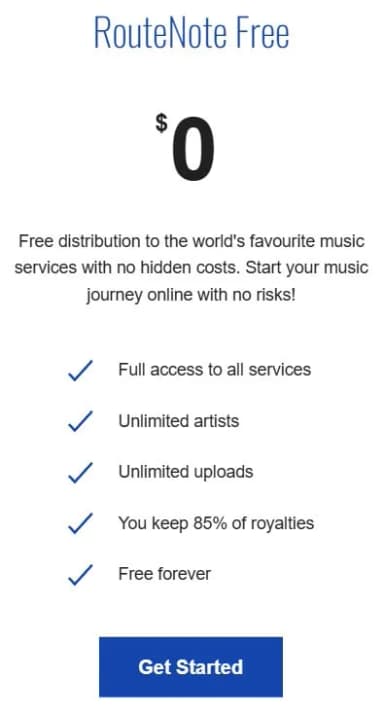
If you’re broke like I was in the past, I’d suggest Routenote. It’s free, kinda average, but really works well if you can wait a few days before release.
This is what they offer for $0 per month:
And if you’re really serious and can pay a little extra? Then I’d suggest these distributors:
- TuneCore
- CD Baby
- DistroKid
- Ditto Music
- AWAL
- LANDR
- Horus Music
Just in case you wanna know more about how these distributors work and what pricing is like, I’ve done a separate blog on this: 7 Best Music Distribution Services (Full Comparison)
How to Choose the Right Music Distributor for Yourself
Every distributor is unique in its own way. Some artists brag about Tunecore being better while others say Distrokid is what they can die for.
But you, my friend, can’t pick the wrong one. Otherwise, that’d cost you streams, royalties, and momentum.
Because what’s right for one artist might not be good for another.
For instance, Tuncore is much more than just a distributor. It goes as high as TV and Radios doing sync licensing for you.
Meanwhile, Distrokid is strictly a distributor that’s mostly suitable for consistent releases.
Anyways, let me simplify this for you with a quick matrix.
| Criteria | What to Look For |
|---|---|
| Budget | Some charge per release (CD Baby), others are subscription-based (DistroKid), and a few offer free plans (Amuse, RouteNote). Know what you can afford now and over time. |
| Royalties | Do they take a cut? Platforms like DistroKid let you keep 100%. Others might take 15–20%. Read the royalty split details before signing up. |
| Extras | Smart links, YouTube monetization, split payments, pre-saves, playlist pitching, etc. Some platforms stack up value, others give you the bare minimum. So, don’t forget to take that into consideration. |
| Support | When something breaks (and it will), will a real human help you fix it? Check reviews and response times before trusting your music to silence. |
| Speed | How fast does your release go live? Some distribute in 1–3 days, others take over a week. Timing matters, especially around promo campaigns. |
Step 3: Let’s Upload Your Music to Spotify
Okay, here comes the main part. Let me show you how you can upload your upcoming songs to Spotify.
Since most independent artists use Distrokid, let me show you how I do it there.
#1 - Sign up on Distrokid, make a new account, and pay your subscription fee.
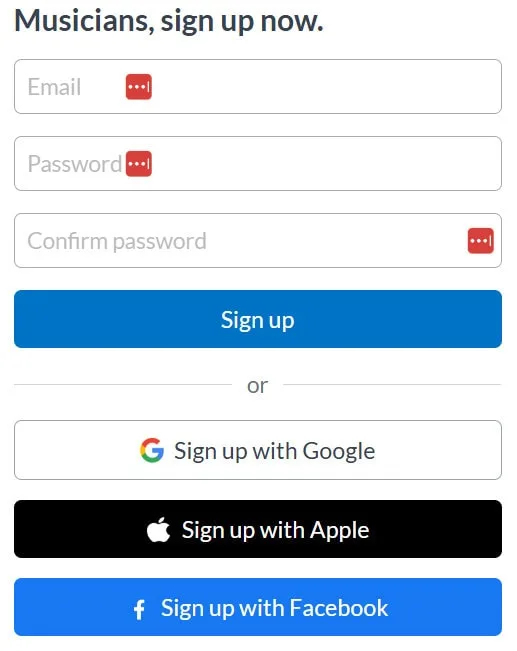
That’s easy. You can do it.
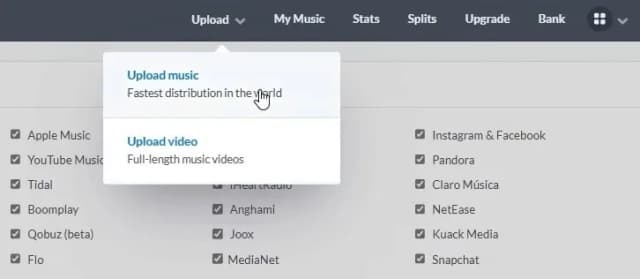
#2 - Once you’re in, you’ll see the upload dropdown. Select ‘upload music.’
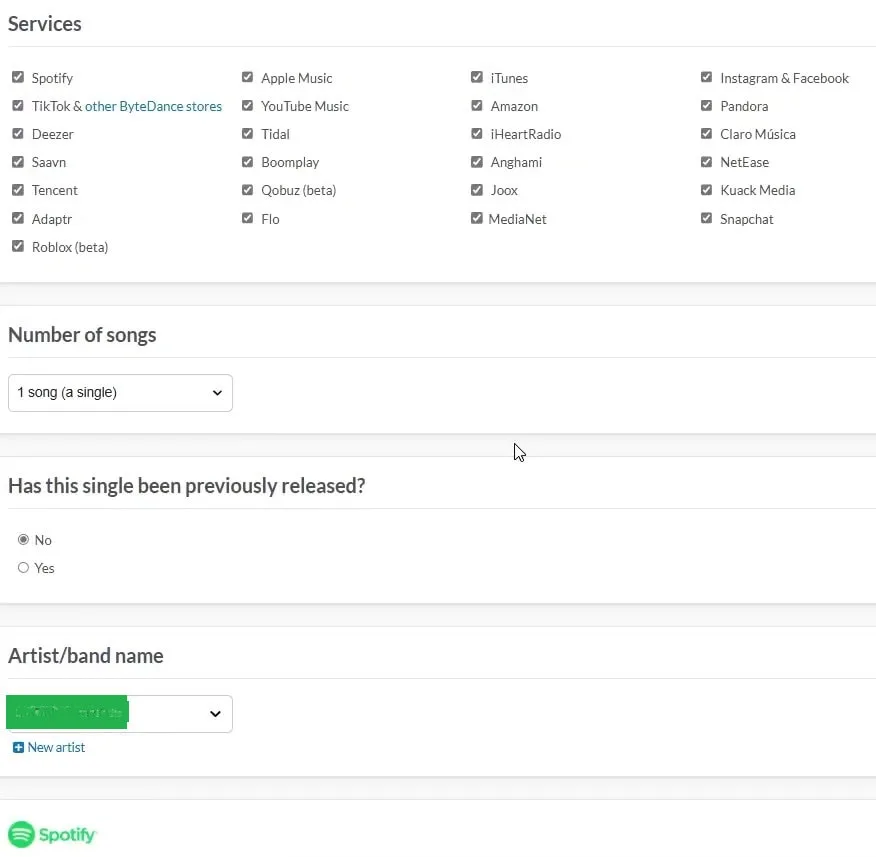
#3 - Select where you wanna upload and all other basic details.
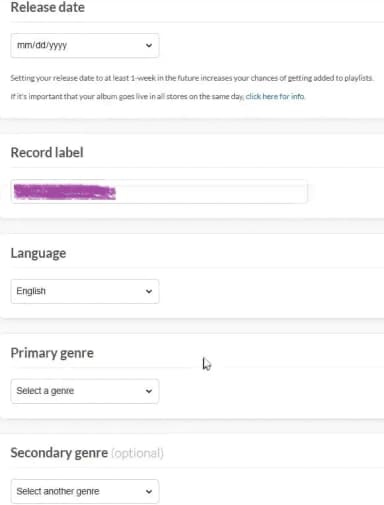
#4 - Fill some other details.
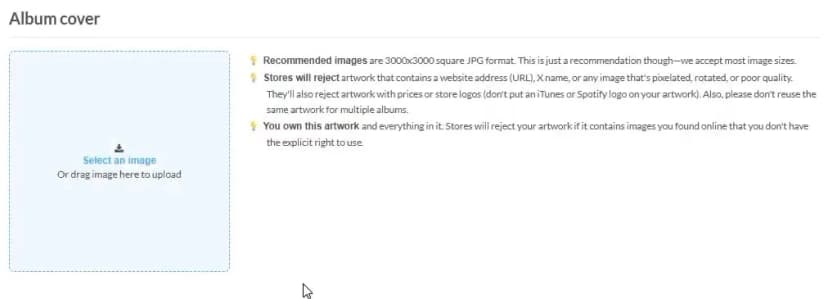
#5 - Upload your album’s cover.
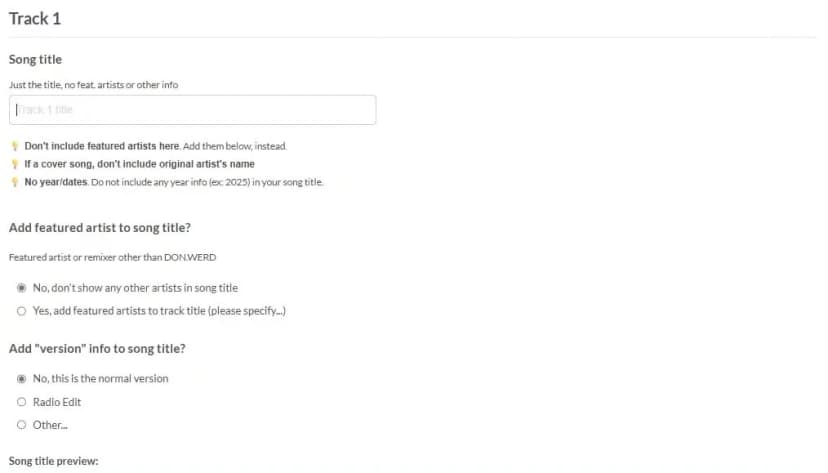
#6 - Fill in your track details.
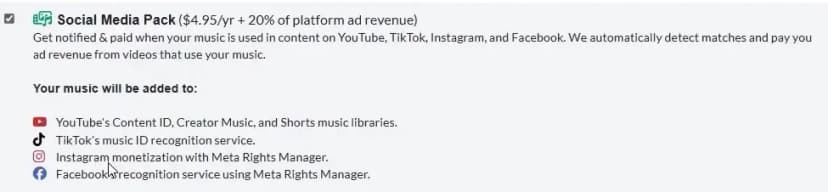
#7 - Pick some extras if you want.
#8 - Once you’re done with everything, you’ll see your track like this:
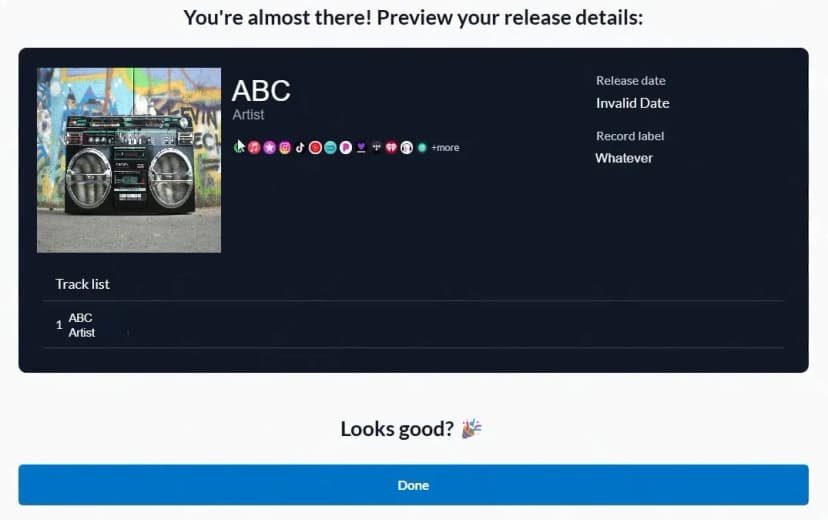
That’s it!
Click on ‘done’ and wait for 2-5 business days to get your track up there.
Step 4: Claim Your Spotify for Artists Profile
Getting your music onto Spotify is only half the game.
If you stop there, you’re basically leaving your artist identity up for grabs.
Spotify auto-generates artist pages when new music is released through a distributor, but those pages are blank, basic, and very much not under your control until you claim them.
Claiming your Spotify for Artists profile puts the power in your hands. You get to:
- Upload your own profile photo, banner, and bio
- Add links to your social media and website
- Control your artist brand and make sure it actually looks like yours
- Access a dashboard full of valuable data: who’s listening, where they’re from, how they found you, and what playlists are driving your streams
- Pitch unreleased songs directly to Spotify’s editorial team
- Get automatically verified with the blue checkmark (most important)
Now you understand why it’s really important? If yes, claim your ‘Spotify for Artist’ profile and get verified.
Some Common Mistakes That Might Kill Your Release
Tbh, I’ve made one of these mistakes myself, and I’ve seen other artists make the rest. Every time, it hurts.
Not because the music was bad, but because the rollout blew up on the launchpad.
Let me tell you what I’m talking about.
#1 - Releasing Without Thinking About the Date
One artist I know dropped a track on a random Wednesday. Without pitch or plan, that guy thought "as long as it’s out, it’s fine."
Except it wasn’t.
Spotify pulls potential editorial picks from tracks scheduled for Friday releases.
If you upload without enough lead time, you miss the pitch window completely.
That artist had a solid song with clean production and a strong hook, but it never reached ears outside his friend circle.
Lesson? Release dates aren’t just dates.
They are your only shot at getting into Spotify’s editorial system.
Plan at least two to three weeks ahead. Pitch through Spotify for Artists at least seven days before release.
No last-minute uploads if you want traction.
#2 - Messy Metadata
This one’s on me.
I uploaded a track with the right audio and clean cover art.
Everything seemed fine until I saw it live under the wrong artist profile. I had accidentally added a dash in my artist name that I never used before.
Spotify created a whole new profile. Guess what? There were no followers or previous releases, it was just me starting from 0 again.
I’ve seen worse. Songs labeled under the wrong genre, messed up ISRC codes, or worse, no ISRC at all. That is how you lose royalties.
Check your metadata like your money depends on it. Because it literally does.
#3 - Not Claiming Your Spotify for Artists Profile
Another artist I helped had their track go live, and fans started tagging someone else with the same name.
Their release got merged into the wrong profile because they didn’t claim their Spotify for Artists in time.
You don’t want your debut showing up on a stranger’s page filled with anime trap beats.
Claim your artist profile before release. Add your bio, photos, and links. That profile is your identity. Own it.
#4 - Skipping Promotion
I’ll be honest. My first few releases had zero promo. I thought good music would find its way. It didn’t.
Uploading without a plan is like dropping a mixtape in the desert and hoping someone walks by. That delivers no pre-saves, teasers, or pitch.
All you get is crickets.
I’ve seen artists with great songs get ignored because they thought hitting "upload" was the final step. It’s not. That is day one.
You don’t need a label. Just a plan:
- Build a pre-save link
- Post snippets leading up to release day
- Tell the story behind the track
- Message your inner circle and ask them to share
- Use SoundCampaign
- Create social media organic content with a plan
- Run Meta ads
If no one knows it’s out, no one listens. Simple as that.
The Final Step: Get Noticed on Spotify (Optional)
Look, I’ve shown you how to upload music to Spotify. But, I don’t wanna leave you here with half-baked knowledge.
Uploading on Spotify isn’t enough if you don’t know how to make numbers there. If I knew this earlier, I’d have earned quite some money from my streams.
Now…
There are two ways to make your song go unnoticed on Spotify.
#1 - Pitching to Editorial Playlists
Spotify has hundreds of official playlists curated by their own editors. And yes, you can get featured on them even if you're fully independent.
The key is timing and strategy.
As I told earlier, you need to submit your track at least two weeks before release, using your Spotify for Artists dashboard.
If you haven’t claimed your profile yet, do that first.
Now, not every pitch gets accepted. But if your track tells a story, sounds polished, and gets saved and replayed by listeners, your odds go way up.
Want to seriously improve your chances? Start here with these blogs that I wrote recently. I’m sure you’ll gain a lot of knowledge.
- How to Submit Music to Spotify Playlists
- Spotify Playlist Pitch Examples That Work (And Why They Do)
- Spotify Playlist Placement: The #1 Masterplan for Musicians
- How to Contact Spotify Playlist Curators (6 Easy Steps)
Give yourself more than just hope. Go in with a plan that actually works.
#2 - Using SoundCampaign for Community Playlists
There are two types of playlists on Spotify. One is the editorial playlist, which is undoubtedly less accessible for independent artists like you.
The second is called the community which is created by the Spotify users, not editors.
You jump in these playlists and you’ll have the same impact.
Now the question is, how to get into Spotify community playlists? Well, that’s where SoundCampaign jumps in.
We have a large pool of playlist curators who can provide feedback and even let you in on their playlist.
This is how you can create your first Spotify campaign.
Before You Leave…
When you landed here, you weren’t sure how to upload your music to Spotify as an independent artist.
Now, not only do you know how to upload it the right way, but you also understand how to promote it properly.
The resources I shared earlier are there to help you take it further. Make sure you give them a read. They hold a lot of value if you're serious about your music.
On that note, I’ll wrap it up here. Wishing you the best with your release. You’ve got this.

Fundador y CEO de SoundCampaign
Soy Nadav. Hacía música antes de construir todo esto, y de ahí viene realmente mi interés por el marketing. La parte de analítica es la que más me gusta: de dónde vienen las reproducciones, qué se movió y qué no. Fundé SoundCampaign para darles a los artistas una exposición realmente genuina. Me llevó mucho más tiempo y esfuerzo del que había previsto, y eso no ha cambiado demasiado.
Promociona tu música
Playlists reales, videos de TikTok y anuncios en Meta

La confianza de más de 100,000 artistas y sellos
Sin bots, nunca.
Caso real
Cómo SoundCampaign puso a Grant Knoche frente a 460,587 oyentes con WOOHOO
Leer la historia completa
¿Listo para que escuchen tu música?
Únete a miles de artistas independientes que usan SoundCampaign para llegar a playlists reales, creadores y fans, con comentarios honestos en cada paso.
- Sin bots, nunca
- Programa de Protección al ArtistaSi un curador o creador no reseña tu tema, te devolvemos el crédito. Tu presupuesto siempre está protegido.
- Conserva el 100% de tus regalíasSomos un servicio de promoción, no un sello. Nunca nos quedamos con un porcentaje de tus streams o regalías.